
Deep Fryer
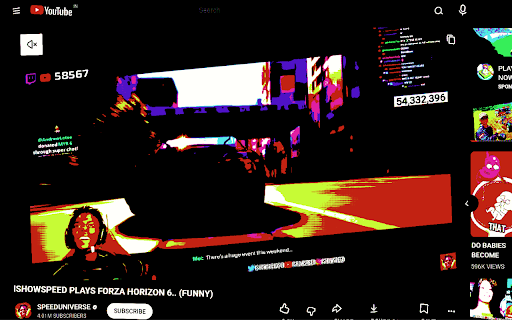
Deep fry your favorite websites with extreme saturation, pixelation, meme Speak, and sizzling bass-boosted audio!
As of June 2026, Deep Fryer has — users in the Entertainment category.
Usersno change0%
—
—
Ratingno change0%
—
— reviews
Reviewsno change0%
—
Version
1.0
Manifest V3
History
1 snapshotsTracking since Jun 8, 2026.
Not enough history yet for this metric — the chart fills in as we collect more snapshots.
View as table
| Date | Users | Rating | Reviews | Version |
|---|---|---|---|---|
| Jun 8, 2026 | — | — | — | 1.0 |
| Now | — | — | — | 1.0 |
Permissions & access
- Permissions
- storageactiveTabscriptingoffscreentabCapture
- Host access
- None declared
Screenshots


About
Welcome to the DEEP FRYER: The ultimate novelty extension that turns the internet into a giant, sizzling, blown-out meme!

Bored of the same clean, flat corporate designs on the web? Want to cook your favorite articles, wikis, or video players to an absolute crisp? Just open the Deep Fryer microwave panel, press START, and watch any webpage get progressively deep-fried in real-time!

FEATURES:
* BLOWN-OUT VISUALS: Saturation up to 900%, contrast up to 480%, sepia filters, and retro CRT monitor scanline overlays that scale with the heat.
* VIOLENT SCREEN SHAKING: At high temperatures (above 75%), header tags, buttons, and eventually the entire webpage will start vibrating and shaking violently.
* HTML5 MEDIA AUDIO FRYER: Bypasses all CORS blocks! Uses Chrome's master tab capture to apply a system-level Web Audio DSP filter, boosting bass by up to +28dB and clipping/distorting any media (like YouTube videos) into an ear-fried masterpiece.
* PROGRESSIVE OVERCOOK TIMER: The longer you leave the fryer running, the worse it gets! Watch text slowly decompose into literal ash blocks (█, ░, ▒) and words turn into "BURNT" or "OOF" while spontaneous thuds and airhorns blast.
* SAFE & REVERSIBLE: Operates 100% locally. Non-destructive caching means the moment you click STOP, the webpage instantly cools down and restores to its original high-quality state.

How to use:
1. Navigate to any website.
2. Click the Deep Fryer icon in your toolbar to open the microwave control panel.
3. Toggle on/off your ingredients (Bass Sizzle, Meme Speak, Emoji Bomb, Image Melt, Fry Media, Auto-Cook).
4. Drag the Fryer Temperature slider to set your heat.
5. Press START and listen to it sizzle!

Let it cook, fam!
Technical
- Version
- 1.0
- Manifest
- V3
- Size
- 29.37KiB
- Min Chrome
- 88
- Languages
- 1
- Featured
- No
Metadata
- ID
- ephmehjempbkofdjlhckgppabddlknlo
- Developer ID
- u860563b2c6d25dd80a7726851cac012f
- Developer Email
- [email protected]
- Created
- Jun 7, 2026
- Last Updated (Store)
- Jun 7, 2026
- Last Scraped
- Jun 8, 2026
- Website
- —
- Support URL
- —
Data sourced from the Chrome Web Store · last verified Jun 8, 2026.