
Readable Capture PDF
Capture any on-screen content into a searchable PDF with real text — AI-ready for ChatGPT & Claude, not just screenshots.
As of June 2026, Readable Capture PDF has — users in the Productivity category.
Usersno change0%
—
—
Ratingno change0%
—
— reviews
Reviewsno change0%
—
Version
1.0.0
Manifest V3
History
1 snapshotsTracking since Jun 17, 2026.
Not enough history yet for this metric — the chart fills in as we collect more snapshots.
View as table
| Date | Users | Rating | Reviews | Version |
|---|---|---|---|---|
| Jun 17, 2026 | — | — | — | 1.0.0 |
| Now | — | — | — | 1.0.0 |
Permissions & access
- Permissions
- activeTabscriptingtabsstoragedownloadsoffscreencontextMenus
- Host access
- None declared
Screenshots


About
Turn anything you can see in your browser into a clean, searchable PDF your AI tools can actually read.

Most "save as PDF" tools — and every screenshot — produce image-only files: a wall of pixels with no real text underneath. AI assistants like ChatGPT and Claude can't reliably read those. Readable Capture PDF gives every page a real, selectable text layer, so the PDFs you create can be searched, copied, quoted, and fed straight into AI tools for summarizing, analysis, or Q&A.

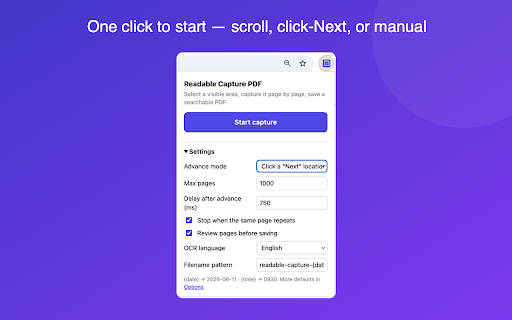
Draw a rectangle over the content, choose how pages advance (auto-scroll, clicking a "Next" button, or manually), and Readable Capture PDF captures the region page by page; extracting real, selectable text from the page itself, with on-device OCR as a fallback for canvas/image content.

★ AI-ready PDFs - a real, selectable text layer on every page (not just screenshots), so ChatGPT, Claude, and other AI tools can actually read and process the file
★ Searchable PDFs - find, select, copy, and quote the text on every page
★ Scroll capture with seam stitching — no duplicated bands, sticky headers removed automatically
★ Click-mode pagination with an auto-suggested "Next" button
★ Review before saving - delete, reorder, zoom, or capture more pages
★ PDF bookmarks per page + source URL & timestamp metadata
★ Per-site presets, pause/resume, keyboard shortcut, JPEG/PNG export, optional Markdown text sidecar
★ 100% local processing - captures, OCR, and PDF assembly never leave your computer; no analytics, no tracking!!

- FREE version: up to 30 pages per PDF with a watermark.
- FULL FOREVER license ($10, one-time, one device): up to 1000 pages, no watermark.

Use only for content you own, control, or have permission to archive. You are responsible for complying with the terms and copyright of the sites you visit.
Technical
- Version
- 1.0.0
- Manifest
- V3
- Size
- 16.84MiB
- Min Chrome
- 116
- Languages
- 1
- Featured
- No
Metadata
- ID
- epfjnjjanhjpdlokihblaipeiciegeod
- Developer ID
- uf75b8cbc2385a51cec40d0d627977746
- Developer Email
- [email protected]
- Created
- Jun 16, 2026
- Last Updated (Store)
- Jun 16, 2026
- Last Scraped
- Jun 17, 2026
- Website
- —
- Support URL
- —
Data sourced from the Chrome Web Store · last verified Jun 17, 2026.