
NO+OTP
Add to the input your password + OTP
As of May 2026, NO+OTP has 289 users and a 5.00/5 rating from 5 reviews in the Workflow & Planning category.
Usersup 5.1 percent+5.1%
289
289
Ratingno change0%
5.00
5 reviews
Reviewsno change0%
5
Version
3.1
Manifest V3
History
3 snapshotsTracking since Apr 1, 2026.
View as table
| Date | Users | Rating | Reviews | Version |
|---|---|---|---|---|
| Apr 1, 2026 | 275 | 5.00 | 5 | 3.1 |
| Apr 30, 2026 | 279 | 5.00 | 5 | 3.1 |
| May 29, 2026 | 287 | 5.00 | 5 | 3.1 |
| Now | 289 | 5.00 | 5 | 3.1 |
Permissions & access
- Permissions
- storageactiveTabclipboardWriteoffscreenscripting
- Host access
- None declared
Screenshots

About
--- Versión en Español más abajo ---

Version 3.1:
- Update to Manifest V3 per Google requirement.

Version 3:
- Popup re-design
- Fixed an issue where leading zeroes weren't added along the pass.
- Added English translation

Version 2.2:
- Fixed bugs preventing the popup from opening after restarting Chrome (thanks to Drutol!).
- Improved QR code detection via the webcam.
- Made the default plugin behavior (direct password input filling) more explicit on the plugin's Options page.

Version 2.0:
- Now you can choose to copy the OTP to the clipboard or display a popup that allows you to decide whether to copy it to the clipboard or directly fill in a password each time.

____
Tired of typing your password and then adding an OTP to access work systems?

OTPs, like the ones generated by Google Authenticator, are a great security measure that, unfortunately, is sometimes misused by system administrators 🙁

With this extension, you can add your password with the OTP included with just one click 😃

Give yourself a little gift, install this extension, and save minutes of work. You won't have to reach for your phone or open any other browser window to copy that pesky key.

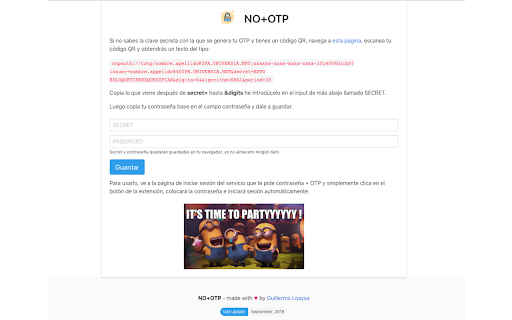
After installation, right-click on the extension button and go to Options, then follow the steps.

This extension doesn't store any user information. None. Your credentials will be stored encrypted in your browser.

--------

versión 3.1:
- Actualización al Manifiesto V3, requerido por Google.

versión 3:
- Rediseño del pop-up
- Se ha arreglado un error por el cual los ceros al comienzo de la OTP no se añadían a la contraseña.
- Se ha añadido el idioma inglés

version 2.2:
 - Se han arreglado errores que impedían que el popup se abriera tras reiniciar Chrome (gracias Drutol!).
 - Se ha mejorado la detección del código QR a través de la webcam.
 - Se ha hecho más explícito el funcionamiento por defecto del plugin (rellenar input de contraseña directamente) en la página de Opciones del plugin.

version 2.0:
- Ahora podrás elegir guardar la OTP en el portapapeles, así como desplegar un popup que te permitirá elegir en cada momento si prefieres guardarlo en el portapapeles o rellenar directamente una contraseña.

____
¿Cansado de escribir tu contraseña y añadir después una OTP para acceder a sistemas del trabajo?

OTPs, como la generada por Google Authenticator, son una buena medida de seguridad que, desgraciadamente, a veces es abusada por los administradores de sistemas 🙁

Con esta extensión, podrás añadir con solo clicar un botón tu contraseña con la OTP incluida 😃

Hazte un pequeño regalo, instala esta extensión y salva minutos de trabajo. Ya no tendrás que ir a buscar el teléfono o abrir ninguna otra ventana de tu navegador para copiar la dichosa clave.

Tras instalarlo, haz clic derecho sobre el botón de la extensión y ve a opciones, allí sigue los pasos.

Esta extensión no almacena ninguna información de usuario. Ninguna. Tus credenciales se guardarán de forma encriptada en tu navegador.
Technical
- Version
- 3.1
- Manifest
- V3
- Size
- 544KiB
- Min Chrome
- 88
- Languages
- 1
- Featured
- No
Metadata
- ID
- epfcbfnadaigbokbekcipecemoaiaeni
- Developer ID
- u5036a9f8d0a877288cb18d0ee5288da1
- Developer Email
- [email protected]
- Created
- Sep 14, 2019
- Last Updated (Store)
- Nov 18, 2024
- Last Scraped
- May 29, 2026
- Website
- loaysa.com
- Support URL
- https://github.com/gloaysa/no-otp/issues
- Privacy Policy
- —
Similar extensions
Alternatives to NO+OTP, ranked by description similarity.

Simple Timer
a Simple Timer
64
★ 5.0

ProText Expander
Expande atajos de texto en fragmentos largos. Escribe menos, haz más.
3
★ 5.0

2FA Authenticator
Esta extensión proporciona códigos de autenticación 2FA en el navegador.
4.0K
★ 3.5

Password Generator
Create strong and customizable passwords. Ajust length & characters. Quick copy. Protect your accounts. Get the Chrome extension now
84
★ 5.0

bypass-made-by-wade079
A plain text description
87

Easy To Remember password generator
A simple extension which generates password that are easier to remember instead of passwords like '!Y4SPMvZvfp'
75

Good Notes
Extension para ayudar en el registro de notas en el call center. Creado por Dexterpol-A21.
119

Xpando
Expansor de texto inteligente que te permite crear atajos personalizados. Ahorra tiempo y mejora tu productividad.
6
★ 5.0
Data sourced from the Chrome Web Store · last verified May 29, 2026.