
A11y Navigation Auditor - WCAG Web Accessibility Structure Audit & AI
View page structure at a glance for WCAG audits. Check headings, links, landmarks and more in your side panel. AI guidance included.
As of June 2026, A11y Navigation Auditor - WCAG Web Accessibility Structure Audit & AI has 30 users in the Developer Tools category.
Usersno change0%
30
30
Ratingno change0%
—
— reviews
Reviewsno change0%
—
Version
1.2.3
Manifest V3
90-day change · In the last 90 days this extension 5 version updates.
History
7 snapshotsTracking since Apr 24, 2026.
View as table
| Date | Users | Rating | Reviews | Version |
|---|---|---|---|---|
| Apr 24, 2026 | — | — | — | 1.0.0 |
| May 1, 2026 | — | — | — | 1.0.0 |
| May 7, 2026 | 5 | — | — | 1.0.2 |
| May 12, 2026 | 15 | — | — | 1.1.0 |
| May 17, 2026 | 14 | — | — | 1.1.0 |
| May 24, 2026 | 21 | — | — | 1.2.0 |
| May 31, 2026 | 27 | — | — | 1.2.1 |
| Now | 30 | — | — | 1.2.3 |
Changelog
- May 31, 2026description
A11y Navigation Auditor brings VoiceOver-style Rotor navigation into your side panel for professional-grade structural audits. It instantly visualizes your page's underlying structure while automatically detecting accessibility gaps, providing the critical overview and insights needed to ensure a truly inclusive experience.

Stop digging through nested DevTools panels. Inspect headings, landmarks, and accessible names in a single view to identify structural flaws immediately.


🔍 Audit Categories

▪️Headings
Level skipping, empty headings, and lost heading roles.

▪️Links
Empty link text, ambiguous text (e.g., "click here"), redundant adjacent links, and identical text pointing to different destinations.

▪️Form Controls
Missing labels, missing autocomplete attributes, and error messages not associated via aria-describedby.

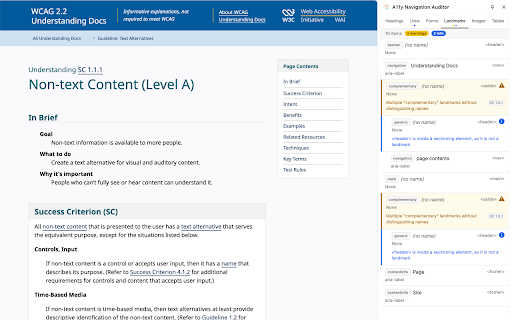
▪️Landmarks
Missing main landmarks, redundant WAI-ARIA roles lacking distinct accessible names, and sectioning elements not functioning as landmarks.

▪️Images
Missing alt attributes, empty alt text on linked images, generic descriptions (e.g., "image", "photo"), and file names used as alt text.

▪️Tables
Missing captions or headers, and improper scope/headers in complex tables.

Diagnostics reference WCAG 2.1 / 2.2 Success Criteria (including 1.1.1, 1.3.1, 2.4.4, 3.3.1, 4.1.2, etc.), but do not fully cover every aspect of each criterion.


✨ NEW in v1.2.0: AI Guidance (Labs)

Powered by Chrome's built-in AI (Gemini Nano), each issue now includes an optional "AI Guidance" button that generates context-aware fix suggestions right in the panel. No data leaves your browser—no API key required, no token costs. Everything runs locally on-device. Available on supported Chrome versions with the Prompt API enabled.


⭐ Key Features

▪️Accessible Name (accname) Display
Shows the calculated accessible name for each element following the official Accessible Name and Description Computation specification. See exactly what screen readers will announce, and identify which attribute provides it—aria-label, aria-labelledby, alt, label, title, or text content.

▪️Real-time ARIA Monitoring
Live tracking of attributes such as aria-expanded, aria-pressed, aria-checked, aria-selected, aria-invalid, aria-busy, and aria-disabled. The panel updates automatically as you interact with the page, eliminating the need for rescanning. It also displays linked error messages when aria-invalid states change.

▪️Click to Highlight
Simply click an item in the side panel to scroll to and highlight the corresponding element on the page.


📊 Comparison with Other Tools

Tools that focus on specific categories like headings or landmarks can't show the full picture, while marker-overlay tools clutter the page and obscure the very structure you're trying to inspect. Even the DevTools Accessibility Tree can be overwhelming, providing too much noise for a quick, high-level audit.

A11y Navigation Auditor bridges this gap by unifying six core Rotor categories into one dedicated side panel. Browse elements the way VoiceOver's Rotor does, while performing efficient accessibility audits.


⚠️ Limitations

This tool focuses on structural accessibility issues detectable through static analysis of the DOM. It does not cover color contrast, keyboard operability, dynamic behavior, or screen reader compatibility. It is not a substitute for comprehensive WCAG conformance testing.


💻 Supported Browsers

This extension requires the Chrome Side Panel API. It works on Google Chrome 114+ and Microsoft Edge 114+. Other Chromium-based browsers (Arc, Brave, Vivaldi, etc.) are not supported due to the lack of Side Panel API implementation.


🔒 Privacy

We do not collect any data. No network requests are ever made. All accessibility checks are performed locally within your browser.
A11y Navigation Auditor brings VoiceOver-style Rotor navigation into your side panel for professional-grade structural audits. It instantly visualizes your page's underlying structure while automatically detecting accessibility gaps, providing the critical overview and insights needed to ensure a truly inclusive experience.

Stop digging through nested DevTools panels. Inspect headings, landmarks, and accessible names in a single view to identify structural flaws immediately.


🔍 Audit Categories

▪️Headings
Level skipping, empty headings, and lost heading roles.

▪️Links
Empty link text, ambiguous text (e.g., "click here"), redundant adjacent links, and identical text pointing to different destinations.

▪️Form Controls
Missing labels, missing autocomplete attributes, and error messages not associated via aria-describedby.

▪️Landmarks
Missing main landmarks, redundant WAI-ARIA roles lacking distinct accessible names, and sectioning elements not functioning as landmarks.

▪️Images
Missing alt attributes, empty alt text on linked images, generic descriptions (e.g., "image", "photo"), and file names used as alt text.

▪️Tables
Missing captions or headers, and improper scope/headers in complex tables.

Diagnostics reference WCAG 2.1 / 2.2 Success Criteria (including 1.1.1, 1.3.1, 2.4.4, 3.3.1, 4.1.2, etc.), but do not fully cover every aspect of each criterion.


✨ NEW in v1.2.0: AI Guidance (Labs)

Powered by Chrome's built-in AI (Gemini Nano), each issue now includes an optional "AI Guidance" button that generates context-aware fix suggestions right in the panel. No data leaves your browser—no API key required, no token costs. Everything runs locally on-device.
*Note: This feature requires a supported Chrome version with the Prompt API and Gemini Nano enabled. Availability may vary depending on your device specifications. If the model is not yet installed, a model download (approximately 4 GB) is required.


⭐ Key Features

▪️Accessible Name (accname) Display
Shows the calculated accessible name for each element following the official Accessible Name and Description Computation specification. See exactly what screen readers will announce, and identify which attribute provides it—aria-label, aria-labelledby, alt, label, title, or text content.

▪️Real-time ARIA Monitoring
Live tracking of attributes such as aria-expanded, aria-pressed, aria-checked, aria-selected, aria-invalid, aria-busy, and aria-disabled. The panel updates automatically as you interact with the page, eliminating the need for rescanning. It also displays linked error messages when aria-invalid states change.

▪️Click to Highlight
Simply click an item in the side panel to scroll to and highlight the corresponding element on the page.


📊 Comparison with Other Tools

Tools that focus on specific categories like headings or landmarks can't show the full picture, while marker-overlay tools clutter the page and obscure the very structure you're trying to inspect. Even the DevTools Accessibility Tree can be overwhelming, providing too much noise for a quick, high-level audit.

A11y Navigation Auditor bridges this gap by unifying six core Rotor categories into one dedicated side panel. Browse elements the way VoiceOver's Rotor does, while performing efficient accessibility audits.


⚠️ Limitations

This tool focuses on structural accessibility issues detectable through static analysis of the DOM. It does not cover color contrast, keyboard operability, dynamic behavior, or screen reader compatibility. It is not a substitute for comprehensive WCAG conformance testing.


💻 Supported Browsers

This extension requires the Chrome Side Panel API. It works on Google Chrome 114+ and Microsoft Edge 114+. Other Chromium-based browsers (Arc, Brave, Vivaldi, etc.) are not supported due to the lack of Side Panel API implementation.
*Note: "AI Guidance" is exclusive to Google Chrome (requires built-in AI / Gemini Nano environment).


🔒 Privacy

We do not collect any data. No network requests are ever made. All accessibility checks are performed locally within your browser.
- May 31, 2026short_description
View page structure and accessibility at a glance for auditing. Bring the Rotor to your side panel to streamline WCAG inspection.
View page structure at a glance for WCAG audits. Check headings, links, landmarks and more in your side panel. AI guidance included.
- May 31, 2026name
A11y Navigation Auditor - Web Accessibility
A11y Navigation Auditor - WCAG Web Accessibility Structure Audit & AI
- May 17, 2026description
A11y Navigation Auditor brings VoiceOver-style Rotor navigation into your side panel for professional-grade structural audits. It instantly visualizes your page's underlying structure while automatically detecting accessibility gaps, providing the critical overview and insights needed to ensure a truly inclusive experience.

Stop digging through nested DevTools panels. Inspect headings, landmarks, and accessible names in a single view to identify structural flaws immediately.


🔍 Audit Categories

▪️Headings
Level skipping, empty headings, and lost heading roles.

▪️Links
Empty link text, ambiguous text (e.g., "click here"), redundant adjacent links, and identical text pointing to different destinations.

▪️Form Controls
Missing labels, missing autocomplete attributes, and error messages not associated via aria-describedby.

▪️Landmarks
Missing main landmarks, redundant WAI-ARIA roles lacking distinct accessible names, and sectioning elements not functioning as landmarks.

▪️Images
Missing alt attributes, empty alt text on linked images, generic descriptions (e.g., "image", "photo"), and file names used as alt text.

▪️Tables
Missing captions or headers, and improper scope/headers in complex tables.

Diagnostics reference WCAG 2.1 / 2.2 Success Criteria (including 1.1.1, 1.3.1, 2.4.4, 3.3.1, 4.1.2, etc.), but do not fully cover every aspect of each criterion.


⭐ Key Features

▪️Accessible Name (accname) Display
Shows the calculated accessible name for each element following the official Accessible Name and Description Computation specification. See exactly what screen readers will announce, and identify which attribute provides it—aria-label, aria-labelledby, alt, label, title, or text content.

▪️Real-time ARIA Monitoring
Live tracking of attributes such as aria-expanded, aria-pressed, aria-checked, aria-selected, aria-invalid, aria-busy, and aria-disabled. The panel updates automatically as you interact with the page, eliminating the need for rescanning. It also displays linked error messages when aria-invalid states change.

▪️Click to Highlight
Simply click an item in the side panel to scroll to and highlight the corresponding element on the page.


📊 Comparison with Other Tools

Tools that focus on specific categories like headings or landmarks can't show the full picture, while marker-overlay tools clutter the page and obscure the very structure you're trying to inspect. Even the DevTools Accessibility Tree can be overwhelming, providing too much noise for a quick, high-level audit.

A11y Navigation Auditor bridges this gap by unifying six core Rotor categories into one dedicated side panel. Browse elements the way VoiceOver's Rotor does, while performing efficient accessibility audits.


⚠️ Limitations

This tool focuses on structural accessibility issues detectable through static analysis of the DOM. It does not cover color contrast, keyboard operability, dynamic behavior, or screen reader compatibility. It is not a substitute for comprehensive WCAG conformance testing.


💻 Supported Browsers

This extension requires the Chrome Side Panel API. It works on Google Chrome 114+ and Microsoft Edge 114+. Other Chromium-based browsers (Arc, Brave, Vivaldi, etc.) are not supported due to the lack of Side Panel API implementation.


🔒 Privacy

We do not collect any data. No network requests are ever made. All accessibility checks are performed locally within your browser.
A11y Navigation Auditor brings VoiceOver-style Rotor navigation into your side panel for professional-grade structural audits. It instantly visualizes your page's underlying structure while automatically detecting accessibility gaps, providing the critical overview and insights needed to ensure a truly inclusive experience.

Stop digging through nested DevTools panels. Inspect headings, landmarks, and accessible names in a single view to identify structural flaws immediately.


🔍 Audit Categories

▪️Headings
Level skipping, empty headings, and lost heading roles.

▪️Links
Empty link text, ambiguous text (e.g., "click here"), redundant adjacent links, and identical text pointing to different destinations.

▪️Form Controls
Missing labels, missing autocomplete attributes, and error messages not associated via aria-describedby.

▪️Landmarks
Missing main landmarks, redundant WAI-ARIA roles lacking distinct accessible names, and sectioning elements not functioning as landmarks.

▪️Images
Missing alt attributes, empty alt text on linked images, generic descriptions (e.g., "image", "photo"), and file names used as alt text.

▪️Tables
Missing captions or headers, and improper scope/headers in complex tables.

Diagnostics reference WCAG 2.1 / 2.2 Success Criteria (including 1.1.1, 1.3.1, 2.4.4, 3.3.1, 4.1.2, etc.), but do not fully cover every aspect of each criterion.


✨ NEW in v1.2.0: AI Guidance (Labs)

Powered by Chrome's built-in AI (Gemini Nano), each issue now includes an optional "AI Guidance" button that generates context-aware fix suggestions right in the panel. No data leaves your browser—no API key required, no token costs. Everything runs locally on-device. Available on supported Chrome versions with the Prompt API enabled.


⭐ Key Features

▪️Accessible Name (accname) Display
Shows the calculated accessible name for each element following the official Accessible Name and Description Computation specification. See exactly what screen readers will announce, and identify which attribute provides it—aria-label, aria-labelledby, alt, label, title, or text content.

▪️Real-time ARIA Monitoring
Live tracking of attributes such as aria-expanded, aria-pressed, aria-checked, aria-selected, aria-invalid, aria-busy, and aria-disabled. The panel updates automatically as you interact with the page, eliminating the need for rescanning. It also displays linked error messages when aria-invalid states change.

▪️Click to Highlight
Simply click an item in the side panel to scroll to and highlight the corresponding element on the page.


📊 Comparison with Other Tools

Tools that focus on specific categories like headings or landmarks can't show the full picture, while marker-overlay tools clutter the page and obscure the very structure you're trying to inspect. Even the DevTools Accessibility Tree can be overwhelming, providing too much noise for a quick, high-level audit.

A11y Navigation Auditor bridges this gap by unifying six core Rotor categories into one dedicated side panel. Browse elements the way VoiceOver's Rotor does, while performing efficient accessibility audits.


⚠️ Limitations

This tool focuses on structural accessibility issues detectable through static analysis of the DOM. It does not cover color contrast, keyboard operability, dynamic behavior, or screen reader compatibility. It is not a substitute for comprehensive WCAG conformance testing.


💻 Supported Browsers

This extension requires the Chrome Side Panel API. It works on Google Chrome 114+ and Microsoft Edge 114+. Other Chromium-based browsers (Arc, Brave, Vivaldi, etc.) are not supported due to the lack of Side Panel API implementation.


🔒 Privacy

We do not collect any data. No network requests are ever made. All accessibility checks are performed locally within your browser.
- May 7, 2026description
A11y Navigation Auditor is a developer tool that brings VoiceOver-style Rotor navigation into your side panel for professional-grade structural audits. It instantly surfaces the underlying structure of your page, giving you the same landmark, heading, and link overview that assistive technology users rely on.

Stop digging through nested DevTools panels. Inspect headings, landmarks, and accessible names in a single view to identify structural flaws immediately.


🔍 Audit Categories

▪️Headings
Level skipping, empty headings, and lost heading roles.

▪️Links
Empty link text, ambiguous text (e.g., "click here"), redundant adjacent links, and identical text pointing to different destinations.

▪️Forms
Missing labels, missing autocomplete attributes, and error messages not associated via aria-describedby.

▪️Landmarks
Missing main landmarks, redundant WAI-ARIA roles lacking distinct accessible names, and sectioning elements not functioning as landmarks.

▪️Images
Missing alt attributes, empty alt text on linked images, generic descriptions (e.g., "image", "photo"), and file names used as alt text.

▪️Tables
Missing captions or headers, and improper scope/headers in complex tables.

Diagnostics reference WCAG 2.1 / 2.2 Success Criteria (including 1.1.1, 1.3.1, 2.4.4, 3.3.1, 4.1.2, etc.), but do not fully cover every aspect of each criterion.


⭐ Key Features

▪️Accessible Name (accname) Display
Shows the calculated accessible name for each element following the official Accessible Name and Description Computation specification. See exactly what screen readers will announce, and identify which attribute provides it—aria-label, aria-labelledby, alt, label, title, or text content.

▪️Real-time ARIA Monitoring
Live tracking of attributes such as aria-expanded, aria-pressed, aria-checked, aria-selected, aria-invalid, aria-busy, and aria-disabled. The panel updates automatically as you interact with the page, eliminating the need for rescanning. It also displays linked error messages when aria-invalid states change.

▪️Click to Highlight
Simply click an item in the side panel to scroll to and highlight the corresponding element on the page.


📊 Comparison with Other Tools

Tools that focus on specific categories like headings or landmarks can't show the full picture, while marker-overlay tools clutter the page and obscure the very structure you're trying to inspect. Even the DevTools Accessibility Tree can be overwhelming, providing too much noise for a quick, high-level audit.

A11y Navigation Auditor bridges this gap by unifying six core Rotor categories into one dedicated side panel. Browse elements the way VoiceOver's Rotor does, while performing efficient accessibility audits.


⚠️ Limitations

This tool focuses on structural accessibility issues detectable through static analysis of the DOM. It does not cover color contrast, keyboard operability, dynamic behavior, or screen reader compatibility. It is not a substitute for comprehensive WCAG conformance testing.


💻 Supported Browsers

This extension requires the Chrome Side Panel API. It works on Google Chrome 114+ and Microsoft Edge 114+. Other Chromium-based browsers (Arc, Brave, Vivaldi, etc.) are not supported due to the lack of Side Panel API implementation.


🔒 Privacy

We do not collect any data. No network requests are ever made. All accessibility checks are performed locally within your browser.
A11y Navigation Auditor brings VoiceOver-style Rotor navigation into your side panel for professional-grade structural audits. It instantly visualizes your page's underlying structure while automatically detecting accessibility gaps, providing the critical overview and insights needed to ensure a truly inclusive experience.

Stop digging through nested DevTools panels. Inspect headings, landmarks, and accessible names in a single view to identify structural flaws immediately.


🔍 Audit Categories

▪️Headings
Level skipping, empty headings, and lost heading roles.

▪️Links
Empty link text, ambiguous text (e.g., "click here"), redundant adjacent links, and identical text pointing to different destinations.

▪️Form Controls
Missing labels, missing autocomplete attributes, and error messages not associated via aria-describedby.

▪️Landmarks
Missing main landmarks, redundant WAI-ARIA roles lacking distinct accessible names, and sectioning elements not functioning as landmarks.

▪️Images
Missing alt attributes, empty alt text on linked images, generic descriptions (e.g., "image", "photo"), and file names used as alt text.

▪️Tables
Missing captions or headers, and improper scope/headers in complex tables.

Diagnostics reference WCAG 2.1 / 2.2 Success Criteria (including 1.1.1, 1.3.1, 2.4.4, 3.3.1, 4.1.2, etc.), but do not fully cover every aspect of each criterion.


⭐ Key Features

▪️Accessible Name (accname) Display
Shows the calculated accessible name for each element following the official Accessible Name and Description Computation specification. See exactly what screen readers will announce, and identify which attribute provides it—aria-label, aria-labelledby, alt, label, title, or text content.

▪️Real-time ARIA Monitoring
Live tracking of attributes such as aria-expanded, aria-pressed, aria-checked, aria-selected, aria-invalid, aria-busy, and aria-disabled. The panel updates automatically as you interact with the page, eliminating the need for rescanning. It also displays linked error messages when aria-invalid states change.

▪️Click to Highlight
Simply click an item in the side panel to scroll to and highlight the corresponding element on the page.


📊 Comparison with Other Tools

Tools that focus on specific categories like headings or landmarks can't show the full picture, while marker-overlay tools clutter the page and obscure the very structure you're trying to inspect. Even the DevTools Accessibility Tree can be overwhelming, providing too much noise for a quick, high-level audit.

A11y Navigation Auditor bridges this gap by unifying six core Rotor categories into one dedicated side panel. Browse elements the way VoiceOver's Rotor does, while performing efficient accessibility audits.


⚠️ Limitations

This tool focuses on structural accessibility issues detectable through static analysis of the DOM. It does not cover color contrast, keyboard operability, dynamic behavior, or screen reader compatibility. It is not a substitute for comprehensive WCAG conformance testing.


💻 Supported Browsers

This extension requires the Chrome Side Panel API. It works on Google Chrome 114+ and Microsoft Edge 114+. Other Chromium-based browsers (Arc, Brave, Vivaldi, etc.) are not supported due to the lack of Side Panel API implementation.


🔒 Privacy

We do not collect any data. No network requests are ever made. All accessibility checks are performed locally within your browser.
- May 1, 2026description
A11y Navigation Auditor is a developer tool that brings VoiceOver-style Rotor navigation into your side panel for professional-grade structural audits. It instantly surfaces the underlying structure of your page, giving you the same landmark, heading, and link overview that assistive technology users rely on.

Stop digging through nested DevTools panels. Inspect headings, landmarks, and accessible names in a single view to identify structural flaws immediately.


🔍 Audit Categories

▪️Headings
Level skipping, empty headings, and lost heading roles.

▪️Links
Empty link text, ambiguous text (e.g., "click here"), redundant adjacent links, and identical text pointing to different destinations.

▪️Forms
Missing labels, missing autocomplete attributes, and error messages not associated via aria-describedby.

▪️Landmarks
Missing main landmarks, redundant WAI-ARIA roles lacking distinct accessible names, and sectioning elements not functioning as landmarks.

▪️Images
Missing alt attributes, empty alt text on linked images, generic descriptions (e.g., "image", "photo"), and file names used as alt text.

▪️Tables
Missing captions or headers, and improper scope/headers in complex tables.

Diagnostics reference WCAG 2.1 / 2.2 Success Criteria (including 1.1.1, 1.3.1, 2.4.4, 3.3.1, 4.1.2, etc.), but do not fully cover every aspect of each criterion.


⭐ Key Features

▪️Accessible Name (accname) Display
Shows the calculated accessible name for each element following the official Accessible Name and Description Computation specification. See exactly what screen readers will announce, and identify which attribute provides it—aria-label, aria-labelledby, alt, label, title, or text content.

▪️Real-time ARIA Monitoring
Live tracking of attributes such as aria-expanded, aria-pressed, aria-checked, aria-selected, aria-invalid, aria-busy, and aria-disabled. The panel updates automatically as you interact with the page, eliminating the need for rescanning. It also displays linked error messages when aria-invalid states change.

▪️Click to Highlight
Simply click an item in the side panel to scroll to and highlight the corresponding element on the page.


📊 Comparison with Other Tools

Tools that focus on specific categories like headings or landmarks can't show the full picture, while marker-overlay tools clutter the page and obscure the very structure you're trying to inspect. Even the DevTools Accessibility Tree can be overwhelming, providing too much noise for a quick, high-level audit.

A11y Navigation Auditor bridges this gap by unifying six core Rotor categories into one dedicated side panel. Browse elements the way VoiceOver's Rotor does, while performing efficient accessibility audits.


⚠️ Limitations

This tool focuses on structural accessibility issues detectable through static analysis of the DOM. It does not cover color contrast, keyboard operability, dynamic behavior, or screen reader compatibility. It is not a substitute for comprehensive WCAG conformance testing.


🔒 Privacy

We do not collect any data. No network requests are ever made. All accessibility checks are performed locally within your browser.
A11y Navigation Auditor is a developer tool that brings VoiceOver-style Rotor navigation into your side panel for professional-grade structural audits. It instantly surfaces the underlying structure of your page, giving you the same landmark, heading, and link overview that assistive technology users rely on.

Stop digging through nested DevTools panels. Inspect headings, landmarks, and accessible names in a single view to identify structural flaws immediately.


🔍 Audit Categories

▪️Headings
Level skipping, empty headings, and lost heading roles.

▪️Links
Empty link text, ambiguous text (e.g., "click here"), redundant adjacent links, and identical text pointing to different destinations.

▪️Forms
Missing labels, missing autocomplete attributes, and error messages not associated via aria-describedby.

▪️Landmarks
Missing main landmarks, redundant WAI-ARIA roles lacking distinct accessible names, and sectioning elements not functioning as landmarks.

▪️Images
Missing alt attributes, empty alt text on linked images, generic descriptions (e.g., "image", "photo"), and file names used as alt text.

▪️Tables
Missing captions or headers, and improper scope/headers in complex tables.

Diagnostics reference WCAG 2.1 / 2.2 Success Criteria (including 1.1.1, 1.3.1, 2.4.4, 3.3.1, 4.1.2, etc.), but do not fully cover every aspect of each criterion.


⭐ Key Features

▪️Accessible Name (accname) Display
Shows the calculated accessible name for each element following the official Accessible Name and Description Computation specification. See exactly what screen readers will announce, and identify which attribute provides it—aria-label, aria-labelledby, alt, label, title, or text content.

▪️Real-time ARIA Monitoring
Live tracking of attributes such as aria-expanded, aria-pressed, aria-checked, aria-selected, aria-invalid, aria-busy, and aria-disabled. The panel updates automatically as you interact with the page, eliminating the need for rescanning. It also displays linked error messages when aria-invalid states change.

▪️Click to Highlight
Simply click an item in the side panel to scroll to and highlight the corresponding element on the page.


📊 Comparison with Other Tools

Tools that focus on specific categories like headings or landmarks can't show the full picture, while marker-overlay tools clutter the page and obscure the very structure you're trying to inspect. Even the DevTools Accessibility Tree can be overwhelming, providing too much noise for a quick, high-level audit.

A11y Navigation Auditor bridges this gap by unifying six core Rotor categories into one dedicated side panel. Browse elements the way VoiceOver's Rotor does, while performing efficient accessibility audits.


⚠️ Limitations

This tool focuses on structural accessibility issues detectable through static analysis of the DOM. It does not cover color contrast, keyboard operability, dynamic behavior, or screen reader compatibility. It is not a substitute for comprehensive WCAG conformance testing.


💻 Supported Browsers

This extension requires the Chrome Side Panel API. It works on Google Chrome 114+ and Microsoft Edge 114+. Other Chromium-based browsers (Arc, Brave, Vivaldi, etc.) are not supported due to the lack of Side Panel API implementation.


🔒 Privacy

We do not collect any data. No network requests are ever made. All accessibility checks are performed locally within your browser.
- May 1, 2026name
A11y Navigation Auditor
A11y Navigation Auditor - Web Accessibility
Permissions & access
- Permissions
- activeTabscriptingstoragesidePanel
- Host access
- None declared
Screenshots


About
A11y Navigation Auditor brings VoiceOver-style Rotor navigation into your side panel for professional-grade structural audits. It instantly visualizes your page's underlying structure while automatically detecting accessibility gaps, providing the critical overview and insights needed to ensure a truly inclusive experience.

Stop digging through nested DevTools panels. Inspect headings, landmarks, and accessible names in a single view to identify structural flaws immediately.


🔍 Audit Categories

▪️Headings
Level skipping, empty headings, and lost heading roles.

▪️Links
Empty link text, ambiguous text (e.g., "click here"), redundant adjacent links, and identical text pointing to different destinations.

▪️Form Controls
Missing labels, missing autocomplete attributes, and error messages not associated via aria-describedby.

▪️Landmarks
Missing main landmarks, redundant WAI-ARIA roles lacking distinct accessible names, and sectioning elements not functioning as landmarks.

▪️Images
Missing alt attributes, empty alt text on linked images, generic descriptions (e.g., "image", "photo"), and file names used as alt text.

▪️Tables
Missing captions or headers, and improper scope/headers in complex tables.

Diagnostics reference WCAG 2.1 / 2.2 Success Criteria (including 1.1.1, 1.3.1, 2.4.4, 3.3.1, 4.1.2, etc.), but do not fully cover every aspect of each criterion.


✨ NEW in v1.2.0: AI Guidance (Labs)

Powered by Chrome's built-in AI (Gemini Nano), each issue now includes an optional "AI Guidance" button that generates context-aware fix suggestions right in the panel. No data leaves your browser—no API key required, no token costs. Everything runs locally on-device.
*Note: This feature requires a supported Chrome version with the Prompt API and Gemini Nano enabled. Availability may vary depending on your device specifications. If the model is not yet installed, a model download (approximately 4 GB) is required.


⭐ Key Features

▪️Accessible Name (accname) Display
Shows the calculated accessible name for each element following the official Accessible Name and Description Computation specification. See exactly what screen readers will announce, and identify which attribute provides it—aria-label, aria-labelledby, alt, label, title, or text content.

▪️Real-time ARIA Monitoring
Live tracking of attributes such as aria-expanded, aria-pressed, aria-checked, aria-selected, aria-invalid, aria-busy, and aria-disabled. The panel updates automatically as you interact with the page, eliminating the need for rescanning. It also displays linked error messages when aria-invalid states change.

▪️Click to Highlight
Simply click an item in the side panel to scroll to and highlight the corresponding element on the page.


📊 Comparison with Other Tools

Tools that focus on specific categories like headings or landmarks can't show the full picture, while marker-overlay tools clutter the page and obscure the very structure you're trying to inspect. Even the DevTools Accessibility Tree can be overwhelming, providing too much noise for a quick, high-level audit.

A11y Navigation Auditor bridges this gap by unifying six core Rotor categories into one dedicated side panel. Browse elements the way VoiceOver's Rotor does, while performing efficient accessibility audits.


⚠️ Limitations

This tool focuses on structural accessibility issues detectable through static analysis of the DOM. It does not cover color contrast, keyboard operability, dynamic behavior, or screen reader compatibility. It is not a substitute for comprehensive WCAG conformance testing.


💻 Supported Browsers

This extension requires the Chrome Side Panel API. It works on Google Chrome 114+ and Microsoft Edge 114+. Other Chromium-based browsers (Arc, Brave, Vivaldi, etc.) are not supported due to the lack of Side Panel API implementation.
*Note: "AI Guidance" is exclusive to Google Chrome (requires built-in AI / Gemini Nano environment).


🔒 Privacy

We do not collect any data. No network requests are ever made. All accessibility checks are performed locally within your browser.
Technical
- Version
- 1.2.3
- Manifest
- V3
- Size
- 90.64KiB
- Min Chrome
- 88
- Languages
- 2
- Featured
- No
Metadata
- ID
- epckdhhgemccfcomonlgkgabihoaaonp
- Developer ID
- ub756834b5c2ec5bab543c840e935d061
- Developer Email
- [email protected]
- Created
- Apr 23, 2026
- Last Updated (Store)
- May 30, 2026
- Last Scraped
- Jun 6, 2026
- Website
- https://www.liberogic.jp/
- Support URL
- —
- Privacy Policy
- —
Data sourced from the Chrome Web Store · last verified Jun 6, 2026.