YouTube Watch Later Organizer
Automatically organize your Watch Later videos by topics - no setup required
As of May 2026, YouTube Watch Later Organizer has 645 users and a 3.73/5 rating from 11 reviews in the Productivity category.
Usersup 5.6 percent+5.6%
645
645
Ratingno change0%
3.73
11 reviews
Reviewsno change0%
11
Version
1.1
Manifest V3
History
3 snapshotsTracking since Apr 1, 2026.
View as table
| Date | Users | Rating | Reviews | Version |
|---|---|---|---|---|
| Apr 1, 2026 | 611 | 3.73 | 11 | 1.1 |
| Apr 30, 2026 | 609 | 3.73 | 11 | 1.1 |
| May 29, 2026 | 632 | 3.73 | 11 | 1.1 |
| Now | 645 | 3.73 | 11 | 1.1 |
Permissions & access
- Permissions
- storagetabsscripting
- Host access
- https://www.youtube.com/*
Screenshots


About
YouTube Watch Later Organizer - Your Smart Video Library Manager

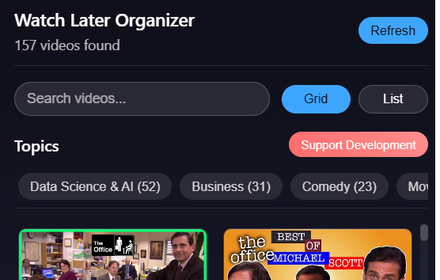
Transform your YouTube Watch Later playlist into an organized, searchable library! This extension automatically categorizes your saved videos into topics, making it easier than ever to find and watch the content you've saved.

🎯 Key Features:
- Smart Topic Detection: Videos are automatically categorized into topics like Tech, Education, Entertainment, and more
- Powerful Search: Quickly find videos by title, channel, or topic
- Dual View Options: Switch between Grid and List views to browse your way
- Real-time Updates: Syncs automatically with your Watch Later playlist
- No Setup Required: Works instantly after installation
- Privacy-Focused: All processing happens locally in your browser

⚠️ IMPORTANT NOTE:
For best results, please follow these steps:
1. Open your YouTube Watch Later playlist
2. Scroll down to the bottom of the playlist until all videos are loaded
3. Then click the extension icon
This ensures all your videos are properly organized and categorized.

Perfect for:
✓ Content creators collecting inspiration
✓ Students organizing educational content
✓ Tech enthusiasts managing tutorials
✓ Anyone with a growing Watch Later list

Why You'll Love It:
- Save Time: No more endless scrolling to find that one video
- Stay Organized: Your videos are automatically sorted into relevant topics
- User-Friendly: Clean, intuitive interface with dark mode
- Zero Configuration: Install and start using immediately
- Performance: Lightweight and fast, doesn't slow down your browsing

How It Works:
1. Install the extension
2. Open your YouTube Watch Later playlist
3. Scroll to load all videos
4. Click the extension icon
5. Browse your videos organized by topics!

Free Forever, No Account Required!

Note: This extension requires access to youtube.com to organize your Watch Later playlist. All processing happens locally in your browser - we don't collect any data.

Support & Feedback:
Have suggestions or need help? Contact us at [email protected]
Technical
- Version
- 1.1
- Manifest
- V3
- Size
- 33.06KiB
- Min Chrome
- 88
- Languages
- 1
- Featured
- No
Metadata
- ID
- epadolfipfmnbcoglbpnlnbpiohgbibg
- Developer ID
- uc48e8ef36d98b83c09463bc04c408e7a
- Developer Email
- [email protected]
- Created
- Nov 24, 2024
- Last Updated (Store)
- Nov 26, 2024
- Last Scraped
- May 29, 2026
- Website
- —
- Support URL
- —
Similar extensions
Alternatives to YouTube Watch Later Organizer, ranked by description similarity.

YT Watch Later Manager
Take control of your YouTube Watch Later playlist with advanced filtering and productivity tools.
Is your Watch Later playlist a…
10
★ 2.0

YouTube Watch Later Cleaner
Quickly clean your YouTube 'Watch Later' playlist
9
★ 1.0

Watch Later Bulk Editor by Thor Solutions
Select and bulk-remove or export videos from your YouTube Watch Later playlist.
44
★ 4.5

YouTube Watch Later Tidy
Bulk delete, filter, sort, and reorder your YouTube Watch Later. Escape the 5000-video limit. Runs locally, no data collected.
853
★ 5.0

Recall - YouTube Video Organizer
Quickly save YouTube videos to your Recall folders while browsing
14
★ 5.0

YouTube Playlist Search
Tired of endlessly scrolling through your YouTube playlists?
Introducing YouTube Playlist Search: Your ultimate solution for…
376
★ 4.3

QuickTube Organizer - YouTube Subscription Manager & Sidebar Categories
Organize your Youtube channels by categories for easy access from sidebar
46

Watch Later Enhanced - Complete YouTube Watchlist
⚡ Alt+Click any YouTube video to save it instantly! Build and sort your custom Watch Later list with zero distractions.
33
★ 5.0
Data sourced from the Chrome Web Store · last verified May 29, 2026.