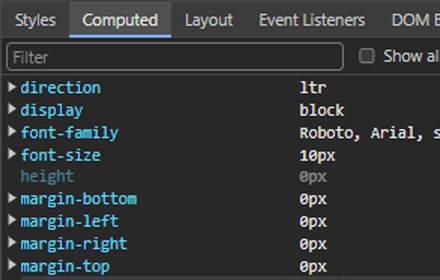
No-Metrics-Pane (slimmer DevTools)
Hides the metrics-/box-model-pane from DevTools. Usage: 'Allow extensions to load custom stylesheets' in DevTools > Experiments.
As of May 2026, No-Metrics-Pane (slimmer DevTools) has 34 users in the Developer Tools category.
Usersdown 2.9 percent−2.9%
34
34
Ratingno change0%
—
— reviews
Reviewsno change0%
—
Version
0.9.8
Manifest V3
History
3 snapshotsTracking since Apr 1, 2026.
View as table
| Date | Users | Rating | Reviews | Version |
|---|---|---|---|---|
| Apr 1, 2026 | 35 | — | — | 0.9.8 |
| Apr 30, 2026 | 32 | — | — | 0.9.8 |
| May 29, 2026 | 35 | — | — | 0.9.8 |
| Now | 34 | — | — | 0.9.8 |
Permissions & access
- Permissions
- None declared
- Host access
- None declared
Screenshots
About
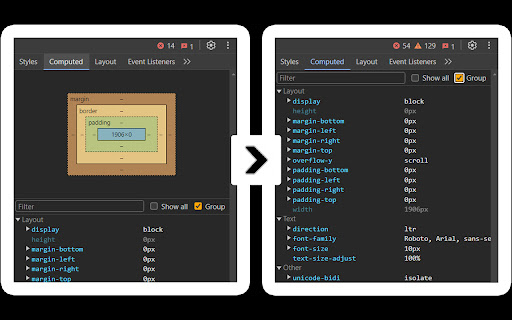
Slimmer DevTools hides the "Metrics" panel in DevTools.

For many developers, this box is rarely useful but takes up valuable space, allowing only a few CSS properties to be visible at a time. Slimmer DevTools removes it, letting you see more properties at once and work more efficiently.

### Enable/Disable
To enable, open `DevTools (F12) > Experiments` and activate "Allow extensions to load custom stylesheets," then restart DevTools.

To toggle Slimmer DevTools on or off, go to Chrome extensions and adjust as needed.

### Built for Simplicity
Designed to reduce clutter in DevTools – inspired by this [StackOverflow thread](https://stackoverflow.com/questions/66691662/is-there-a-way-to-hide-the-box-model-graphic-in-chrome-developer-tools).
Technical
- Version
- 0.9.8
- Manifest
- V3
- Size
- 598KiB
- Min Chrome
- 88
- Languages
- 1
- Featured
- Yes
Metadata
- ID
- eoponiimbhcmaenjpdedhfknijgjcjcf
- Developer ID
- u6289afdfe2a6198f5c0a01960a27c2cf
- Developer Email
- [email protected]
- Created
- Jan 23, 2024
- Last Updated (Store)
- Feb 21, 2025
- Last Scraped
- May 29, 2026
- Website
- —
- Support URL
- —
- Privacy Policy
- —
Similar extensions
Alternatives to No-Metrics-Pane (slimmer DevTools), ranked by description similarity.

DevLens Pro
All-in-one developer panel: visual debug, CSS lab, AI analysis, event breakpoints — replaces 10 DevTools tabs.
3

ALT-DEV TOOLS
A powerful sidebar DevTools alternative — Elements, Console, Network, Sources & Application panels right in your browser sidebar
—
★ 5.0

StarterCSS
Rapidly implement CSS layouts, effects, and designs without parsing through online docs
69

Designer's Little Helper
Developer & designer toolkit: Grid, CSS Inspector, Color Picker, Contrast Checker, Responsive Testing & more.
20

Dev Tools Enhancer
Dev Tools Enhancer: Boost browser dev tools
3

DevLens — Design Handover Inspector
Stop guessing pixels. Inspect any element's box model, typography, colors, spacing, and layout properties.
9
★ 5.0

Tweaklify
Fast DOM prototyping & live style editing — click any element to inspect and tweak it instantly.
28
★ 5.0

DevBoost
All-in-one developer toolkit for web testing, debugging, and optimization.
21
★ 5.0
Data sourced from the Chrome Web Store · last verified May 29, 2026.