
Formula Error Explainer Pro
Hover any #DIV/0!, #N/A, #REF! or other Google Sheets error to see what went wrong and how to fix it.
As of June 2026, Formula Error Explainer Pro has — users in the Productivity category.
Usersno change0%
—
—
Ratingno change0%
—
— reviews
Reviewsno change0%
—
Version
1.1
Manifest V3
History
1 snapshotsTracking since May 7, 2026.
Not enough history yet for this metric — the chart fills in as we collect more snapshots.
View as table
| Date | Users | Rating | Reviews | Version |
|---|---|---|---|---|
| May 7, 2026 | — | — | — | 1.1 |
| Now | — | — | — | 1.1 |
Permissions & access
- Permissions
- storage
- Host access
- https://docs.google.com/*, https://imromec-extensions.vercel.app/*
Screenshots

About
Stop Googling what #REF! means.
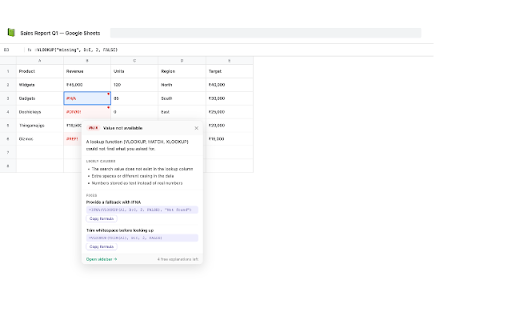
Formula Error Explainer adds a tiny red dot to every error cell in your Google Sheet. Hover or click it to instantly see:
• What the error actually means — in plain English, no jargon
• Why it's happening — the most common causes listed clearly
• How to fix it — copy-ready formulas you can paste straight in
─────────────────────────────
FREE PLAN
─────────────────────────────
✓ Red pulsing indicator on every error cell
✓ Full explanations for #DIV/0! and #N/A
✓ 5 explanations per session
✓ Works immediately — no sign-in, no setup
─────────────────────────────
─────────────────────────────
✓ All 10 error types explained
   #DIV/0! · #N/A · #REF! · #NAME? · #VALUE!
   #NUM! · #NULL! · #ERROR! · Circular refs · Loading
✓ Unlimited explanations
✓ Copy-ready fix suggestions with one-click copy
✓ Sheet sidebar panel (Alt+Shift+E)
✓ Sheet health score (0–100)
✓ Export errors as CSV or JSON
✓ Error history across sessions
✓ One-time payment — no subscription, ever
─────────────────────────────
HOW IT WORKS
─────────────────────────────
1. Open any Google Sheet
2. A pulsing red dot appears on every error cell
3. Click or hover the dot — get the explanation instantly
4. Pro users: press Alt+Shift+E to open the full sidebar
─────────────────────────────
PRIVACY
─────────────────────────────
Your spreadsheet data never leaves your browser. Everything runs locally. We only store your error history in Chrome's local storage on your own machine. No tracking, no analytics, no ads.
One-time payment. Lifetime access. Works on all your Google Sheets.
Technical
- Version
- 1.1
- Manifest
- V3
- Size
- 32.19KiB
- Min Chrome
- 88
- Languages
- 1
- Featured
- No
Metadata
- ID
- eoneihkldfcochjchnkcmoklkjblfijn
- Developer ID
- u72830fe4eb04337005131dbbeb1f3cf2
- Developer Email
- [email protected]
- Created
- May 6, 2026
- Last Updated (Store)
- May 6, 2026
- Last Scraped
- Jun 13, 2026
- Website
- —
- Support URL
- —
- Privacy Policy
- https://imromec-extensions.vercel.app/privacy.html
Data sourced from the Chrome Web Store · last verified Jun 13, 2026.