
Dataslayer AI Looker Studio Analyzer
Audit Looker Studio dashboards with AI-powered insights. Detect errors, optimize reports, and save time on data review.
As of June 2026, Dataslayer AI Looker Studio Analyzer has 967 users and a 5.00/5 rating from 14 reviews in the Productivity category.
Usersdown 2.5 percent−2.5%
967
967
Ratingno change0%
5.00
14 reviews
Reviewsno change0%
14
Version
1.0.28
Manifest V3
90-day change · In the last 90 days this extension 1 version update, changed permissions.
History
8 snapshotsTracking since Apr 1, 2026.
View as table
| Date | Users | Rating | Reviews | Version |
|---|---|---|---|---|
| Apr 1, 2026 | 992 | 5.00 | 14 | 1.0.27 |
| Apr 18, 2026 | 1.0K | 5.00 | 14 | 1.0.27 |
| Apr 28, 2026 | 1.0K | 5.00 | 14 | 1.0.27 |
| May 15, 2026 | 1.0K | 5.00 | 14 | 1.0.27 |
| May 21, 2026 | 1.0K | 5.00 | 14 | 1.0.28 |
| May 28, 2026 | 986 | 5.00 | 14 | 1.0.28 |
| Jun 4, 2026 | 953 | 5.00 | 14 | 1.0.28 |
| Jun 10, 2026 | 942 | 5.00 | 14 | 1.0.28 |
| Now | 967 | 5.00 | 14 | 1.0.28 |
Changelog
- May 15, 2026host_permissions
https://lookerstudio.google.com/, https://www.googleapis.com/*, https://openidconnect.googleapis.com/*, https://gs.metrics.softpoint.es/*
https://lookerstudio.google.com/*, https://datastudio.google.com/*, https://www.googleapis.com/*, https://openidconnect.googleapis.com/*, https://gs.metrics.softpoint.es/*
- May 15, 2026permissions
activeTab, scripting, tabs, identity, alarms, storage
activeTab, scripting, tabs, identity, identity.email, alarms, storage
Permissions & access
- Permissions
- activeTabscriptingtabsidentityidentity.emailalarmsstorage
- Host access
- https://lookerstudio.google.com/*, https://datastudio.google.com/*, https://www.googleapis.com/*, https://openidconnect.googleapis.com/*, https://gs.metrics.softpoint.es/*
Screenshots


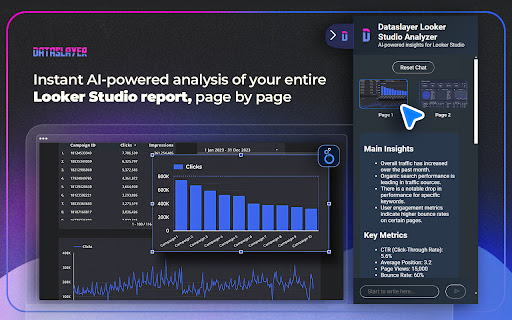


About
Make your Looker Studio reports error-free — instantly and effortlessly
Stop wasting hours manually reviewing Looker Studio dashboards.
Dataslayer Looker Studio Analyzer uses AI-powered insights to scan your entire report, page by page, helping you spot errors, inconsistencies, and optimization opportunities in seconds.
Plus, its built-in AI chat lets you ask questions about your report and get instant answers, making your analysis faster and smarter.

Key Features
      - AI-powered report analysis: Instantly detect errors and optimize your dashboards.
      - Page-by-page review: Let AI scan every section of your report, no manual work required.
      - Interactive AI chat: Ask anything about your report and get real-time insights.
      - Data quality checks: Identify missing data, broken visualizations, and discrepancies.
      - Performance insights: Understand trends, KPIs, and areas for improvement.
      - Time-saving automation: Focus on analysis, not troubleshooting.

Why Use Dataslayer Looker Studio Analyzer?
     - Audit faster: Ensure report accuracy across all pages.
     - Fix issues instantly: Spot missing data sources, incorrect filters, and formatting errors.
     - Make smarter decisions: Get clear recommendations for better reporting.
     - Optimize dashboards: Improve visualization performance and clarity.
     - Chat with AI: Get explanations, insights, and suggestions instantly.

Who Is This For?
    - Data analysts: Validate Looker Studio dashboards with ease.
    - Marketing teams: Ensure accurate campaign reporting.
    - Agencies & consultants: Automate report auditing for clients.

What Can You Analyze?
Dataslayer Looker Studio Analyzer works with Looker Studio dashboards pulling data from key marketing platforms:
Google Ads, Google Analytics 4, Facebook Ads, LinkedIn, and more.
It scans every page to detect missing data, incorrect filters, and slow-loading widgets, so you can optimize performance across your dashboards.

Privacy & Security Commitment
Dataslayer is certified under ISO 27001 (Information Security Management) and ISO 27701 (Privacy Information Management), following industry-leading standards for data security and privacy.
Your data is never stored — Dataslayer acts as a real-time data transfer layer, ensuring your information stays protected.

Learn more: www.dataslayer.ai/security

About Dataslayer
Dataslayer is a trusted data automation company helping marketers and analysts simplify reporting.
Thousands of users worldwide rely on Dataslayer to streamline their workflows.
We're consistently rated among the top tools in marketing analytics. See what our users say on G2: https://www.g2.com/products/dataslayer-ai/reviews

Start analyzing smarter. Add Dataslayer Looker Studio Analyzer to Chrome today and make your Looker Studio dashboards work for you.
Technical
- Version
- 1.0.28
- Manifest
- V3
- Size
- 258KiB
- Min Chrome
- 88
- Languages
- 2
- Featured
- No
Metadata
- ID
- eoffmhpbhjagpckonengcinfchmdcdni
- Developer ID
- ua9901ae06bba5a37e64978250be20eb0
- Developer Email
- [email protected]
- Created
- Mar 13, 2025
- Last Updated (Store)
- May 8, 2026
- Last Scraped
- Jun 10, 2026
- Website
- dataslayer.ai
- Support URL
- dataslayer.ai/contact-us
- Privacy Policy
- https://dataslayer.ai/privacy-policy
Similar extensions
Alternatives to Dataslayer AI Looker Studio Analyzer, ranked by description similarity.

Export Data to Looker Studio™ — Faster Dashboards with Speedboost
Export SEO, ads, eCommerce, and PPC data into Looker Studio™ — build automated, faster dashboards with Speedboost.
31

DashboardNarrator - Dashboard AI Analysis
Capture full dashboard pages and analyze them with AI. Perfect for dashboards and BI web content analysis.
25
★ 5.0

AI Data Insight
获取页面中的任意区域解读
15
★ 5.0

AI Chart Intelligence - Instant Charts Analysis
Analyze any chart instantly with AI. Get fast insights and summaries, download data,export and share in one click
79
★ 5.0

Klarly Page Analytics
Get insights right on your page – the ultimate operational insights tool!
152
★ 5.0

DataLens
Transforms CSV files into intelligent dashboards
30
★ 5.0

Veritas Video Analyzer
Summarize videos and detect AI-generated content using Claude AI
16

MockDash - Secure Data Scramble & Screenshot Editor
Make dashboards client-ready. Scramble numbers, blur PII & add your logo. Create secure, professional screenshots in 1 click.
—
Data sourced from the Chrome Web Store · last verified Jun 10, 2026.