
D-Link Network Assistant
D-Link Network Assistant
As of May 2026, D-Link Network Assistant has 6,000 users and a 3.72/5 rating from 32 reviews.
Usersno change0%
6.0K
6,000
Ratingno change0%
3.72
32 reviews
Reviewsno change0%
32
Version
3.0.2.7
Manifest V2
History
1 snapshotsTracking since Apr 30, 2026.
View as table
| Date | Users | Rating | Reviews | Version |
|---|---|---|---|---|
| Apr 30, 2026 | 6.0K | 3.72 | 32 | 3.0.2.7 |
| Now | 6.0K | 3.72 | 32 | 3.0.2.7 |
Permissions & access
- Permissions
- storageunlimitedStoragesystem.network
- Host access
- https://www.google-analytics.com/, http://www.google-analytics.com/collect, https://wfp.zendesk.com/api/v2/, https://api-test.bizcloud.dlink.com/dna, https://s3-us-west-1.amazonaws.com/download-site/download-file
Screenshots


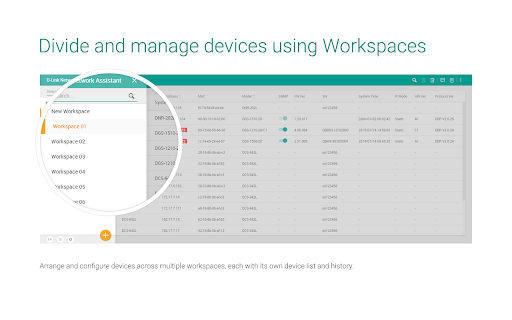
About
First time setup for your D-Link devices!
The D-Link Network Assistant is designed to help users configure and manage their D-Link devices for first time deployment.

Features:
1. Solve IP conflict
2. IP settings
3. SNMP settings
4. Set device time/time zone
5. Config backup/restore
6. Firmware upgrade
Technical
- Version
- 3.0.2.7
- Manifest
- V2
- Size
- 2.04MiB
- Min Chrome
- 44
- Languages
- 1
- Featured
- No
Metadata
- ID
- eoenegoacckkpkijhfhijfechhhpkbmp
- Developer ID
- uc654d60a2f71685038063730ea86aca6
- Developer Email
- —
- Created
- Nov 6, 2015
- Last Updated (Store)
- Mar 2, 2017
- Last Scraped
- May 29, 2026
- Website
- —
- Support URL
- —
- Privacy Policy
- —
Similar extensions
Alternatives to D-Link Network Assistant, ranked by description similarity.

Cisco Network Setup Assistant
Cisco Network Setup Assistant is used to connect devices securely to networks utilizing Cisco Identity Services Engine.
205

Cisco Network Setup Assistant
Cisco Network Setup Assistant is used to connect devices securely to networks utilizing Cisco Identity Services Engine.
34

Cisco Network Setup Assistant
Cisco Network Setup Assistant is used to connect devices securely to networks utilizing Cisco Identity Services Engine.
14
192.168.1.1 | Router Login Admin
Simple use of 192.168.1.1 to log in to the router for management and configuration.
645

Donut@Home for ZLT S10
Unlocking the full features of Smart@Home LTE Wireless Router for model ZLT S10.
4.0K
★ 4.4

TP-Link Router Login
Log in to your TP-Link Router’s Admin Panel and make changes to your WiFi settings easily.
791
192.168.l.l | Router Admin Login
Access router settings with ease by logging in at 192.168.l.l - the gateway to your home network's admin panel.
195

192.168.100.1 Login Admin
Login Now!...192.168.100.1 Login Admin. It is a private IPv4 network address to change default router settings.
579
Data sourced from the Chrome Web Store · last verified May 29, 2026.