
Vex 🍒
Your AI-Powered Life
As of June 2026, Vex 🍒 has 3 users in the Workflow & Planning category.
Usersno change0%
3
3
Ratingno change0%
—
— reviews
Reviewsno change0%
—
Version
2.6.94
Manifest V3
90-day change · In the last 90 days this extension 2 version updates, changed permissions.
History
5 snapshotsTracking since Apr 20, 2026.
View as table
| Date | Users | Rating | Reviews | Version |
|---|---|---|---|---|
| Apr 20, 2026 | — | — | — | 2.2.86 |
| Apr 25, 2026 | 3 | — | — | 2.2.86 |
| May 2, 2026 | 2 | — | — | 2.2.86 |
| May 9, 2026 | 2 | — | — | 2.5.19 |
| Jun 8, 2026 | 3 | — | — | 2.5.19 |
| Now | 3 | — | — | 2.6.94 |
Changelog
- Jun 8, 2026host_permissions
https://*.chrry.ai/*, https://chrry.dev/*
https://*.chrry.ai/*, https://wasabi.chrry.ai/*
Permissions & access
- Permissions
- storagesidePaneltabscontextMenuscookies
- Host access
- https://*.chrry.ai/*, https://wasabi.chrry.ai/*
Screenshots

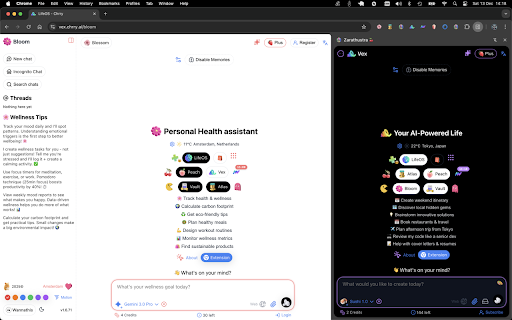


About
🤖 Vex - Your AI-Powered Life Assistant
Instant AI Help While You Browse - No Sign-Up Required to Try!

Vex brings multiple AI models (ChatGPT, Claude, Gemini, Perplexity) directly into your browser sidebar. Get instant answers, manage tasks, and boost productivity without leaving your current webpage.

✨ Key Features:

🤖 Multi-AI Chat Interface
Switch between GPT-5, Claude, Gemini, Sushi 🍣 and more AI models
Real-time responses in a persistent sidebar
Conversation history automatically saved
Works immediately in guest mode - no account needed!

⚡ Quick Actions
Right-click any text → "Explain", "Summarize", "Expand"
Keyboard shortcuts for instant access
Context-aware AI responses

📋 Built-in Task Manager
Create and organize tasks within the sidebar
AI-powered task suggestions
Sync across devices (when signed in)

💻 Developer-Friendly
Automatic code syntax highlighting
Debug code snippets with AI
Markdown formatting support

🔐 Privacy-First
Private conversations, Burn mode 🔥
Guest mode available - try before signing up
Full data control

🚀 How to Use:
Install Extension: Add Vex to Chrome
Start Immediately: Click the Vex icon - works in guest mode right away!
Choose AI Model: Select from GPT-5, Claude, Gemini, Sushi 🍣 etc.
Start Chatting: Ask questions, get instant AI-powered answers
Optional Sign-In: Create account for conversation sync & more features

💡 Perfect For:
Students: Explain complex concepts from study materials
Developers: Debug code without leaving your IDE
Writers: Draft and edit content with AI assistance
Professionals: Quick research and analysis
Everyone: AI help whenever you need it

📱 Part of the Chrry AI Ecosystem:
Vex connects with specialized AI agents:

🌸 Bloom: Health & wellness assistant
🍑 Peach: Social planning & connections
🏦 Vault: Finance & budget tracking
⏱️ Focus: Productivity & time management
📚 Atlas: Travel Assistant

💰 Pricing:
Guest: Free trial - works immediately, no account needed!
Member: Free with account + conversation sync
Plus (€9.99/mo): 2000 AI messages/month
Pro (€19.99/mo): 5000 AI messages/month + priority

⚠️ Requirements:
Internet connection required for AI responses
Works on all websites
Optional Google sign-in for sync & advanced features

🔒 Privacy Policy: vex.chrry.ai/privacy
Technical
- Version
- 2.6.94
- Manifest
- V3
- Size
- 3.39MiB
- Min Chrome
- 88
- Languages
- 1
- Featured
- No
Metadata
- ID
- enpllenkofnbmnflnlkbomkcilamjgac
- Developer ID
- u219336a1df4f91d06d4361d2776c08db
- Developer Email
- [email protected]
- Created
- Dec 5, 2025
- Last Updated (Store)
- Jun 7, 2026
- Last Scraped
- Jun 8, 2026
- Website
- chrry.ai
- Support URL
- vex.chrry.ai/about
- Privacy Policy
- http://vex.chrry.ai/privacy
Similar extensions
Alternatives to Vex 🍒, ranked by description similarity.

Nexus AI – Smart Web & PDF Context Analyzer, Summarizer
Smart context-aware AI summaries for web & PDFs. Instantly chat with files, rewrite content, and extract structured data to CSV.
41
★ 5.0

AI SideChat: Send Text & Images with Prompts
Boost productivity: open ChatGPT, Gemini, DeepSeek & more in a side panel. Send text & images instantly with pre-defined prompts.
3

Prompt Helix
AI-powered page analysis. Stop copy-pasting into ChatGPT. Analyze any webpage in one click.
—

Universal AI Navigator
Navigation sidebar for Gemini, ChatGPT, Claude, and Perplexity.
18
★ 5.0

Caiioo
AI-powered context management assistant with web browsing, file operations, and API integrations
37
★ 5.0

Definio AI: Multi-Modal AI Sidebar
Definio runs every LLM model from one sidebar. Throw your question at any of them, switch on a whim, never open a new tab.
3.0K
★ 4.9

Chrry 🍒
AI Super App - Discover, create, and manage your AI-powered life
—
★ 5.0

AI Sidebar Extension (All Models)
Sidebar to toggle between Gemini, ChatGPT, Perplexity, Grok, and DeepSeek.
100
★ 1.0
Data sourced from the Chrome Web Store · last verified Jun 8, 2026.