
Quick WebSocket Client with Socket.IO
Construct custom Web Socket requests and handle responses to directly test your Web Socket services,Includes Socket.IO support.
As of May 2026, Quick WebSocket Client with Socket.IO has 3,000 users and a 5.00/5 rating from 2 reviews in the Developer Tools category.
Usersno change0%
3.0K
3,000
Ratingno change0%
5.00
2 reviews
Reviewsno change0%
2
Version
0.0.2.1
Manifest V3
Permissions & access
- Permissions
- storage
- Host access
- None declared
Screenshots
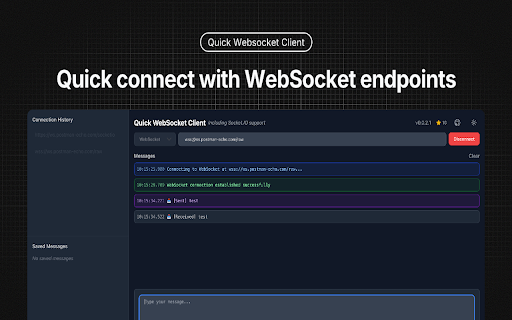


About
## Features

v0.0.2.1 Release for Socket.IO support.

- 🔌 Easy WebSocket Connection Management
  - Quick connect/disconnect with WebSocket endpoints
  - Connection status monitoring
  - Detailed connection state logging

- 🔌 Support Socket.IO Connection
  - Quick connect/disconnect with Socket.IO endpoints
   - Support for both event subscription
   - Support event and message

- 📝 Advanced Message Handling
  - Support for both text and binary messages
  - Built-in JSON formatting and validation
  - Message history with timestamp and direction
  - Save frequently used messages for quick access

- 💾 Persistent Storage
  - Auto-save connection history
  - Save favorite messages for reuse
  - Quick access to recent connections

- 🎨 Modern User Interface
  - Clean and intuitive design
  - Real-time message updates
  - Compact message display
  - Dark/Light theme support

## Perfect for

- Web developers testing WebSocket APIs
- Backend developers debugging WebSocket services
- QA engineers validating WebSocket implementations
- Anyone working with WebSocket-based applications

## How to Use

1. Enter your WebSocket URL (e.g., ws://localhost:8080)
2. Click "Connect" to establish connection
3. Send text or binary messages
4. View real-time responses
5. Save frequently used messages for quick access
6. Monitor connection status and history

## Technical Details

- Built with React and TypeScript
- Uses native WebSocket API
- Supports all modern browsers
- Zero external dependencies for core functionality
- Secure local storage for saved data

Perfect for developers who need a reliable, feature-rich WebSocket testing tool right in their browser.

## Test Server
- Web Socket: wss://ws.postman-echo.com/raw
- Socket.IO https://ws.postman-echo.com/socketio
Technical
- Version
- 0.0.2.1
- Manifest
- V3
- Size
- 291KiB
- Min Chrome
- 88
- Languages
- 1
- Featured
- No
Metadata
- ID
- enmpedlkjjjnhoehlkkghdjiloebecpn
- Developer ID
- uf46ab05da7dc7114962abfb079baf71d
- Developer Email
- [email protected]
- Created
- Dec 27, 2024
- Last Updated (Store)
- Jan 27, 2025
- Last Scraped
- May 29, 2026
- Website
- oslook.com
- Support URL
- —
- Privacy Policy
- —
Similar extensions
Alternatives to Quick WebSocket Client with Socket.IO, ranked by description similarity.

Flash Cloud Socket Tester
Test WebSocket and Socket.IO connections with ease. A modern, intuitive tool for developers.
3

SocketMaster: WebSocket Tester
A robust WebSocket testing client. Connect, send messages, and analyze responses with real-time logs and JSON formatting.
8

WebSocket Proxy
Monitor, log, and modify WebSocket messages in real-time with a powerful proxy and testing tool.
334
★ 5.0

WebSocket Visualizer
Graphically displays incoming and outgoing WebSocket messages with event type grouping
487
★ 5.0

Socket.IO Test Client
Socket.IO Client Development Tool
10.0K
★ 5.0

WebSocket DevTools
Professional WebSocket debugging tool with message proxying, simulation, blocking and favorites features
10.0K
★ 4.9

Sails Live
A Sails.js WebSocket Client - Request and listen to your RESTful APIs
71
★ 5.0

PieSocket - WebSocket & SocketIO Test Client
Test Websocket & SocketIO connections with ease, supports both secure (wss) and unsecure (ws) protocols.
30.0K
★ 4.3
Data sourced from the Chrome Web Store · last verified May 29, 2026.