
Highlight to QR
Highlight any text to instantly generate a QR code — click the QR button that appears.
As of June 2026, Highlight to QR has 4 users in the Productivity category.
Usersno change0%
4
4
Ratingno change0%
—
— reviews
Reviewsno change0%
—
Version
1.0.0
Manifest V3
History
6 snapshotsTracking since May 7, 2026.
View as table
| Date | Users | Rating | Reviews | Version |
|---|---|---|---|---|
| May 7, 2026 | — | — | — | 1.0.0 |
| May 11, 2026 | — | — | — | 1.0.0 |
| May 17, 2026 | 4 | — | — | 1.0.0 |
| May 23, 2026 | 5 | — | — | 1.0.0 |
| May 30, 2026 | 6 | — | — | 1.0.0 |
| Jun 13, 2026 | 5 | — | — | 1.0.0 |
| Now | 4 | — | — | 1.0.0 |
Permissions & access
- Permissions
- None declared
- Host access
- None declared
Screenshots

About
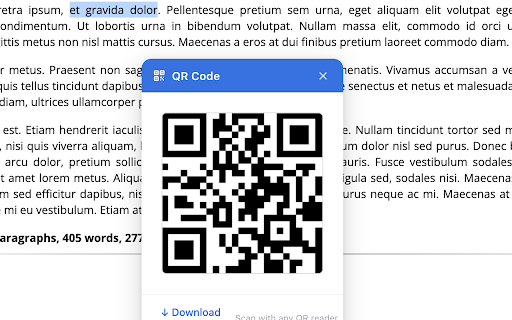
Instantly convert any selected text into a QR code. Just highlight text on any webpage, and a blue QR button appears. Click it to see the generated QR code in a popup with a download option.

Perfect for:
• Sharing text via QR codes
• Converting URLs, email addresses, or contact info to scannable codes
• Quick QR generation without switching tabs

Features:
✓ One-click QR generation
✓ Floating button on text selection
✓ Download as PNG image
✓ No data collection or external requests
✓ Works on any website

Privacy: All QR generation happens locally in your browser. No data is collected or sent to servers.
Technical
- Version
- 1.0.0
- Manifest
- V3
- Size
- 17.7KiB
- Min Chrome
- 88
- Languages
- 1
- Featured
- No
Metadata
- ID
- enlbofeijjnongpecmgnpehnclokieoo
- Developer ID
- ub0f5e77c5754535a7f43395a59d09558
- Developer Email
- [email protected]
- Created
- May 6, 2026
- Last Updated (Store)
- May 6, 2026
- Last Scraped
- Jun 13, 2026
- Website
- —
- Support URL
- —
Data sourced from the Chrome Web Store · last verified Jun 13, 2026.