
Get Social
All Your Favorite Social Accounts In One Tab!
As of May 2026, Get Social has 53 users in the Workflow & Planning category.
Usersup 8.2 percent+8.2%
53
53
Ratingno change0%
—
— reviews
Reviewsno change0%
—
Version
1.4
Manifest V3
History
3 snapshotsTracking since Apr 1, 2026.
View as table
| Date | Users | Rating | Reviews | Version |
|---|---|---|---|---|
| Apr 1, 2026 | 49 | — | — | 1.4 |
| Apr 30, 2026 | 47 | — | — | 1.4 |
| May 28, 2026 | 49 | — | — | 1.4 |
| Now | 53 | — | — | 1.4 |
Permissions & access
- Permissions
- None declared
- Host access
- None declared
Screenshots
About
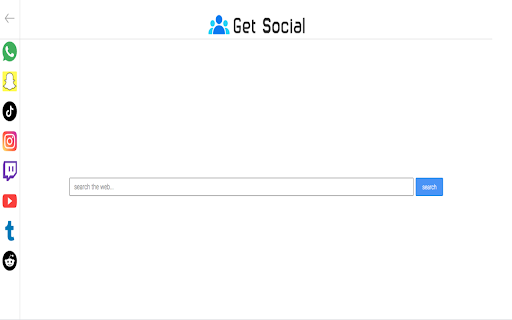
Get Social keeps your favorite social messengers in one place. Stay connected and manage your accounts more efficiently from the comfort of this browser extension. From WhatsApp to YouTube, access your it all in one place with ease along with a search box to browse the internet.

How to get started:
Get Social is a browser extension which is integrated into Chrome to provide users access your social media accounts in one place. The new tab extension is easy to use and user-friendly and once the it is added to Chrome, users need to login to their accounts as per the Terms stated by the respective apps to stay connected and chat away! To browse the internet, add text in the search box.
Note: This extension does not store or share any personal information, financial details, or authentication permissions.

Features:
Safe and secure access to WhatsApp, Pinterest, YouTube and more
Customized web search powered by Bing.com
Ease of navigation between apps
Completely free to use

Permissions
It  needs permission to allow a new tab to display the Get Social extension with the features including access to messenger apps and  customised search. This extension does NOT ask for your login or password.

Uninstallation:
To uninstall the "Get Social" extension in Chrome, go to chrome://extensions/ and locate "Get Social", click on the Remove option and you will be prompted with a pop up "Remove Get Social?", click the Remove button and the extension will get uninstalled.

By clicking "Add to Chrome", I accept and agree to install the "Get Social" extension and hereby agree to set Chrome New Tab to that provided by the service and the Privacy Policy and Terms of Use.

Please refer to our Privacy Policy (https://mediastinct.com/privacy-policy/) and Terms of Use (https://mediastinct.com/terms-conditions/) or contact us at [email protected] for any queries.

Disclaimer: Get Social is not a part of any of the applications or messengers added in this extension including WhatsApp, Facebook, Instagram,YouTube and the others. It is an unofficial app (browser add-on) and an independent project, and functions only as a toolbar extension that has been created to ensure that messenger services and the search box can be accessed and used at ease. Please, refer to our Privacy Policy for more details on the purpose and methods of our handling user data.
The search engine on the new tab will change to Bing.com once downloaded.
Technical
- Version
- 1.4
- Manifest
- V3
- Size
- 194KiB
- Min Chrome
- 88
- Languages
- 1
- Featured
- No
Metadata
- ID
- enkdoeliknnjpkhaggjllpjmmmfpeehi
- Developer ID
- u468d88d3c2a97f15a7be99e0b55ec1bb
- Developer Email
- [email protected]
- Created
- Sep 28, 2020
- Last Updated (Store)
- Apr 4, 2024
- Last Scraped
- May 28, 2026
- Website
- —
- Support URL
- —
- Privacy Policy
- https://mediastinct.com/privacy-policy/
Similar extensions
Alternatives to Get Social, ranked by description similarity.

Messenger Central
No more switching between tabs to access your messenger apps!.
50.0K
★ 1.0

Business Messenger
All your business chat messengers in one place!
295
★ 3.7

Social Search Extension
Extension for privacy protection for your browser.
584

Movies Search Web
A premium web-based tool that lets you find all your favorite movies simple and quick.
1.0K
★ 5.0

Smartbase
Feature packed New Tab
3.0K

Daily Inspiring Quotes
Daily Quotes to Motivate & Inspire You!
167

Ultimate Office Tools
Easily Access Office Tools Right from Your Browser.
1.0K
★ 5.0

AppStartTab
Get app shortcuts on your new tab.
10.0K
Data sourced from the Chrome Web Store · last verified May 28, 2026.