
YouTube Videos Looper
Loop sections (loop start & end time as required) of YouTube videos
As of May 2026, YouTube Videos Looper has 23 users and a 5.00/5 rating from 1 reviews in the Functionality & UI category.
Usersno change0%
23
23
Ratingno change0%
5.00
1 reviews
Reviewsno change0%
1
Version
1.0
Manifest V3
History
3 snapshotsTracking since Apr 1, 2026.
View as table
| Date | Users | Rating | Reviews | Version |
|---|---|---|---|---|
| Apr 1, 2026 | 23 | 5.00 | 1 | 1.0 |
| Apr 30, 2026 | 19 | 5.00 | 1 | 1.0 |
| May 28, 2026 | 20 | 5.00 | 1 | 1.0 |
| Now | 23 | 5.00 | 1 | 1.0 |
Permissions & access
- Permissions
- activeTabstorage
- Host access
- None declared
Screenshots
About
Hi, Guys!

Thanks a lot for trying out this extension!

Why this extension?

 1. PROBLEM: Currently, on Youtube, to loop a video, we either have an option to either loop if
      from start to end, or for the timestamps that the content creator has provided, but we
      cannot loop from any start to end time, and because of this, we end searching things like
      "some xyz song but only the good part" and many times this "good part" is also not exactly
       the part we like.

2. SOLUTION: This is the problem that this extension solves. With this, you can choose any
     start and end time (THE BEST PART OF ANY VIDEO/SONG) and loop it, so no need to
     search through n-number of videos to listen to what you like!


How do you use it?

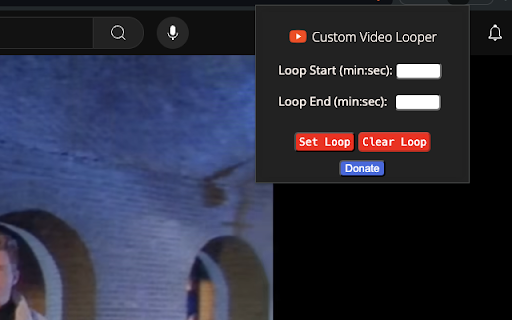
It's actually very intuitive! After installation, when you click on the logo of the extension, it shows Loop start time and Loop end time. You just have to enter the start and end time, and click on set loop, and that's it! Now, your "best part" will loop, until you either clear the loop by clicking on "Clear Loop" button on the extension, or you can simply reload the tab and the loop will reset.   You can look at the image provided to check out the UI, it's pretty simple!
  Example:
     1) start Time = 0:52; end Time = 1:30 (Loop from 0 min 52 sec to 1 min 30 sec)
     2) start Time = 1:20:26; end Time = 2:40:09 (Loop from 1hr 20m 26 sec to 2hr 40m 9sec)


Permissions that this extension use:

1. This extension uses just 2 permissions, namely storage and to access the activeTab.
2. Why do we need these 2 permissions?
      a) Storage: Using this permission, we store the value of start and end time so that even
           when you click somewhere else and then later comeback to the extension to check the
           current values of start & end time, it shows up there!
      b) Active tab: Using this, we are able to set the loop for the youtube tab, so without this
           permission, we won't have access to the youtube screen and hence won't be able to set
           the loop.

Have any feedback or have some new ideas to add to this? Please leave a comment!
Also, if you find this extension useful, any kind of donation/good rating & reviews would be very helpful in continuing my journey as a developer.

Thanks a lot, and enjoy!!
Technical
- Version
- 1.0
- Manifest
- V3
- Size
- 19.16KiB
- Min Chrome
- 88
- Languages
- 1
- Featured
- No
Metadata
- ID
- enicagmjbefldbkcdehidiignkcadhmc
- Developer ID
- u9e8b178b76e86750078c04bcb6877bd4
- Developer Email
- [email protected]
- Created
- Jul 4, 2024
- Last Updated (Store)
- Jul 4, 2024
- Last Scraped
- May 28, 2026
- Website
- —
- Support URL
- —
- Privacy Policy
- —
Similar extensions
Alternatives to YouTube Videos Looper, ranked by description similarity.

Youtube Looper - Loop Video Sections
Replay YouTube videos with custom start and end times. Perfect for learning, practicing, or enjoying your favorite video segments.
20
★ 4.9

Timestamp Button for YouTube Comments
Quickly add timestamps to comments in YouTube videos
74
★ 4.3

YtScroll
Add custom rewind and forward buttons to YouTube video player
3

YouTube User Comment Viewer
Track and display comments from a specific user on YouTube videos in a live overlay feed
9
★ 5.0
Playback Speed Time
Get the actual time to watch after applying playback speed to a video
31
★ 5.0

YouTube Loop Button
Adds a Loop button to YouTube videos.
3

Custom Video Speed for YouTube™
change the current & default speed of YouTube™ videos by steps of 0.1 from 0.1 up to 8.0 using sliders, buttons, and/or the keyboard
2.0K
★ 4.3

Tabtube
Transform your new tab into a personalized YouTube video background experience
5
Data sourced from the Chrome Web Store · last verified May 28, 2026.