
Copy As Plain Text
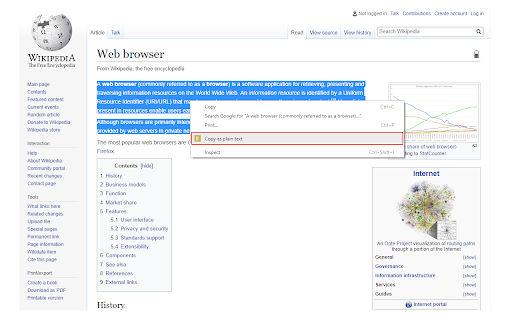
Easily copy the selected text without formatting to the clipboard via the right-click menu.
As of May 2026, Copy As Plain Text has 30,000 users and a 4.13/5 rating from 48 reviews in the Productivity category.
Usersno change0%
30.0K
30,000
Ratingdown 0.2 percent−0.2%
4.13
48 reviews
Reviewsdown 2.0 percent−2.0%
48
Version
0.1.5
Manifest V3
History
2 snapshotsTracking since Apr 1, 2026.
View as table
| Date | Users | Rating | Reviews | Version |
|---|---|---|---|---|
| Apr 1, 2026 | 30.0K | 4.14 | 49 | 0.1.5 |
| Apr 21, 2026 | 30.0K | 4.13 | 48 | 0.1.5 |
| Now | 30.0K | 4.13 | 48 | 0.1.5 |
Permissions & access
- Permissions
- storageactiveTabscriptingcontextMenusclipboardWrite
- Host access
- None declared
Screenshots
About
Copy As Plain Text is a lite extension that lets you easily copy any text without formatting to the clipboard via the right-click context-menu item.

Simply browse a website and select a desired text, then right-click and select - Copy as plain text - from the context-menu. The selected text will be copied to the clipboard without any formatting. Alternatively, you can press the toolbar button to copy the plain text to the clipboard.

Please note that, to paste the clipboard you can use (Ctrl + V) or right-click and select - Paste - from the context-menu.

To report bugs, please fill out the bug report form on the addon's homepage (https://mybrowseraddon.com/copy-as-plain-text.html).
Technical
- Version
- 0.1.5
- Manifest
- V3
- Size
- 17.9KiB
- Min Chrome
- 88
- Languages
- 1
- Featured
- Yes
Metadata
- ID
- eneajgkmdhmjmloiabgkpkiooaejmlpk
- Developer ID
- u1cbcb78579a2f3402c48ebe9334f7465
- Developer Email
- [email protected]
- Created
- Dec 31, 2017
- Last Updated (Store)
- Jul 22, 2025
- Last Scraped
- May 31, 2026
- Website
- —
- Privacy Policy
- —
Similar extensions
Alternatives to Copy As Plain Text, ranked by description similarity.

Copy Selected Text
Adds a context menu option to copy selected text.
7

Plain text converter
Use this tool to paste without formatting — convert copied content and paste as plain text anywhere with one click.
95

Copy without Formatting
Copy selected text without any formatting
118

Copy as...
Copy page title, URL, and selection as text or hyperlink with multiple format options
7

Copy Clean Text
Copy selected text as clean plain text or simple Markdown. Runs only on click. No site access.
3

Select & Copy HTML Text
Select part of an HTML document and copy the underlying text to the clipboard!
2.0K
★ 3.0

Copy & Paste as Text - Neatly formatted
Copy and paste any content in a clean, well-structured plain text format.
975
★ 5.0

Clean Copy Tool
Copy clean formatted text from any webpage
1
Data sourced from the Chrome Web Store · last verified May 31, 2026.