
Video Downloader for TikTok
Download tiktok.com's videos with a single click or by right-clicking on the video elements
As of May 2026, Video Downloader for TikTok has 926 users and a 3.00/5 rating from 4 reviews in the Workflow & Planning category.
Usersup 3.8 percent+3.8%
926
926
Ratingno change0%
3.00
4 reviews
Reviewsno change0%
4
Version
0.1.1
Manifest V3
History
3 snapshotsTracking since Apr 1, 2026.
View as table
| Date | Users | Rating | Reviews | Version |
|---|---|---|---|---|
| Apr 1, 2026 | 892 | 3.00 | 4 | 0.1.1 |
| Apr 30, 2026 | 914 | 3.00 | 4 | 0.1.1 |
| May 28, 2026 | 945 | 3.00 | 4 | 0.1.1 |
| Now | 926 | 3.00 | 4 | 0.1.1 |
Permissions & access
- Permissions
- storage
- Host access
- None declared
Screenshots

About
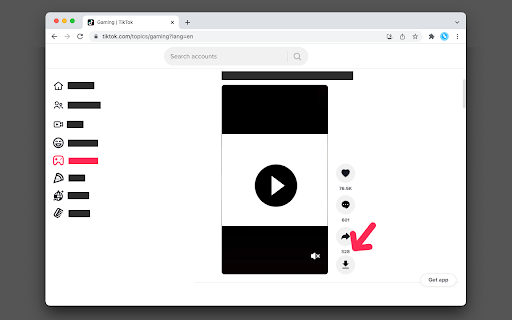
This extension allows you to download video streams from supported hostnames to the local disk. There are two methods you can use to download a video:

1. Right-click on the video element and click "Save Video" (this item appears on the context menu when you have this extension installed)
2. Use the "Download" button next to the video element

Supported hostnames:
1. https://www.tiktok.com/*

How does it work:
Method 1: the extension tries to remove the overlay item that hides the video element so that the native right-click over video element could appear
Method 2: the extension tries to find the video element and insert a download button next to it. This method displays the downloading progress. Also, the extension tries to find the correct filename for the media.

For bug reports please use
https://github.com/chandler-stimson/video-downloader
Technical
- Version
- 0.1.1
- Manifest
- V3
- Size
- 28.7KiB
- Min Chrome
- 88
- Languages
- 1
- Featured
- Yes
Metadata
- ID
- endnhjcpnhomfjbloggpapdndhafoeeo
- Developer ID
- u671f43fce17c1fd114ededef75edd56e
- Developer Email
- [email protected]
- Created
- Jan 5, 2022
- Last Updated (Store)
- Jan 6, 2022
- Last Scraped
- May 28, 2026
- Website
- —
- Privacy Policy
- —
Similar extensions
Alternatives to Video Downloader for TikTok, ranked by description similarity.

TikTok Downloader
This extension will allow you to download TikTok videos.
3.0K
★ 3.5

Live Stream Downloader
Detect and Download M3U8 HLS Streams (HTTP Live Stream) in multiple threads to your local disk
400.0K
★ 4.3
Video Extractor 2023
Video Extractor 2023 By ImFullStack.dev
1.0K
★ 2.7

Video Downloader | Vidify
Video downloader to save online videos, media from almost any site and in just a few clicks. Easy and reliable.
970
★ 4.9

All-In-One Video Downloader Pro
All-In-One Video Downloader Pro By ImFullStack.dev
285
★ 3.0

Video Downloader - Total
Download videos from websites, save embedded MP4/WebM files, and record Live Streams from supported pages in Chrome
389
★ 3.0

Twitch Downloader
Twitch Video Downloader to save any video, record and download lives.
1.0K
★ 4.6

Free Downloader Online DomainB Video
Free Downloader Online DomainB Video - Easily Save Videos from Most Website
4.0K
★ 4.8
Data sourced from the Chrome Web Store · last verified May 28, 2026.