
Always Pin - Tabs Manager
Manage pinned tabs
As of May 2026, Always Pin - Tabs Manager has 691 users and a 3.25/5 rating from 4 reviews in the Functionality & UI category.
Usersup 21.4 percent+21.4%
691
691
Ratingup 21.7 percent+21.7%
3.25
4 reviews
Reviewsup 33.3 percent+33.3%
4
Version
1.0
Manifest V3
History
3 snapshotsTracking since Apr 1, 2026.
View as table
| Date | Users | Rating | Reviews | Version |
|---|---|---|---|---|
| Apr 1, 2026 | 569 | 2.67 | 3 | 1.0 |
| Apr 30, 2026 | 590 | 3.25 | 4 | 1.0 |
| May 28, 2026 | 613 | 3.25 | 4 | 1.0 |
| Now | 691 | 3.25 | 4 | 1.0 |
Permissions & access
- Permissions
- storagetabs
- Host access
- None declared
Screenshots


About
Always Pin - Tabs Manager

Manage and maintain your browsing experience with the "Always Pin - Tabs Manager" extension. This tool is designed for users who frequently work with pinned tabs and desire a more organized and systematic approach.

Key Features:

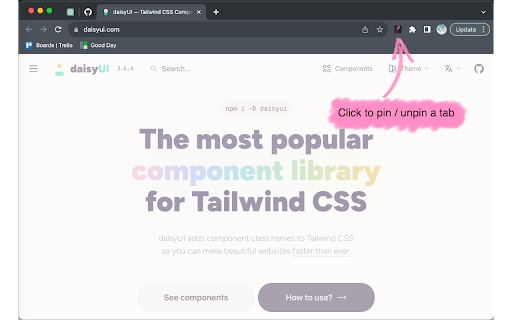
Automatic Pinning: Upon installation, the extension creates a dedicated storage for your pinned tabs. Clicking the extension icon will pin your current tab, saving its URL for future sessions.

Intuitive Tab Management: If the current tab's URL is already in your pinned list, clicking the extension will unpin it and remove it from the list. This toggle feature ensures a clutter-free browsing experience.

Consistent Experience: Every time you open a new window, the extension recalls your pinned tabs, opening and arranging them in the order you've set, ensuring a consistent browsing setup across sessions.

Customizable Order: Via the options page, view and reorder your pinned tabs. Simple up and down arrows allow you to define the display sequence of your tabs. Save your preferred order with a single click.

Enhance your browsing routine with the "Always Pin - Tabs Manager". Keep your essential tabs at your fingertips, organized your way.
Technical
- Version
- 1.0
- Manifest
- V3
- Size
- 9.43MiB
- Min Chrome
- 88
- Languages
- 1
- Featured
- Yes
Metadata
- ID
- emoblkeooomkdbgodabbhcabjhneinmo
- Developer ID
- u650b53ccf9cfaf1ed356d113e5f24a67
- Developer Email
- [email protected]
- Created
- Sep 19, 2023
- Last Updated (Store)
- Sep 19, 2023
- Last Scraped
- May 28, 2026
- Website
- —
- Support URL
- https://github.com/ThePrompter/always_pin
- Privacy Policy
- —
Similar extensions
Alternatives to Always Pin - Tabs Manager, ranked by description similarity.

Pinned Tabs
An Awesome Global Pinned Tabs Extension that allows you to set tabs to be automatically pinned
1

Pinner
An extension to easy pin/unpin tabs and close all unpinned at lightning speed
2

Tab Priority Manager
Automatically organize your tabs based on usage - your most important tabs stay front and center
15
★ 5.0

Persistent Pinned Tabs for Brave
For Brave Browser. True pinned tabs that persist across sessions and non-icognito windows.
23

All Windows Pinned Tabs
Keeps pinned tabs across all Chrome windows
45

Persistent Pinned Tabs
Keeps pinned tabs on their original page. Any link clicked on a pinned tab now opens in a new tab.
44

Favorite Tabs
Manage and switch to your favorite tabs easily.
65
★ 5.0

Minimal Tab Sorter
Sort tabs by website domain, preserving pinned tabs and tab groups.
2
★ 5.0
Data sourced from the Chrome Web Store · last verified May 28, 2026.