
NeuroView: Sensory-Friendly Subtitles
Transform YouTube into a distraction-free scrolling teleprompter. Block visual noise and reduce sensory overload.
As of June 2026, NeuroView: Sensory-Friendly Subtitles has 12 users in the Accessibility category.
Usersno change0%
12
12
Ratingno change0%
—
— reviews
Reviewsno change0%
—
Version
1.0.3
Manifest V3
90-day change · In the last 90 days this extension 1 version update.
History
8 snapshotsTracking since Apr 9, 2026.
View as table
| Date | Users | Rating | Reviews | Version |
|---|---|---|---|---|
| Apr 9, 2026 | — | — | — | 1.0.1 |
| Apr 20, 2026 | — | — | — | 1.0.1 |
| Apr 26, 2026 | 12 | — | — | 1.0.3 |
| May 9, 2026 | 14 | — | — | 1.0.3 |
| May 14, 2026 | 15 | — | — | 1.0.3 |
| May 21, 2026 | 14 | — | — | 1.0.3 |
| Jun 3, 2026 | 13 | — | — | 1.0.3 |
| Jun 9, 2026 | 15 | — | — | 1.0.3 |
| Now | 12 | — | — | 1.0.3 |
Changelog
- Apr 20, 2026description
Watching YouTube with ADHD or sensory processing challenges can be exhausting. Fast-paced cuts, flashy pop-ups, and cluttered interfaces constantly drain your executive function, making it hard to absorb the actual information.

FocusTube is built specifically to solve this.

With a single click, it transforms any YouTube video into a distraction-free, Apple Music-style scrolling teleprompter. By physically masking the chaotic video feed and visually anchoring your eyes to the current sentence, FocusTube helps your brain stay locked in.

✨ How It Works (The "Hyper-Focus" Mechanism):

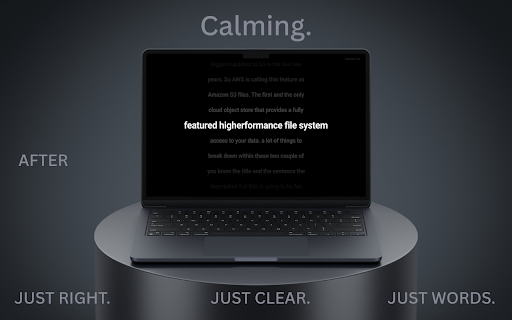
Dynamic Visual Anchoring: The exact sentence being spoken is scaled up and highlighted in the center of your screen, perfectly synced with the audio.

Ambient Context: Previous and upcoming sentences gracefully fade into the background. If you zone out for a second, you won't lose the thread.

Sensory-Friendly Masking: A full-screen overlay completely hides the visual noise of the YouTube player.

Customizable Environment: Includes Dark, Light, and System themes to match your light sensitivity preferences and reduce eye strain.

Frictionless Exit: Fully keyboard-accessible. Just press ESC to instantly return to the normal YouTube view.

🎯 Who is this for?

ADHDers who struggle to process auditory information without reading along.

Neurodivergent individuals who experience sensory overload from hyper-edited videos.

Students & Researchers who want to read through long-form podcasts or documentary scripts efficiently without screen distractions.

🔒 100% Privacy & Local:
FocusTube respects your focus and your data. The extension runs entirely locally in your browser. No tracking, no data collection, no accounts required.

Take back your attention span. Turn off the noise and just read the room.
Watching video content with ADHD or sensory processing challenges can be exhausting. Fast-paced cuts, flashy pop-ups, and cluttered interfaces constantly overwhelm your executive function, making it hard to absorb actual information.

NeuroView is engineered specifically to mitigate this.

With a single click, it transforms any YouTube video into a distraction-free, immersive scrolling teleprompter. By physically masking the chaotic video feed and visually anchoring your eyes to the active sentence, NeuroView creates a calm environment for your brain to process information at its own pace.

✨ How It Works (The Sensory-Shielding Mechanism):

Dynamic Visual Anchoring: The exact sentence being spoken is scaled up and highlighted in the center of your screen, perfectly synced with the audio.

Ambient Context: Previous and upcoming sentences gracefully fade into the background. If you lose focus momentarily, you won't lose the thread.

Sensory-Friendly Masking: A full-screen overlay completely hides the visual noise and addictive recommendations of the standard player interface.

Deep Sensory Customization (Pro): Unlock clinical-grade adjustments including low-stimulation pastel highlighters, the OpenDyslexic font, and adjustable background opacity to perfectly match your visual needs.

Frictionless Exit: Fully keyboard-accessible. Just press ESC to instantly return to the normal view.

🎯 Who is this for?

ADHDers who struggle to process auditory information without reading along.

Neurodivergent individuals who experience sensory overload from hyper-edited videos.

Students & Researchers who want to read through long-form podcasts or documentaries efficiently without screen distractions.

🔒 100% Privacy & Local (Zero Data Collection):
NeuroView respects your cognitive space and your privacy. The extension runs entirely locally in your browser. No tracking, no data collection, and no accounts required.

💳 FSA / HSA Eligible:
As a specialized accessibility tool, NeuroView Pro may be fully eligible for FSA/HSA reimbursement with a Letter of Medical Necessity (LMN) from your healthcare provider.

Take back your attention span. Turn off the noise, and regain your focus.
- Apr 20, 2026short_description
Apple Music-style scrolling captions for YouTube. Mask visual noise, reduce sensory overload, and lock into hyper-focus.
Transform YouTube into a distraction-free scrolling teleprompter. Block visual noise and reduce sensory overload.
- Apr 20, 2026name
FocusTube: ADHD-Friendly Subtitles
NeuroView: Sensory-Friendly Subtitles
Permissions & access
- Permissions
- storage
- Host access
- *://*.youtube.com/*
Screenshots



About
Watching video content with ADHD or sensory processing challenges can be exhausting. Fast-paced cuts, flashy pop-ups, and cluttered interfaces constantly overwhelm your executive function, making it hard to absorb actual information.

NeuroView is engineered specifically to mitigate this.

With a single click, it transforms any YouTube video into a distraction-free, immersive scrolling teleprompter. By physically masking the chaotic video feed and visually anchoring your eyes to the active sentence, NeuroView creates a calm environment for your brain to process information at its own pace.

✨ How It Works (The Sensory-Shielding Mechanism):

Dynamic Visual Anchoring: The exact sentence being spoken is scaled up and highlighted in the center of your screen, perfectly synced with the audio.

Ambient Context: Previous and upcoming sentences gracefully fade into the background. If you lose focus momentarily, you won't lose the thread.

Sensory-Friendly Masking: A full-screen overlay completely hides the visual noise and addictive recommendations of the standard player interface.

Deep Sensory Customization (Pro): Unlock clinical-grade adjustments including low-stimulation pastel highlighters, the OpenDyslexic font, and adjustable background opacity to perfectly match your visual needs.

Frictionless Exit: Fully keyboard-accessible. Just press ESC to instantly return to the normal view.

🎯 Who is this for?

ADHDers who struggle to process auditory information without reading along.

Neurodivergent individuals who experience sensory overload from hyper-edited videos.

Students & Researchers who want to read through long-form podcasts or documentaries efficiently without screen distractions.

🔒 100% Privacy & Local (Zero Data Collection):
NeuroView respects your cognitive space and your privacy. The extension runs entirely locally in your browser. No tracking, no data collection, and no accounts required.

💳 FSA / HSA Eligible:
As a specialized accessibility tool, NeuroView Pro may be fully eligible for FSA/HSA reimbursement with a Letter of Medical Necessity (LMN) from your healthcare provider.

Take back your attention span. Turn off the noise, and regain your focus.
Technical
- Version
- 1.0.3
- Manifest
- V3
- Size
- 98.05KiB
- Min Chrome
- 88
- Languages
- 1
- Featured
- No
Metadata
- ID
- emlcjnbncigohocjmlpgfbgiplpglakl
- Developer ID
- u2346d214ccc57cd78b081758c70f1957
- Developer Email
- [email protected]
- Created
- Apr 9, 2026
- Last Updated (Store)
- Apr 13, 2026
- Last Scraped
- Jun 9, 2026
- Website
- —
- Support URL
- —
Data sourced from the Chrome Web Store · last verified Jun 9, 2026.