
Utab
Boost your productivity by navigating between tabs faster and more precisely. Switching between tabs gets tedious fast when you…
As of June 2026, Utab has 8 users and a 5.00/5 rating from 1 reviews in the Productivity category.
Usersup 100.0 percent+100.0%
8
8
Ratingno change0%
5.00
1 reviews
Reviewsno change0%
1
Version
2.3
Manifest V3
90-day change · In the last 90 days this extension 3 version updates, changed permissions.
History
8 snapshotsTracking since Apr 8, 2026.
View as table
| Date | Users | Rating | Reviews | Version |
|---|---|---|---|---|
| Apr 8, 2026 | 4 | 5.00 | 1 | 1.1 |
| Apr 19, 2026 | 3 | 5.00 | 1 | 1.1 |
| Apr 24, 2026 | 3 | 5.00 | 1 | 1.1 |
| May 2, 2026 | 4 | 5.00 | 1 | 1.1 |
| May 8, 2026 | — | 5.00 | 1 | 1.1 |
| May 13, 2026 | 5 | 5.00 | 1 | 1.1 |
| May 19, 2026 | 7 | 5.00 | 1 | 2.0 |
| May 25, 2026 | 7 | 5.00 | 1 | 2.1 |
| Now | 8 | 5.00 | 1 | 2.3 |
Changelog
- May 13, 2026description
Boost your productivity by navigating between tabs faster and more efficient!

Switching between tabs becomes tedious when having many different tabs. Utab fixes that by adding a simple offset overlay to your tabs and letting you jump instantly using your keyboard.

Each tab shows a small offset indicator. Just read the number or letter, type the shortcut, and you’re there — no mouse, no searching.

Mac command:
Cmd + i + offset: move to the right by offset amount.
Cmd + u + offset: move to the left by offset amount.
cmd + b: move to the previous tab.

Windows command:
Alt + i + offset: move to the right by offset amount.
Alt + u + offset: move to the left by offset amount.
Alt + b: move to the previous tab.

Example:
The desired tab to move to is 5 tabs to the right.
Mac: Cmd+i+5
Window: Alt+i+5

Simple, fast, and surprisingly fun — Utab turns tab switching into a quick, muscle-memory action so you can stay focused on what matters.

V1.1 (latest):
+ Better efficiency in rendering by caching favicon.
+ Jump back feature.
+ Allow tab switching while editing.
Boost your productivity by navigating between tabs faster and more precisely.

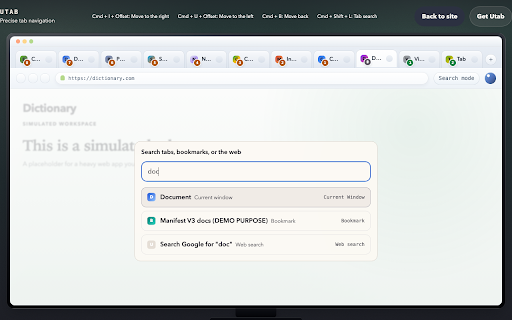
Switching between tabs gets tedious fast when you have dozens open. Utab fixes that by adding a numbered offset overlay to your tabs, letting you jump instantly using your keyboard. Utab also supports tab search with Google integration, so you can find tabs, bookmarks, and search the web from one place.

Each tab shows a small offset indicator. Just read the number or letter, type the shortcut, and you’re there — no mouse, no searching.

Mac command:
Cmd + i + offset: move to the right by offset amount.
Cmd + u + offset: move to the left by offset amount.
Cmd + b: move to the previous tab.
Cmd + Shift + L: tab search.

Windows command:
Alt + i + offset: move to the right by offset amount.
Alt + u + offset: move to the left by offset amount.
Alt + b: move to the previous tab.
Alt + Shift + L: tab search.

Example:
The desired tab to move to is 5 tabs to the right.
Mac: Cmd+i+5
Window: Alt+i+5

Simple, fast, and surprisingly fun — Utab turns tab switching into a quick, muscle-memory action so you can stay focused on what matters.

Try and activate on the official website:
- https://utab.dev
- May 13, 2026short_description
Boost your productivity by navigating between tabs faster and more efficient!

Switching between tabs becomes tedious when having…
Boost your productivity by navigating between tabs faster and more precisely.

Switching between tabs gets tedious fast when you…
- May 13, 2026permissions
tabs, scripting, favicon
tabs, scripting, favicon, storage, bookmarks, offscreen, identity, identity.email
Permissions & access
- Permissions
- tabsscriptingfaviconstoragebookmarksoffscreenidentityidentity.email
- Host access
- <all_urls>
Screenshots


About
Boost your productivity by navigating between tabs faster and more precisely.

Switching between tabs gets tedious fast when you have dozens open. Utab fixes that by adding a numbered offset overlay to your tabs, letting you jump instantly using your keyboard. Utab also supports tab search with Google integration, so you can find tabs, bookmarks, and search the web from one place.

Each tab shows a small offset indicator. Just read the number or letter, type the shortcut, and you’re there — no mouse, no searching.

Mac command:
Cmd + i + offset: move to the right by offset amount.
Cmd + u + offset: move to the left by offset amount.
Cmd + b: move to the previous tab.
Cmd + Shift + L: tab search.

Windows command:
Alt + i + offset: move to the right by offset amount.
Alt + u + offset: move to the left by offset amount.
Alt + b: move to the previous tab.
Alt + Shift + L: tab search.

Example:
The desired tab to move to is 5 tabs to the right.
Mac: Cmd+i+5
Window: Alt+i+5

Simple, fast, and surprisingly fun — Utab turns tab switching into a quick, muscle-memory action so you can stay focused on what matters.

Try and activate on the official website:
- https://utab.dev
Technical
- Version
- 2.3
- Manifest
- V3
- Size
- 37.87KiB
- Min Chrome
- 88
- Languages
- 1
- Featured
- No
Metadata
- ID
- elmfbjogdjhkghldpggooldhedaggbfg
- Developer ID
- ud6c817697aacb763538a89413273df92
- Developer Email
- [email protected]
- Created
- Jan 25, 2026
- Last Updated (Store)
- May 19, 2026
- Last Scraped
- Jun 7, 2026
- Website
- utab.dev
- Support URL
- https://utab.dev/support
- Privacy Policy
- https://utab.dev/privacy
Similar extensions
Alternatives to Utab, ranked by description similarity.

Tab Manager Plus
Spravuj otevřené záložky, přehledně je zobrazuj a jednoduše zavírej nebo přepínej mezi nimi.
10

Tab Swap
Swap Tabs: Effortlessly Navigate Back to Your Last Tab
80

uTabManager - Your tab manager
Easily view all open tabs and efficiently perform batch operations on multiple tabs.
185
★ 3.0

TabSwitch - Jump to Any Tab Instantly
2 keystrokes to any tab. Press hotkey, type letter, switch. Works with 100+ tabs. 100% local, zero data collection.
1

tiptaptab
A keyboard-first tab manager that helps you quickly navigate and manage your tabs
1
★ 5.0

Fuzzy Tab Switcher
Fast fuzzy search across all open tabs with Alt+K
14
★ 5.0

Tab Flick ✨ — switch your tabs fast, like on Windows or macOS
Inspired by the familiar Alt+Tab window switcher on Windows, Tab Flick brings the same fast, muscle-memory flow — triggered by…
1.0K
★ 5.0

Tab Return (Last Selected Tab)
Tab Return - Automatically switch to the last selected tab when closing a tab, Tab Flipping, Auto-select new tabs
78
Data sourced from the Chrome Web Store · last verified Jun 7, 2026.