
Quickview for Alibaba
Enable Quickview for Alibaba to search any products in Alibaba for fast interaction
As of May 2026, Quickview for Alibaba has 85 users and a 1.00/5 rating from 1 reviews in the Productivity category.
Usersup 7.6 percent+7.6%
85
85
Ratingno change0%
1.00
1 reviews
Reviewsno change0%
1
Version
1.0.4
Manifest V3
History
2 snapshotsTracking since Apr 1, 2026.
View as table
| Date | Users | Rating | Reviews | Version |
|---|---|---|---|---|
| Apr 1, 2026 | 79 | 1.00 | 1 | 1.0.4 |
| Apr 29, 2026 | 86 | 1.00 | 1 | 1.0.4 |
| Now | 85 | 1.00 | 1 | 1.0.4 |
Permissions & access
- Permissions
- notifications
- Host access
- None declared
Screenshots
About
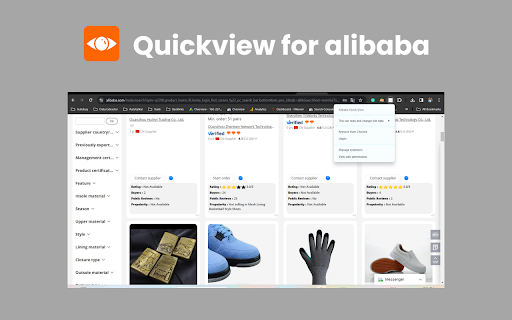
Boost your Alibaba sourcing with 1 click! Install the Alibaba Chrome extension for quick access to diverse products on Alibaba. Easily explore data on ratings, buyers, visibility, and reviews for efficient product research. 🛍️

Key features of Quickview for Alibaba chrome extension

Explore millions of Alibaba products in seconds right from within your browser. 🌐
Dig into ratings, trends in buyer behavior, visibility, and review scores to make smarter sourcing decisions. 📊
Eliminate the need to look through countless search pages and research product models. 💡
Maximize your profits through informed sourcing decisions. 💰
With just a click of the button, you can have access to powerful research tools anytime anywhere. 🖱️

How to use:

1.	Visit the Chrome Web Store. 🌐
2.	Search for "Quickview for Alibaba Chrome extension" in the search bar. 🔍
3.	Click on the extension in the search results and then click "Add to Chrome" to install it. 🛒
4.	After installation, the extension's icon should appear in your Chrome toolbar, typically near the address bar. 📌
5.	Click on the icon to activate the extension. 🚀
6.	Open the extension and connect your Alibaba.com account for full access. 🔗
7.	Select the preferred currency, language, and notification settings. Hover over any product image and see how magic happens! ✨
8.	The extension instantly displays key research data: Ratings, verified buyers’ feedback, product rank, and even reviews. 📊
9.	Compare like products side by side for a full analysis. Display data in spreadsheets for easy offline analysis. 📈
10.	Find out different alternatives and unique product options your competitors overlook. 👀
Technical
- Version
- 1.0.4
- Manifest
- V3
- Size
- 26.55KiB
- Min Chrome
- 88
- Languages
- 1
- Featured
- No
Metadata
- ID
- elbagpciheegocbkflmdckajdfdjbmjb
- Developer ID
- u84610b70af174d685dcedeec242c0a10
- Developer Email
- [email protected]
- Created
- Jan 21, 2024
- Last Updated (Store)
- Jul 8, 2024
- Last Scraped
- May 26, 2026
- Website
- —
- Support URL
- —
Similar extensions
Alternatives to Quickview for Alibaba, ranked by description similarity.

AliEx Search Suggestion Expander| Ecomstal
Expand the quantity of AliEx search suggestions displayed on the AliExpress search result page, use the extension.
113
★ 5.0

A-Wholesale Scraper: Export Products, Suppliers, Reviews & More
Alibaba Scraper: Extract Alibaba product details, supplier profiles & more. Export to CSV, JSON, XLSX effortlessly.
332
★ 4.0

AliExpress Reviews Scraper - Extract Reviews from AliExpress™️
Extract & export AliExpress product reviews to CSV/Excel/JSON. Get ratings, comments, images & buyer info with one click!
72

AliSave | Download AliExpress Images & Videos
Save Aliexpress Images & Videos. The most popular tool for AliExpress & Alibaba!
100.0K
★ 4.2

Alibaba To AliExpress Search By Image
Search any product from Alibaba to Aliexpress by image or Url.
39
★ 5.0

BetterAgent
Extension to enhance your online shopping experience by removing popups, displaying QCs, badges, and making navigation smoother.
18

AliExpress Data Extractor
AliExtract exports title, price, description and images to ZIP file. Perfect for price tracking and product analysis.
10

1688图片批量下载
在1688、淘宝、阿里巴巴、速卖通等电商网站上通过图片搜索同款。
975
★ 5.0
Data sourced from the Chrome Web Store · last verified May 26, 2026.