
SAML to AWS STS Keys Conversion
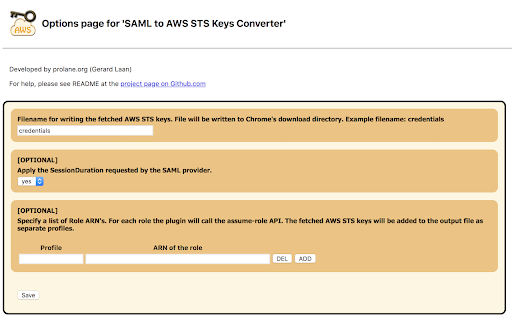
Generates file with AWS STS Keys after logging in to AWS webconsole using SSO (SAML 2.0). It leverages 'assumeRoleWithSAML' API.
As of May 2026, SAML to AWS STS Keys Conversion has 10,000 users and a 3.78/5 rating from 9 reviews in the Developer Tools category.
Usersno change0%
10.0K
10,000
Ratingno change0%
3.78
9 reviews
Reviewsno change0%
9
Version
3.3
Manifest V3
Permissions & access
- Permissions
- webRequeststoragedownloads
- Host access
- <all_urls>
Screenshots
About
Google Chrome Extension which converts a SAML 2.0 assertion to AWS STS Keys (temporary credentials -> AccessKeyId, SecretAccessKey and SessionToken).

### Why this Chrome Extension? ###
If you don't have any user administration setup within AWS Identity & Access Management (IAM) but instead rely on your corporate user directory, i.e. Microsoft Active Directory. Your company uses a SAML 2.0 Identity Provider (IDP) to log in to the AWS Web Management Console (Single Sign On). Then this Chrome Estension if for you!

You run into trouble as soon as you would like to execute some fancy scripts from your computer which calls the AWS API's. When sending a request to the AWS API's you need credentials, meaning an AccessKey and SecretKey. You can easily generate these keys for each user in AWS IAM. However, since you don't have any users in AWS IAM and don't want to create users just for the sake of having an AccessKey and SecretKey you are screwed. But there is a way to get temporary credentials specifically for your corporate identity.

The Security Token Service (STS) from AWS provides an API action assumeRoleWithSAML. Using the SAML Assertion given by your IDP the Chrome Extension will call this API action to fetch temporary credentials. (AccessKeyId, SecretAccessKey and SessionToken). This way there is no need to create some sort of anonymous user in AWS IAM used for executing scripts. This would be a real security nightmare, since it won't be possible to audit who did what. This Chrome Extension however will make it super easy for you to just use your corporate identity for executing scripts calling AWS API's.
Technical
- Version
- 3.3
- Manifest
- V3
- Size
- 157KiB
- Min Chrome
- 88
- Languages
- 1
- Featured
- No
Metadata
- ID
- ekniobabpcnfjgfbphhcolcinmnbehde
- Developer ID
- ua3db8e17a15c8970c973573ae783daf3
- Developer Email
- [email protected]
- Created
- Apr 3, 2016
- Last Updated (Store)
- Mar 20, 2023
- Last Scraped
- May 26, 2026
- Website
- —
- Support URL
- —
- Privacy Policy
- —
Similar extensions
Alternatives to SAML to AWS STS Keys Conversion, ranked by description similarity.

AWS SAML to STS
Captures AWS SAML sign-ins and turns them into temporary STS credentials for the AWS CLI and SDKs.
101

AWS Identity Center Credential Manager
Quickly refresh your local AWS CLI credentials from IAM Identity Center (SSO) with one click.
66
★ 3.0

Granted
manifest.json description
1.0K
★ 5.0

Extension for AWS IAM Identity Center (AWS SSO)
This extension is for AWS IAM Identity Center, formerly known as AWS Single Sign-On (AWS SSO).
61

CloudConnector(D)
AWS SSO SAML Connection's Credential Helper
102
★ 5.0

Extension for AWS SSO
This extension is for AWS Single Sign-On (AWS SSO).
1.0K
★ 4.8

SatisVAULT
Manage Azure Key Vault and AWS secrets in 1 click. No more portal switching. Free to start.
2
★ 5.0

CloudKeeper - Credential Helper
AWS SSO External AWS Account - STS Keys Generator
1.0K
★ 5.0
Data sourced from the Chrome Web Store · last verified May 26, 2026.