
SafeStream Pro
A local AI content filter for family-friendly viewing. Detects and skips sensitive scenes on-device.
As of June 2026, SafeStream Pro has 2 users in the Productivity category.
Usersup 100.0 percent+100.0%
2
2
Ratingno change0%
—
— reviews
Reviewsno change0%
—
Version
2.0.1
Manifest V3
History
9 snapshotsTracking since Apr 1, 2026.
View as table
| Date | Users | Rating | Reviews | Version |
|---|---|---|---|---|
| Apr 1, 2026 | 1 | — | — | 2.0.1 |
| Apr 17, 2026 | 1 | — | — | 2.0.1 |
| Apr 22, 2026 | — | — | — | 2.0.1 |
| Apr 27, 2026 | 1 | — | — | 2.0.1 |
| May 5, 2026 | 1 | — | — | 2.0.1 |
| May 10, 2026 | — | — | — | 2.0.1 |
| May 16, 2026 | 1 | — | — | 2.0.1 |
| May 22, 2026 | 2 | — | — | 2.0.1 |
| May 28, 2026 | — | — | — | 2.0.1 |
| Now | 2 | — | — | 2.0.1 |
Permissions & access
- Permissions
- storage
- Host access
- None declared
Screenshots

About
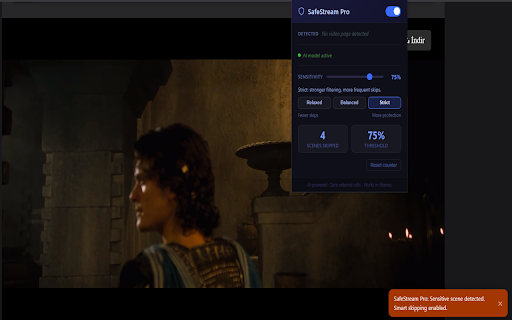
SafeStream Pro uses on-device AI to detect sensitive scenes and auto-skip them for a safer, family-friendly viewing experience.

Detailed description:
SafeStream Pro helps you watch online videos with more peace of mind.

The extension uses local AI detection to identify sensitive visual content and automatically skip ahead. It is designed for families, shared devices, and users who want stronger control over what appears on screen.

Key features:

On-device AI filtering: analysis runs locally in your browser
Smart auto-skip: skips sensitive scenes automatically
Adjustable sensitivity: choose Relaxed, Balanced, or Strict filtering
Real-time status: see model status, detected title, and skipped scene count
Works in embedded players: compatible with iframe-based video pages
Lightweight control panel: simple one-click enable/disable and quick reset
Why users like it:

Easy to use
No complicated setup
Clear controls with understandable sensitivity guidance
Family-friendly viewing with fewer surprises
Privacy:

SafeStream Pro processes video frames locally on your device
No external API calls are required for content detection
No unnecessary permissions requested
Suggested “What’s New” text (for your next update):

Improved sensitivity controls with clear explanations
Added one-click presets (Relaxed / Balanced / Strict)
Faster and smoother detection performance
Better model status reliability and error handling
Technical
- Version
- 2.0.1
- Manifest
- V3
- Size
- 3.3MiB
- Min Chrome
- 88
- Languages
- 1
- Featured
- No
Metadata
- ID
- ekimnmphikjenlbdjaheopilcjolgmea
- Developer ID
- u9bb7f96eb4a8636c38c810b007acbb4f
- Developer Email
- [email protected]
- Created
- Mar 24, 2026
- Last Updated (Store)
- Jun 4, 2026
- Last Scraped
- Jun 10, 2026
- Website
- —
- Support URL
- —
- Privacy Policy
- —
Data sourced from the Chrome Web Store · last verified Jun 10, 2026.