
GetMeKey
Your Ultimate Password Assistant
As of May 2026, GetMeKey has 5 users and a 5.00/5 rating from 1 reviews in the Privacy & Security category.
Usersno change0%
5
5
Ratingno change0%
5.00
1 reviews
Reviewsno change0%
1
Version
1.0.4
Manifest V3
History
2 snapshotsTracking since Apr 1, 2026.
View as table
| Date | Users | Rating | Reviews | Version |
|---|---|---|---|---|
| Apr 1, 2026 | — | 5.00 | 1 | 1.0.4 |
| Apr 29, 2026 | 6 | 5.00 | 1 | 1.0.4 |
| Now | 5 | 5.00 | 1 | 1.0.4 |
Permissions & access
- Permissions
- clipboardWriteclipboardReadactiveTab
- Host access
- None declared
Screenshots


About
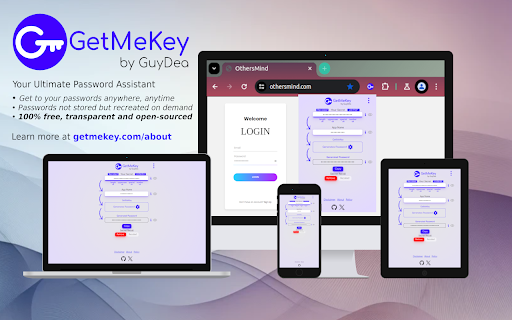
GetMeKey allows you to have unbreakable passwords, unique to each application, without relying on any files, clouds or managers.

You just need to come up with your one-and-only secret passphrase, which is the last password you will ever have to remember, and specify what application you want to recreate a password for.

Cryptographic hash function is applied to combination of your secret and an app name, creating randomly looking password, that cannot be tracked back to reveal your original secret.

This unique approach makes GetMeKey:

=== Secure ===
Passwords generated by GetMeKey are long pseudo-random texts, which cannot be tracked back to your original secret, offering best protection against all forms of hacking-attacks. Additionally, all operations are performed on your device without any external communication, ensuring privacy and security.

=== Simple ===
You really just to need to remember your single secret passphrase (optionally hashing algorithm if you choose not to use the default), to get to any of your passwords. You can also take advantage of Recall, Remember or App Name Prefill functionalities, to recreate your passwords with one-click.

=== Accessible ===
GetMeKey runs in any browser and there is no backend infrastructure - everything is done directly in the browser. As long as you have any browser at hand, you can get to any of your passwords - even offline.

=== Transparent ===
GetMeKey is build and served with clear, formatted source code - anyone can review what it does in realtime. GetMeKey is also open-source, so whole development history is publicly available.

=== Free ===
Whole idea of the GetMeKey is to provide user-friendly way how to run lightweight cryptographic hashing algorithm directly on your device. This means GetMeKey doesn't need any heavy infrastructure to be maintained - no expenses, no reason to monetize.
Technical
- Version
- 1.0.4
- Manifest
- V3
- Size
- 3.63MiB
- Min Chrome
- 88
- Languages
- 1
- Featured
- No
Metadata
- ID
- ekgpdkjhglljcjfcedpjfahihdcpgicp
- Developer ID
- ud7723a08802a1b2a1afe558d6f72eab1
- Developer Email
- [email protected]
- Created
- May 25, 2024
- Last Updated (Store)
- Jul 17, 2024
- Last Scraped
- May 26, 2026
- Website
- —
- Support URL
- —
- Privacy Policy
- https://getmekey.com/policy
Similar extensions
Alternatives to GetMeKey, ranked by description similarity.

HashKey - Password Manager
Secure password manager with end-to-end encryption. Store, generate, and autofill passwords safely.
5

Mind Vault - Stateless Password Generator
Generate unbreakable SHA-256 passwords without storage. No cloud, no DB. You control your keys. Your mind is your fortress.
7

MindYourPass – Password Manager
MindYourPass makes authentication safe and easy.
4.0K
★ 4.6

Kryon - Password Generator Offline and Local Encryption
Stateless, secure password generator.
5

Password Generator
Generate strong random passwords locally in Chrome with custom length, symbols, numbers, copy, and instant strength feedback.
72

Password Pcrypt
Handle your username and password credentials for all web pages.
199
★ 5.0

Memorable Passwords
Generate memorable, secure passwords from real words. Easy to remember, hard to crack.
2

CipherKeep
Offline-first secure password manager
1
Data sourced from the Chrome Web Store · last verified May 26, 2026.