Aliexpress Cart Exporter
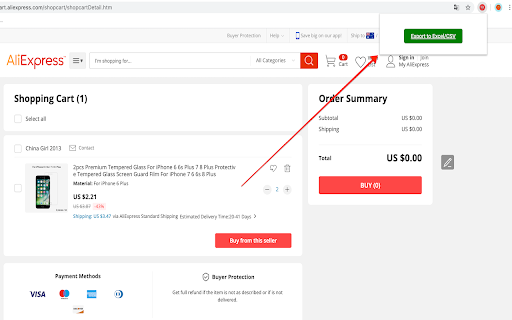
This extension exports Aliexpress cart products title, URL, Quantity and other attributes into Excel/CSV file
As of May 2026, Aliexpress Cart Exporter has 479 users and a 4.42/5 rating from 26 reviews in the Shopping category.
Usersup 4.1 percent+4.1%
479
479
Ratingno change0%
4.42
26 reviews
Reviewsno change0%
26
Version
1.7.4
Manifest V3
History
5 snapshotsTracking since Apr 1, 2026.
View as table
| Date | Users | Rating | Reviews | Version |
|---|---|---|---|---|
| Apr 1, 2026 | 460 | 4.42 | 26 | 1.7.4 |
| Apr 20, 2026 | 466 | 4.42 | 26 | 1.7.4 |
| May 5, 2026 | 493 | 4.42 | 26 | 1.7.4 |
| May 16, 2026 | 474 | 4.42 | 26 | 1.7.4 |
| May 30, 2026 | 483 | 4.42 | 26 | 1.7.4 |
| Now | 479 | 4.42 | 26 | 1.7.4 |
Permissions & access
- Permissions
- activeTabscripting
- Host access
- None declared
Screenshots

About
Uses:
1- Share the links of items you want to buy with anyone, where they can buy on your behalf; an awesome solution for those who are working with buying agents in China, dropshipping,  online shopping services, proxy buying services, online personal shoppers, etc.
2- Share your Aliexpress items with sourcing agents in China to find similar items on Taobao, 1688, or other Chinese wholesale websites.
3- Collaborate with your family or team members about what items you need to buy.
4- Save the cart information on your local computer to buy them in the future.
And many others!

The extension exports the file into CSV format, which is similar to the Excel format. If you want to convert the CSV into Excel, you can simply use Microsoft Office Excel to open the CSV file, then click on “save as” and choose the Excel file format you want (likely XLS or XLSX).

This extension is FREE to use for everyone forever. The extension runs 100% on your browser/computer. All data are stored on your computer ONLY. We have no access to any data whatsoever.

Please feel free to share your thoughts by leaving a review or simply emailing us. We would appreciate your rating and feedback to help us to improve our extension further. All reviews, from 1 to 5 stars, are welcome!

NOTE:  If you have many items in your cart, you must scroll down to the bottom until the end so that all the items in your cart shows up.  Then you can now click "Export to Excel/CSV" button.

Update v1.2:  Added column for total item cost.
Update v1.4:  Minor fix of blank popups showing.
Update v1.5: Separated shipping cost and shipping method.
Update v1.7.2: Fix Aliexpress cart page.
Update v1.7.3: Fix on missing button on popup
Update v1.7.4: Fix export items on cart page.

* We are NOT affiliated with Aliexpress. This extension is independently developed to easily export Aliexpress cart data.
Technical
- Version
- 1.7.4
- Manifest
- V3
- Size
- 83.36KiB
- Min Chrome
- 88
- Languages
- 1
- Featured
- Yes
Metadata
- ID
- ekennconjgaijhpnjlcfiodigjaaeadd
- Developer ID
- u88480b31578123e07f57e6db0c2a28ef
- Developer Email
- [email protected]
- Created
- Jun 8, 2020
- Last Updated (Store)
- Jul 24, 2025
- Last Scraped
- May 30, 2026
- Website
- —
- Support URL
- —
Similar extensions
Alternatives to Aliexpress Cart Exporter, ranked by description similarity.
Amazon cart exporter
This extension exports amazon.com cart products Title, URL, Quantity, Price and other attributes into Excel/CSV file
4.0K
★ 4.8

Ali Cart Export: Export your AliExpress cart to CSV
Export your AliExpress cart to a CSV spreadsheet, including the title, SKU, price, quantity and URL of all your cart items.
316
★ 4.5
Ebay Cart Exporter
This extension exports ebay.com cart products link, title, status, quantity and other attributes into Excel/CSV file
89
★ 5.0

AMZ Cart Export: Export your Amazon cart to CSV
Export your Amazon cart to a CSV spreadsheet, including their title, ASIN, price, quantity and URL of all your cart items.
1.0K
★ 4.6

Cart Exporter | Download your shopping cart as a CSV spreadsheet.
Export your shopping cart to a CSV spreadsheet. Supports Amazon, AliExpress and eBay.
430
★ 3.7

AiPrice(AliPrice) Search by Image for AE Beta
AiPrice Search by Image allows you to easily find the source goods on e-commerce websites.
6.0K
★ 5.0

Aliexpress search by image
Search by image on Aliexpress, Taobao, Alibaba,1688, etc.
67
★ 5.0

AliExpress Shopper Inventory
Easily collect and export your AliExpress orders to local .csv, .json, or .html files, or to Google Sheets via the clipboard.
1.0K
★ 4.9
Data sourced from the Chrome Web Store · last verified May 30, 2026.