
BitShell - Binary, Hex & Base64 Converter
Binary, hex, decimal, text, Base64 & IP converter with IPv4/IPv6/CIDR support, smart format detection, history, and one-click copy.
As of June 2026, BitShell - Binary, Hex & Base64 Converter has 40 users and a 5.00/5 rating from 6 reviews in the Developer Tools category.
Usersup 100.0 percent+100.0%
40
40
Ratingno change0%
5.00
6 reviews
Reviewsno change0%
6
Version
1.0.7
Manifest V3
90-day change · In the last 90 days this extension 1 version update.
History
12 snapshotsTracking since Apr 1, 2026.
View as table
| Date | Users | Rating | Reviews | Version |
|---|---|---|---|---|
| Apr 1, 2026 | 20 | 5.00 | 6 | 1.0.6 |
| Apr 19, 2026 | 21 | 5.00 | 6 | 1.0.6 |
| Apr 24, 2026 | 24 | 5.00 | 6 | 1.0.6 |
| Apr 29, 2026 | 23 | 5.00 | 6 | 1.0.6 |
| May 4, 2026 | 26 | 5.00 | 6 | 1.0.6 |
| May 9, 2026 | 29 | 5.00 | 6 | 1.0.6 |
| May 12, 2026 | 33 | 5.00 | 6 | 1.0.6 |
| May 16, 2026 | 33 | 5.00 | 6 | 1.0.7 |
| May 21, 2026 | 40 | 5.00 | 6 | 1.0.7 |
| May 25, 2026 | 39 | 5.00 | 6 | 1.0.7 |
| Jun 8, 2026 | 40 | 5.00 | 6 | 1.0.7 |
| Jun 14, 2026 | 39 | 5.00 | 6 | 1.0.7 |
| Now | 40 | 5.00 | 6 | 1.0.7 |
Changelog
- May 12, 2026description
BitShell is a fast, fully offline conversion tool for developers,
security researchers, students, and system administrators who work with
encodings and number systems daily. No websites. No tracking. No data
ever leaves your machine.

Key Features

Universal Conversion
- Binary (0b)
- Hexadecimal (0x)
- Decimal (ints and floats)
- UTF-8 text
- Base64 encode/decode
- IPv4 and IPv6 support
- IPv4 subnet / CIDR calculator

Smart Detection
- Auto-detects IPv4 and IPv6 addresses
- Auto-detects CIDR notation (e.g. 14.12.72.8/24) and switches to subnet mode
- Real-time validation
- Helpful error suggestions
- Character and byte counters

Blazing Fast and Private
- Instant conversions as you type
- Handles up to 100,000 characters
- No server calls — 100% offline
- No tracking, analytics, or data collection

Copy and History Tools
- One-click copy for any format
- Copy all formats at once
- Visual copy confirmation
- History of your last 50 conversions, including subnet calculations

Customizable Settings
- Adjustable font size
- Binary grouping (4/8/16 bits)
- Hex grouping (1–4 bytes)
- Prefix toggles (0b, 0x)
- Upper/lowercase hex
- Leading-zero control

Keyboard Shortcuts
- Ctrl/Cmd + K — Clear input
- Ctrl/Cmd + Enter — Copy all
- Ctrl/Cmd + H — Toggle history
- Ctrl/Cmd + , — Settings
- Escape — Close sidebars

Terminal-Inspired UI
- Clean, distraction-free layout
- Solarized dark theme
- Smooth transitions and professional monospace fonts

Perfect For
- Developers
- Security researchers
- Students learning binary, hex, and networking
- Sysadmins and network engineers
- Reverse engineers and protocol analysts

Common Use Cases
- Calculate subnet ranges, host counts, and network addresses from CIDR notation
- Convert IP addresses between formats
- Decode Base64 strings
- Convert hex color codes
- Analyze packet capture data
- Switch between number bases for coding
- Encode/decode text for web development

Recent Updates (v1.0.6)
- New: IPv4 subnet / CIDR calculator — type any CIDR address (e.g. 200.107.16.17/18) to instantly see IP in binary, subnet mask, network address, broadcast address, first/last host, address count, and max hosts
- CIDR is auto-detected as you type — no extra tab or button needed
- CIDR results fully supported in copy, copy all, and history
- Fixed hex prefix display for multi-byte binary and decimal inputs
- Fixed leading zeros on space-separated decimal-to-binary conversion
- Improved bit and byte counter accuracy for decimal and fractional binary inputs
- Fixed decimal float text conversion to show clear error instead of silent output
- Code cleanup and performance improvements
- Added a pop-out button for a resizable window

Technical Details
- Works fully offline
- Uses Chrome Storage API
- Context-menu integration
- Supports arbitrarily large integers via BigInt
- UTF-8 text support
- Robust error handling

Why BitShell?
Most online converters require internet access and track your data. BitShell is different:
- Offline anywhere
- Zero data collection
- Instant performance
- Professional-grade tools
- Clean, focused interface

Support and Feedback
Found a bug or want a new feature? Reach out through the support link. BitShell improves with your feedback.

Privacy
BitShell does not collect personal data, track usage, send data to servers, or use analytics.
All settings and history stay on your device only.
BitShell is a fast, fully offline conversion tool for developers,
security researchers, students, and system administrators who work with
encodings and number systems daily. No websites. No tracking. No data
ever leaves your machine.

Key Features

Universal Conversion
- Binary (0b)
- Hexadecimal (0x)
- Decimal (ints and floats)
- UTF-8 text
- Base64 encode/decode
- IPv4 and IPv6 support
- IPv4 subnet / CIDR calculator

Smart Detection
- Auto-detects IPv4 and IPv6 addresses and switches to IP mode
- Auto-detects CIDR notation (e.g. 14.12.72.8/24) and switches to subnet mode
- Real-time validation with helpful error messages and format suggestions
- Character and byte counters

Blazing Fast and Private
- Instant conversions as you type
- Handles up to 100,000 characters
- No server calls — 100% offline
- No tracking, analytics, or data collection
Copy and History Tools
- One-click copy for any format
- Copy all formats at once
- Visual copy confirmation
- History of your last 50 conversions, including subnet calculations

Customizable Settings
- Adjustable font size
- Binary grouping (4/8/16 bits)
- Hex grouping (1–4 bytes)
- Prefix toggles (0b, 0x)
- Upper/lowercase hex
- Leading-zero control

Keyboard Shortcuts
- Ctrl/Cmd + K — Clear input
- Ctrl/Cmd + Enter — Copy all
- Ctrl/Cmd + H — Toggle history
- Ctrl/Cmd + , — Settings
- Escape — Close sidebars
Terminal-Inspired UI
- Clean, distraction-free layout
- Solarized dark theme
- Smooth transitions and professional monospace fonts

Perfect For
- Developers
- Security researchers
- Students learning binary, hex, and networking
- Sysadmins and network engineers
- Reverse engineers and protocol analysts

Common Use Cases
- Calculate subnet ranges, host counts, and network addresses from CIDR notation
- Convert IP addresses between binary, hex, and decimal formats
- Decode Base64 strings
- Convert hex color codes
- Analyze packet capture data
- Switch between number bases for coding
- Encode/decode text for web development

Recent Updates (v1.0.7)
- New: Dedicated IP tab for IPv4, IPv6, and CIDR — select IP mode directly or let auto-detection switch to it as you type
- Auto-detection now switches to the IP tab when an IPv4, IPv6, or CIDR address is entered from any other tab
- Invalid IP input shows a clear error with format suggestions, matching the behavior of all other input types
- CIDR auto-detection now also activates the IP tab correctly
- Version bump and description update to reflect IP conversion support

Previous Updates (v1.0.6)
- New: IPv4 subnet / CIDR calculator — type any CIDR address (e.g. 200.107.16.17/18) to instantly see IP in binary, subnet mask, network address, broadcast address, first/last host, address count, and max hosts
- CIDR is auto-detected as you type — no extra tab or button needed
- CIDR results fully supported in copy, copy all, and history
- Fixed hex prefix display for multi-byte binary and decimal inputs
- Fixed leading zeros on space-separated decimal-to-binary conversion
- Improved bit and byte counter accuracy for decimal and fractional binary inputs
- Fixed decimal float text conversion to show clear error instead of silent output
- Code cleanup and performance improvements
- Added a pop-out button for a resizable window

Technical Details
- Works fully offline
- Uses Chrome Storage API
- Context-menu integration
- Supports arbitrarily large integers via BigInt
- UTF-8 text support
- Robust error handling

Why BitShell?
Most online converters require internet access and track your data. BitShell is different:
- Offline anywhere
- Zero data collection
- Instant performance
- Professional-grade tools
- Clean, focused interface

Support and Feedback
Found a bug or want a new feature? Reach out through the support link. BitShell improves with your feedback.

Privacy
BitShell does not collect personal data, track usage, send data to servers, or use analytics.
All settings and history stay on your device only.
- May 12, 2026short_description
Fast binary, hex, decimal, text & Base64 converter with smart format detection, history, and one-click copy.
Binary, hex, decimal, text, Base64 & IP converter with IPv4/IPv6/CIDR support, smart format detection, history, and one-click copy.
Permissions & access
- Permissions
- contextMenusstorageclipboardWrite
- Host access
- None declared
Screenshots


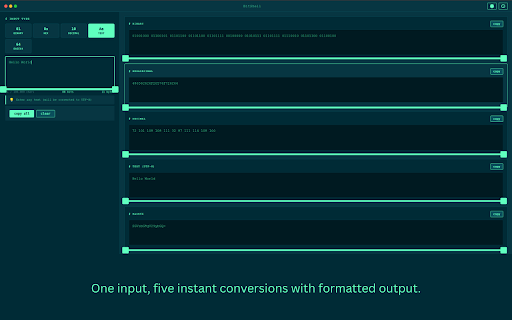


About
BitShell is a fast, fully offline conversion tool for developers,
security researchers, students, and system administrators who work with
encodings and number systems daily. No websites. No tracking. No data
ever leaves your machine.

Key Features

Universal Conversion
- Binary (0b)
- Hexadecimal (0x)
- Decimal (ints and floats)
- UTF-8 text
- Base64 encode/decode
- IPv4 and IPv6 support
- IPv4 subnet / CIDR calculator

Smart Detection
- Auto-detects IPv4 and IPv6 addresses and switches to IP mode
- Auto-detects CIDR notation (e.g. 14.12.72.8/24) and switches to subnet mode
- Real-time validation with helpful error messages and format suggestions
- Character and byte counters

Blazing Fast and Private
- Instant conversions as you type
- Handles up to 100,000 characters
- No server calls — 100% offline
- No tracking, analytics, or data collection
Copy and History Tools
- One-click copy for any format
- Copy all formats at once
- Visual copy confirmation
- History of your last 50 conversions, including subnet calculations

Customizable Settings
- Adjustable font size
- Binary grouping (4/8/16 bits)
- Hex grouping (1–4 bytes)
- Prefix toggles (0b, 0x)
- Upper/lowercase hex
- Leading-zero control

Keyboard Shortcuts
- Ctrl/Cmd + K — Clear input
- Ctrl/Cmd + Enter — Copy all
- Ctrl/Cmd + H — Toggle history
- Ctrl/Cmd + , — Settings
- Escape — Close sidebars
Terminal-Inspired UI
- Clean, distraction-free layout
- Solarized dark theme
- Smooth transitions and professional monospace fonts

Perfect For
- Developers
- Security researchers
- Students learning binary, hex, and networking
- Sysadmins and network engineers
- Reverse engineers and protocol analysts

Common Use Cases
- Calculate subnet ranges, host counts, and network addresses from CIDR notation
- Convert IP addresses between binary, hex, and decimal formats
- Decode Base64 strings
- Convert hex color codes
- Analyze packet capture data
- Switch between number bases for coding
- Encode/decode text for web development

Recent Updates (v1.0.7)
- New: Dedicated IP tab for IPv4, IPv6, and CIDR — select IP mode directly or let auto-detection switch to it as you type
- Auto-detection now switches to the IP tab when an IPv4, IPv6, or CIDR address is entered from any other tab
- Invalid IP input shows a clear error with format suggestions, matching the behavior of all other input types
- CIDR auto-detection now also activates the IP tab correctly
- Version bump and description update to reflect IP conversion support

Previous Updates (v1.0.6)
- New: IPv4 subnet / CIDR calculator — type any CIDR address (e.g. 200.107.16.17/18) to instantly see IP in binary, subnet mask, network address, broadcast address, first/last host, address count, and max hosts
- CIDR is auto-detected as you type — no extra tab or button needed
- CIDR results fully supported in copy, copy all, and history
- Fixed hex prefix display for multi-byte binary and decimal inputs
- Fixed leading zeros on space-separated decimal-to-binary conversion
- Improved bit and byte counter accuracy for decimal and fractional binary inputs
- Fixed decimal float text conversion to show clear error instead of silent output
- Code cleanup and performance improvements
- Added a pop-out button for a resizable window

Technical Details
- Works fully offline
- Uses Chrome Storage API
- Context-menu integration
- Supports arbitrarily large integers via BigInt
- UTF-8 text support
- Robust error handling

Why BitShell?
Most online converters require internet access and track your data. BitShell is different:
- Offline anywhere
- Zero data collection
- Instant performance
- Professional-grade tools
- Clean, focused interface

Support and Feedback
Found a bug or want a new feature? Reach out through the support link. BitShell improves with your feedback.

Privacy
BitShell does not collect personal data, track usage, send data to servers, or use analytics.
All settings and history stay on your device only.
Technical
- Version
- 1.0.7
- Manifest
- V3
- Size
- 43.22KiB
- Min Chrome
- 88
- Languages
- 1
- Featured
- Yes
Metadata
- ID
- ekccllhkobdjemdinnbdopagcdjglohf
- Developer ID
- u196ebe3dc77e3e78cb4559ba19f5bba0
- Developer Email
- [email protected]
- Created
- Feb 9, 2026
- Last Updated (Store)
- May 10, 2026
- Last Scraped
- Jun 14, 2026
- Support URL
- https://bitshell.netlify.app/
- Privacy Policy
- https://bitshell.netlify.app/privacy-policy
Similar extensions
Alternatives to BitShell - Binary, Hex & Base64 Converter, ranked by description similarity.

Base64 Image Converter
Convert images to Base64 strings and Base64 to images with a professional interface.
6

Base64 - Encoder & Decoder
Quickly encode or decode Base64 text with proper UTF-8 support — fully offline and local.
4

Base64ly
Instant Base64 encode/decode with zero friction. Auto-detects and converts clipboard content.
12

Base64 Buddy
Encode or decode selected text to/from Base64
17

Binary Code Translator
For seamless binary coded decimal translations. Ease bitstream data complexity with this bin to text extension.
316
★ 4.5

Base64 Buddy
Encode/Decode files in Base64
26
★ 5.0

NexusLabs DevKit — 8+ Developer Tools
8 essential developer utilities in one popup — format, encode, decode, hash, and validate without leaving your tab. Fully offline.
1

Hex Calculator
A simple hexadecimal calculator for addition, subtraction, multiplication, and division (with remainder).
4
Data sourced from the Chrome Web Store · last verified Jun 14, 2026.