
Profile Picture Creator
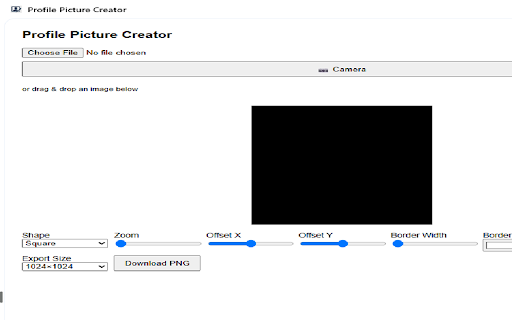
Create custom profile pictures with shapes, borders and colors.
As of May 2026, Profile Picture Creator has 49 users in the Social & Communication category.
Usersup 11.4 percent+11.4%
49
49
Ratingno change0%
—
— reviews
Reviewsno change0%
—
Version
1.0.6
Manifest V3
History
4 snapshotsTracking since Apr 1, 2026.
View as table
| Date | Users | Rating | Reviews | Version |
|---|---|---|---|---|
| Apr 1, 2026 | 44 | — | — | 1.0.6 |
| Apr 20, 2026 | 61 | — | — | 1.0.6 |
| May 5, 2026 | 57 | — | — | 1.0.6 |
| May 16, 2026 | 59 | — | — | 1.0.6 |
| Now | 49 | — | — | 1.0.6 |
Permissions & access
- Permissions
- storagesidePanel
- Host access
- None declared
Screenshots
About
Create a profile picture instantly in your browser now.

All the data processing is done directly on your computer, you can either use a photo of yourself or use your web camera to take a photo of yourself.

A profile photo is your handshake in the online world. Whether you are networking on LinkedIn, streaming on Twitch, or commenting in a Slack workspace, that small circular thumbnail sets the tone before a single word is exchanged. A profile-picture-maker extension—an always-ready mini design studio that lives in your browser—streamlines the process of crafting, testing, and updating these images. Below are the core benefits that make such an extension more than a vanity app and firmly position it as a productivity enhancer, personal-branding ally, and privacy safeguard.

Friction-Free Creation Right Where You Work Opening Photoshop or a web-based editor for a quick avatar tweak often feels like swatting a fly with a sledgehammer: slow launch times, steep learning curves, and scattered files. A browser extension lives one click away on any page—social network, learning platform, or company intranet. Inline drag-and-drop lets you import a selfie or logo and instantly apply presets without leaving the tab, reducing workflow interruptions and the classic “I’ll fix that later” procrastination.

Professional-Looking Results Without Design Skills Good profile pictures follow consistent design rules: balanced cropping, clear focal point, adequate contrast, and a tidy color palette. Extensions bake those rules into smart templates—rounded masks, overlay grids. A slider-based interface democratizes design decisions that used to require hours of YouTube tutorials. The result: crisp, on-brand images

Consistent Cross-Platform Branding Inconsistent visuals confuse audiences and dilute trust. Quality extensions store custom templates synced to the cloud—background color, border width, watermark placement—so every new avatar matches your existing aesthetic. Update one parameter (e.g., swap a holiday-themed background for a neutral gradient), and export platform-specific sizes—400 × 400 px for Twitter, 98 × 98 px for Microsoft Teams, 128 × 128 px for GitHub—in a single batch. This keeps your brand cohesive without a spreadsheet of dimension guidelines.

Real-Time Previews and A/B Testing What looks perfect at full resolution can turn illegible when shrunk to 32 pixels. Extensions overlay live previews for popular platforms inside the editor panel, revealing whether text remains readable or whether your company logo becomes a colored blob. Many also offer one-click multivariant exports so you can set different profile shots for professional networks, gaming sites, and messaging apps, then track which variant garners more engagement.

Privacy and Security Enhancements - Uploading personal photos to random online converters risks data leakage. A reputable extension processes images locally in the browser sandbox or through encrypted on-device AI models, meaning pictures never leave your computer unless you explicitly save them to the cloud.
Technical
- Version
- 1.0.6
- Manifest
- V3
- Size
- 84.55KiB
- Min Chrome
- 88
- Languages
- 41
- Featured
- No
Metadata
- ID
- ekbljjemgdbkfpmhemfcjjcoomidklni
- Developer ID
- u560c068e654062145fcfd2d87576449b
- Developer Email
- [email protected]
- Created
- May 15, 2025
- Last Updated (Store)
- May 15, 2025
- Last Scraped
- May 16, 2026
- Website
- —
- Support URL
- —
- Privacy Policy
- https://profile-picture-maker.pdfwork.com/privacy-policy
Similar extensions
Alternatives to Profile Picture Creator, ranked by description similarity.

LinkAssist - LinkedIn AI Assistant
AI-powered LinkedIn comment suggestions and advanced analytics. Boost engagement effortlessly. Requires LinkAssist account.
68
★ 5.0

TypeSm.art - Auto Cross-Post Tweets to Bluesky & LinkedIn
Seamlessly auto-post your tweets to LinkedIn and Bluesky - save time, grow faster.
74
★ 5.0

QuickReply
AI-powered QuickReply assistant for Social Media
10

Social Media Screenshot
Capture screenshots with the right aspect ratio for different social media platforms
33
★ 3.0

Brandalyze - Best Social Media Brand Analysis Tool
Real-time brand analysis for social media content. Analyse posts/profiles for brand alignment while browsing social media.
20

Facebook Profile Customizer - Themes & Fonts
Transform Facebook with custom themes, fonts & effects. Dark mode, neon effects, unique fonts & more. Ad-free personalization!
55

AI Viral Studio - AI Image & Video Editor & Social Media Helper
AI-Powered Meme Creation and Social Media Sharing
120
★ 5.0

Thumbnail AI - YouTube Studio
Generate AI thumbnails directly in YouTube Studio with one click
—
Data sourced from the Chrome Web Store · last verified May 16, 2026.