
Open Multiple Links and URLs
Easily open multiple URLs in new tabs or extract links from any text.
As of May 2026, Open Multiple Links and URLs has 123 users and a 5.00/5 rating from 2 reviews in the Productivity category.
Usersdown 2.4 percent−2.4%
123
123
Ratingno change0%
5.00
2 reviews
Reviewsno change0%
2
Version
1.1.0
Manifest V3
History
2 snapshotsTracking since Apr 26, 2026.
View as table
| Date | Users | Rating | Reviews | Version |
|---|---|---|---|---|
| Apr 26, 2026 | 126 | 5.00 | 2 | 1.1.0 |
| May 24, 2026 | 132 | 5.00 | 2 | 1.1.0 |
| Now | 123 | 5.00 | 2 | 1.1.0 |
Permissions & access
- Permissions
- storagecontextMenusscriptingactiveTab
- Host access
- None declared
Screenshots

About
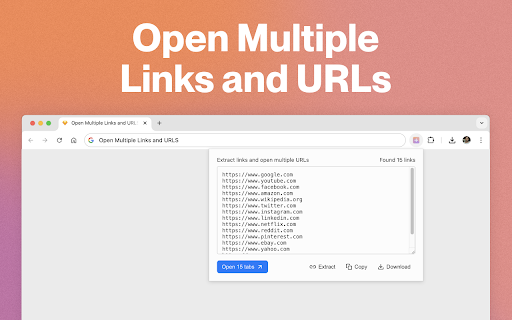
Open multiple URLs at once with a single click!

Whether you have a document, a list of URLs, or just some text with links, our simple tool will open all the URLs in new tabs for you. Unlike other similar extensions, this tool supports both plain-text and HTML formats of the input text.

How to Use the Multiple Links and URLs Opener:

Using the Toolbar Button (supports plain text):
Just click the toolbar button, paste your text, and then click "Open" or "Copy" to get started!

Using the Context Menu (supports both plain text and HTML):
Highlight any text on a website (plain text or HTML), right-click, and select either "Copy" to extract and copy the links to clipboard or select "Open" to launch all the links in new tabs.

Enjoy effortless browsing!
Technical
- Version
- 1.1.0
- Manifest
- V3
- Size
- 499KiB
- Min Chrome
- 88
- Languages
- 1
- Featured
- No
Metadata
- ID
- ejanmgojkmffppibepldopdjopcdoddj
- Developer ID
- ua6308e9d4dc17c1880fbe77d9f018656
- Developer Email
- [email protected]
- Created
- Dec 17, 2024
- Last Updated (Store)
- Dec 17, 2024
- Last Scraped
- May 24, 2026
- Website
- —
- Support URL
- —
- Privacy Policy
- —
Similar extensions
Alternatives to Open Multiple Links and URLs, ranked by description similarity.

Bulk URL Opener
Open multiple URLs in batch with ease
11
★ 5.0

Bulk/Multiple URL Opener in 1 CLICK
Open multiple URLs at once with advanced options
133
★ 5.0

Bulk Link Opener
Open multiple links in new tabs or windows with one click.
41

Open Multi URLs
Open multiple URLs at once. Paste URLs (one per line), set delay & target, then launch.
7

Bulk Link Opener
Automatically open multiple links in new tabs with a set delay and easy start/stop functionality.
22
★ 4.7

Open Multiple URLs
Efficiently open multiple URLs at once with this bulk URL opener extension for Chrome. Launch all links in new tabs quickly.
494
★ 5.0

Url opener
Bulk url opener allows you to open multiple urls. Urlopener works as link opener resolving all links on new tabs with 1 click
1.0K
★ 4.4

Bulk URL Opener
Paste multiple links and open them instantly in new tabs or a window. Cleans whitespace and removes duplicates.
4
Data sourced from the Chrome Web Store · last verified May 24, 2026.