
TransferNow for Chrome and Gmail
Fast, secure transfer of large files. Generate download links for large files directly from Chrome and Gmail.
As of June 2026, TransferNow for Chrome and Gmail has 3,000 users and a 5.00/5 rating from 3 reviews in the Productivity category.
Usersdown 25.0 percent−25.0%
3.0K
3,000
Ratingno change0%
5.00
3 reviews
Reviewsno change0%
3
Version
1.2.1
Manifest V3
90-day change · In the last 90 days this extension lost 1.0K users, 4 version updates.
History
5 snapshotsTracking since Apr 7, 2026.
View as table
| Date | Users | Rating | Reviews | Version |
|---|---|---|---|---|
| Apr 7, 2026 | 4.0K | 5.00 | 3 | 1.1.4 |
| May 11, 2026 | 4.0K | 5.00 | 3 | 1.1.5 |
| May 28, 2026 | 4.0K | 5.00 | 3 | 1.1.6 |
| Jun 7, 2026 | 3.0K | 5.00 | 3 | 1.1.6 |
| Jun 12, 2026 | 3.0K | 5.00 | 3 | 1.2.0 |
| Now | 3.0K | 5.00 | 3 | 1.2.1 |
Permissions & access
- Permissions
- sidePanelscriptingactiveTab
- Host access
- https://mail.google.com/
Screenshots


About
Send any file of any size directly from your Chrome browser with Gmail!

With the TransferNow extension for Chrome, forget about size limits for your attachments in Gmail. Simplify file transfer without overloading your inbox or that of your recipients, while enhancing your image or that of your company.

Why choose the TransferNow extension for Chrome and Gmail?

– Send files of all types and sizes: Don't worry about Gmail's size restrictions.
– Stay informed about downloads: Receive notifications when your files are downloaded.
– Control the data you send: Manage access to your files with ease.
– Enhance your image: Personalize your transfers to suit your image!

How does the TransferNow extension for Chrome and Gmail work?

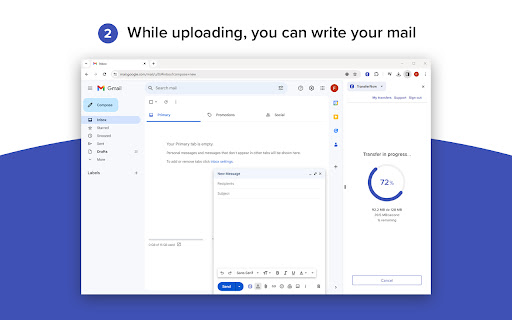
From your Chrome browser, click on the "TransferNow" button at the top right of your screen, or click directly on the "TransferNow" button available when you write a new message from Gmail.

The side panel opens, prompting you to log in to your account. Once logged in, select one or more files to send, or select a folder.

Customize your transfer: set a subject, create a personalized link, password-protect file access, enable download notifications, preview and stream files before uploading, and more.

Click on "Transfer" to start sending your files. Once the transfer is complete and the security check has been carried out, you'll get a link to copy and paste or insert directly into your new Gmail message.

That's it! Send your email with your file download link 🚀

Compatibility : The TransferNow extension for Chrome is compatible with Gmail and can be used with any Gmail account. A TransferNow account is required to use this extension.

You can also create download links for your files outside Gmail.

If you don't have a TransferNow account yet, check out our offers here => https://www.transfernow.net/en/prices
Technical
- Version
- 1.2.1
- Manifest
- V3
- Size
- 6.68MiB
- Min Chrome
- 88
- Languages
- 21
- Featured
- No
Metadata
- ID
- ejaijeeblgpgldhdonlbleempkgpmjdb
- Developer ID
- ub0ed2a70409a1b48fabdfcb8a774cc94
- Developer Email
- [email protected]
- Created
- Dec 16, 2023
- Last Updated (Store)
- Jun 11, 2026
- Last Scraped
- Jun 12, 2026
- Website
- https://www.transfernow.net/
- Support URL
- https://www.transfernow.net/en/support
- Privacy Policy
- https://www.transfernow.net/en/privacy-gdpr
Similar extensions
Alternatives to TransferNow for Chrome and Gmail, ranked by description similarity.

Save Bulk Gmail Attachments to Drive & ZIP
Download all attachments from multiple Gmail emails at once — save to Drive or ZIP, sorted into folders automatically.
1.0K
★ 4.3

Upload to Google Drive™
Boost productivity with Upload to Google Drive™ – save your photos, videos, files and other documents directly to Google Drive™
10.0K
★ 3.9

Upload File
Instantly share and send large files with Upload File. Create PDF link, upload PDF — all in one click.
148
★ 5.0

Bulk Attachment Downloader for Gmail
Adds a button to download all attachments from a message or an entire thread.
806
★ 5.0

Direct File Link Downloader
Download files directly from URLs with real-time validation - highlight text, right-click context menu, or input links directly
1.0K
★ 4.2

Gmail Thread Attachment Manager
Centralized attachment dashboard for Gmail threads - view and download all attachments from any email thread instantly.
26
★ 5.0

Instant Download Links for Google Drive
Turn Google Drive share links into direct download URLs. Copy, paste, and get instant links for images, PDFs, and more!
661
One-click file attachment by file.kiwi
Create a download link immediately and attach files anywhere, whether it's Gmail, Twitter, or Facebook.
2.0K
★ 3.7
Data sourced from the Chrome Web Store · last verified Jun 12, 2026.