
FloatTube — A Floating Mini Player for YouTube
A smart floating mini player for YouTube that automatically shows while you scroll and hides at the top.
As of June 2026, FloatTube — A Floating Mini Player for YouTube has 798 users and a 4.71/5 rating from 7 reviews in the Workflow & Planning category.
Usersno change0%
798
798
Ratingdown 5.8 percent−5.8%
4.71
7 reviews
Reviewsup 133.3 percent+133.3%
7
Version
1.2.1
Manifest V3
90-day change · In the last 90 days this extension 3 version updates.
History
9 snapshotsTracking since Apr 1, 2026.
View as table
| Date | Users | Rating | Reviews | Version |
|---|---|---|---|---|
| Apr 1, 2026 | — | 5.00 | 3 | 1.1.0 |
| Apr 16, 2026 | — | 5.00 | 4 | 1.1.1 |
| Apr 22, 2026 | — | 5.00 | 5 | 1.2.0 |
| Apr 27, 2026 | 4.0K | 5.00 | 5 | 1.2.0 |
| May 10, 2026 | — | 5.00 | 5 | 1.2.0 |
| May 15, 2026 | 1.0K | 5.00 | 5 | 1.2.0 |
| May 28, 2026 | 1.0K | 4.71 | 7 | 1.2.0 |
| Jun 3, 2026 | 748 | 4.71 | 7 | 1.2.0 |
| Jun 9, 2026 | 758 | 4.71 | 7 | 1.2.1 |
| Now | 798 | 4.71 | 7 | 1.2.1 |
Permissions & access
- Permissions
- storage
- Host access
- https://www.youtube.com/*
Screenshots


About
Automatically enters Picture-in-Picture (PiP) when switching tabs — just like the Arc browser experience — with subtitle support.


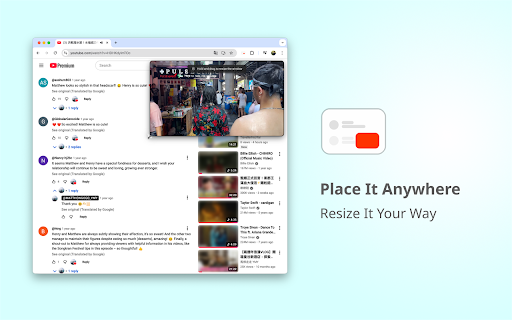
After installing, open any YouTube video page. When you scroll down and the original video is no longer visible, a floating mini player will automatically appear on the page.

Unlike Picture-in-Picture, this player stays within the YouTube page, letting you watch the video while reading comments or browsing related content — no need to scroll back up.

You can drag, resize, and control playback just like the native player.
YouTube CC subtitles are fully supported, including styled captions (where available), so you never miss a detail.

💡 Note:
- This extension only works on YouTube video pages.
- To display subtitles in PiP, make sure to enable them first by clicking the YouTube CC button. Shortcut: C
- Automatic Picture-in-Picture requires Chrome 134 or later, but the floating in-page player that appears when scrolling works on all mainstream versions.
- After installing or updating, if you already have a YouTube video page open, please refresh it once to ensure the floating player activates properly.

---
YouTube is a video sharing platform owned by Google LLC.
This extension is an independent project and is not affiliated with, endorsed by, or in any way officially connected to YouTube or Google LLC.
This extension has been granted official YouTube brand authorisation to use interface elements in screenshots and promotional videos.

The following promotional materials are from creators and have been used with their permission:
@MATTHEWGOGO_YMY –
https://www.youtube.com/watch?v=HDHKdylmTOc
https://www.youtube.com/watch?v=e-XDu4NaSNw
Technical
- Version
- 1.2.1
- Manifest
- V3
- Size
- 513KiB
- Min Chrome
- 88
- Languages
- 21
- Featured
- No
Metadata
- ID
- eieengmkmmkinnkgdickldmloecjdahl
- Developer ID
- u0a1e1820fdf7d1a2f5895b156b9888f2
- Developer Email
- [email protected]
- Created
- Nov 4, 2025
- Last Updated (Store)
- May 28, 2026
- Last Scraped
- Jun 9, 2026
- Website
- https://floattube.uuphy.com/
- Support URL
- —
- Privacy Policy
- —
Similar extensions
Alternatives to FloatTube — A Floating Mini Player for YouTube, ranked by description similarity.

Picture in Picture - Floating player
Picture-in-Picture mode allows you to watch a video in a floating window with playback video and volume controls.
200.0K
★ 4.6

Picture in Picture - PiP View
Watch videos in a floating PiP window (always on top of other windows) even when tab is switched.
70.0K
★ 3.9

Picture in Picture Player - Floating Video
Keep your videos visible at all times while doing something else! PiP mode on all videos.
100.0K
★ 4.3

Picture in Picture - floating video player
Watch videos while surfing the web with Picture in Picture (PiP) mode. Floating video player for Web!
400.0K
★ 4.5

Picture-in-Picture Floating Video Player
Allows users to watch videos in Picture-in-Picture video player.
2.0K
★ 4.9

Picture-in-Picture - Floating Video Player
The extension lets users watch videos in Picture-in-Picture (PiP) mode.
8.0K
★ 4.8

PIPX - Take Control of Picture-in-Picture, Automatically
Never lose your video again, Automatic Picture-in-Picture (PiP) mode when you switch tabs.
1.0K
★ 4.5

Picture in Picture Extension
Transform your video viewing experience with the Picture in Picture Extension.
1.0K
★ 5.0
Data sourced from the Chrome Web Store · last verified Jun 9, 2026.