
Sound Booster - increase volume up
Boost audio on any tab with powerful volume control, bass boost, and equalizer. Perfect for videos, music, and more.
As of June 2026, Sound Booster - increase volume up has 176 users and a 3.67/5 rating from 3 reviews in the Entertainment category.
Usersup 10.0 percent+10.0%
176
176
Ratingdown 26.6 percent−26.6%
3.67
3 reviews
Reviewsup 50.0 percent+50.0%
3
Version
1.0.10
Manifest V3
History
4 snapshotsTracking since Apr 19, 2026.
View as table
| Date | Users | Rating | Reviews | Version |
|---|---|---|---|---|
| Apr 19, 2026 | 160 | 5.00 | 2 | 1.0.10 |
| May 4, 2026 | 166 | 5.00 | 2 | 1.0.10 |
| May 26, 2026 | 170 | 5.00 | 2 | 1.0.10 |
| Jun 8, 2026 | 178 | 5.00 | 2 | 1.0.10 |
| Now | 176 | 3.67 | 3 | 1.0.10 |
Permissions & access
- Permissions
- activeTabtabCapturestoragesystem.display
- Host access
- None declared
Screenshots

About
# Volume Booster

## Overview
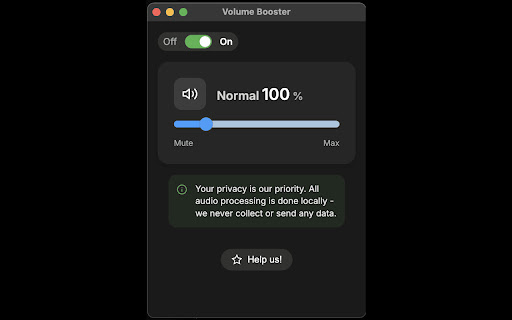
Volume Booster is a powerful browser extension that enhances your audio experience by providing advanced volume control, bass boost, and equalizer features. Whether you're watching videos, listening to music, or participating in online meetings, Volume Booster helps you achieve the perfect audio balance.

## Key Features

### 1. Volume Control
- Boost volume up to 600% on any browser tab
- Independent volume control for each tab
- Smooth volume adjustment with precise control
- Preserve volume settings across sessions

### 2. User Interface
- Clean, intuitive design
- Quick access toolbar
- Easy-to-use sliders and controls

## How It Works

### Installation
1. Install the extension from the Chrome Web Store
2. Click the extension icon in your browser toolbar
3. The Volume Booster interface will appear

### Basic Usage
1. **Volume Control**
   - Use the main volume slider to adjust overall volume
   - Each tab maintains its own volume settings
   - Volume changes are applied in real-time

## Privacy & Security
- No data collection
- No ads
- No tracking
- Works entirely locally
- No internet connection required

## Support
- Regular updates
- Bug fixes
- Performance improvements
- User feedback implementation

## Troubleshooting
- If audio quality is distorted, reduce volume boost
- For best performance, close unnecessary tabs
- Reset settings if experiencing issues
- Update to the latest version for optimal performance

## Updates & Maintenance
- Regular feature updates
- Performance optimizations
- New preset additions
- Bug fixes and improvements

## User Feedback
We value user feedback and continuously work to improve the extension. Feel free to:
- Report bugs
- Suggest features
- Share your experience
- Rate the extension

## License
This extension is free to use for personal and commercial purposes.

For more information, support, or to report issues, please visit our support page or contact us through the Chrome Web Store.
Technical
- Version
- 1.0.10
- Manifest
- V3
- Size
- 109KiB
- Min Chrome
- 88
- Languages
- 24
- Featured
- No
Metadata
- ID
- eideflnlhjkimgcdbjmmckanbcnlmcbh
- Developer ID
- ue61db7df2ebe3acd4595a76258acd8bf
- Developer Email
- [email protected]
- Created
- Jun 18, 2025
- Last Updated (Store)
- Jun 18, 2025
- Last Scraped
- Jun 8, 2026
- Website
- —
- Support URL
- —
- Privacy Policy
- —
Similar extensions
Alternatives to Sound Booster - increase volume up, ranked by description similarity.

Volume Booster — Enhance sound
The extension lets you boost browser tab volume up to 600% for better audio.
5.0K
★ 4.8

Boost — Increase volume
The extension lets you control and amplify browser sound up to 600%.
1.0K
★ 5.0

Volume Sound Booster -2000%
Amplify audio to 2000% with advanced bass and treble controls. Works on YouTube, Spotify, Netflix, and all websites.
548
★ 4.7

VolumeBooster Pro
laptop not loud enough? Boost individual tabs audio to 11.
27

Sound adapter - Boost your volume
Sound booster increase volume video or music on any tab! Bass booster and volume control in your browser.
2.0K
★ 4.2

Sound Booster — Increase sound
The extension boosts tab volume up to 600% for powerful, clear sound.
1.0K
★ 4.6

600% Sound Volume Booster
Tab audio booster (up to 600%). Optional Turbo: EQ, toolbar boost & higher cap; checkout in the extension when you upgrade.
80.0K
★ 4.6
Audio Equalizer - EQ
Audio Equalizer - adjust volume of sound, bass booster, sound booster, dim the highs. EQ Audio Equalizer for all webs!
30.0K
★ 3.7
Data sourced from the Chrome Web Store · last verified Jun 8, 2026.