
Redmine Styler – Customize Status Colors
A Chrome extension that lets you customize background and text colors based on Redmine ticket statuses.
As of May 2026, Redmine Styler – Customize Status Colors has 65 users in the Developer Tools category.
Usersup 14.0 percent+14.0%
65
65
Ratingno change0%
—
— reviews
Reviewsno change0%
—
Version
1.0.1
Manifest V3
History
2 snapshotsTracking since Apr 26, 2026.
View as table
| Date | Users | Rating | Reviews | Version |
|---|---|---|---|---|
| Apr 26, 2026 | 57 | — | — | 1.0.1 |
| May 24, 2026 | 55 | — | — | 1.0.1 |
| Now | 65 | — | — | 1.0.1 |
Permissions & access
- Permissions
- storage
- Host access
- None declared
Screenshots

About
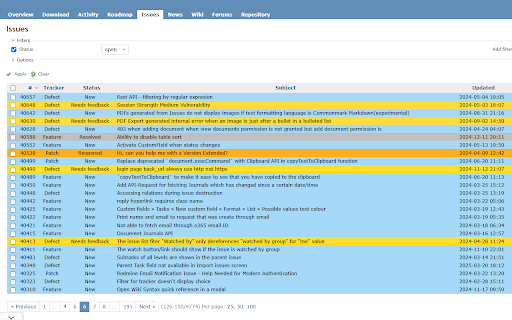
Customize the background and text colors based on issue statuses in the Redmine Issue tab.
When many tickets are shown, this extension improves readability and visual clarity at a glance.
You can also restrict it to specific URLs, and toggle the overdue status highlight ON or OFF.

How to Use
1. After installing the extension, click the Extensions icon at the top right corner of Chrome.
2. From the list of extensions, select Redmine Styler.
3. Set the URL, overdue status, and colors for each issue status, then click Save Settings.
Technical
- Version
- 1.0.1
- Manifest
- V3
- Size
- 30.5KiB
- Min Chrome
- 88
- Languages
- 3
- Featured
- No
Metadata
- ID
- eianjmfecdppblkehkjojenjbmgianih
- Developer ID
- uda2f38073585895996079bb14f296032
- Developer Email
- [email protected]
- Created
- Mar 25, 2025
- Last Updated (Store)
- Mar 27, 2025
- Last Scraped
- May 24, 2026
- Website
- —
- Support URL
- —
- Privacy Policy
- —
Similar extensions
Alternatives to Redmine Styler – Customize Status Colors, ranked by description similarity.

Redmine Notification
Redmine notification tools
1.0K
★ 4.4

Jira Color Component
This extensions change color for Jira component
16

Cards & Colors
Extension enhances visibility to issues and cards on Jira Agile boards based on colored edges and statuses
228
★ 5.0

Merge requests in redmine
This extension fetches the merge requests associated to a redmine issue from a given git server. Only GitLab is supported.
23
★ 5.0

Gitcolor - Github Contribution Themer
Set different themes to the GitHub contribution graph
87
★ 5.0

Redmine Noticer
This extension notice you the new message of redmine.
13
★ 5.0

CLink
Adds a colored frame and tag to specified links and Urls.
6
★ 5.0

Environment Marker
Use the Environment Marker extension and prevent screw-ups with the (programming) environments.
40.0K
★ 4.8
Data sourced from the Chrome Web Store · last verified May 24, 2026.