
CrosPaper - The Wallpaper Engine for ChromeOS
Customize your Chromebook's wallpaper with any image you find online, in your Google Photos library, or your file browser.
As of June 2026, CrosPaper - The Wallpaper Engine for ChromeOS has 9,000 users and a 3.35/5 rating from 37 reviews in the Functionality & UI category.
Usersno change0%
9.0K
9,000
Ratingdown 2.0 percent−2.0%
3.35
37 reviews
Reviewsup 19.4 percent+19.4%
37
Version
CrosPaper - 1.0
Manifest V3
History
7 snapshotsTracking since Apr 5, 2026.
View as table
| Date | Users | Rating | Reviews | Version |
|---|---|---|---|---|
| Apr 5, 2026 | 9.0K | 3.42 | 31 | CrosPaper - 1.0 |
| Apr 16, 2026 | 9.0K | 3.37 | 30 | CrosPaper - 1.0 |
| Apr 22, 2026 | 9.0K | 3.35 | 31 | CrosPaper - 1.0 |
| May 18, 2026 | 9.0K | 3.41 | 32 | CrosPaper - 1.0 |
| Jun 1, 2026 | 9.0K | 3.33 | 33 | CrosPaper - 1.0 |
| Jun 10, 2026 | 9.0K | 3.43 | 35 | CrosPaper - 1.0 |
| Jun 21, 2026 | 9.0K | 3.42 | 36 | CrosPaper - 1.0 |
| Now | 9.0K | 3.35 | 37 | CrosPaper - 1.0 |
Changelog
- May 27, 2026description
🌟 𝗪𝗛𝗔𝗧'𝗦 𝗡𝗘𝗪
- Bug fixes for loading saved Live Wallpapers (CSP, CSPX)
- Improvements for larger live wallpapers to be created & saved.

The Best Wallpaper App for ChromeOS!

🖱𝗥𝗜𝗚𝗛𝗧-𝗖𝗟𝗜𝗖𝗞 𝗧𝗢 𝗣𝗜𝗖𝗞
- Make a wallpaper from any image, SVG, or web page you online! It's as easy as right-clicking and picking a layout.
- Grab GIFs and videos from supported websites, then edit them into Live Wallpapers!
- With Notifications turned on, you can even reset the layout of your wallpaper from the system tray.

💾 𝗦𝗔𝗩𝗘 𝗙𝗢𝗥 𝗟𝗔𝗧𝗘𝗥
- Any picture you select from online can be saved to local storage.
- CrosPaper Pro members can upload directly to Google Photos from the Pop-up menu.
- Use the Share button to send your friends a link to your wallpapers
- Keep track of your old wallpapers using the History feature. Up to 20 entries for free members and 100 for Pro!
- Save CrosPaper Live Wallpapers for future use, or share them with your friends!

📸 𝗨𝗦𝗘 𝗬𝗢𝗨𝗥 𝗢𝗪𝗡 𝗜𝗠𝗔𝗚𝗘𝗦 𝗔𝗦 𝗪𝗔𝗟𝗟𝗣𝗔𝗣𝗘𝗥𝗦
- Use the pop-up window to add wallpapers from images in your Chromebook's local storage.
- CrosPaper Pro members can pick images from their Google Photos library as wallpapers.
- Pick a solid color to serve as a neutral backdrop!

🪄  𝗘𝗗𝗜𝗧 𝗬𝗢𝗨𝗥 𝗜𝗠𝗔𝗚𝗘𝗦
-  Add filters to enhance your backdrops with effects—including blur, brighten, and more!
- Unlike the standard ChromeOS Wallpaper app, CrosPaper can resize any image to fit your screen using our built-in image adjuster!
- Pro members can even adjust any video to fit their screen for a custom Live Wallpaper!

📽️ 𝗟𝗜𝗩𝗘 𝗪𝗔𝗟𝗟𝗣𝗔𝗣𝗘𝗥𝗦
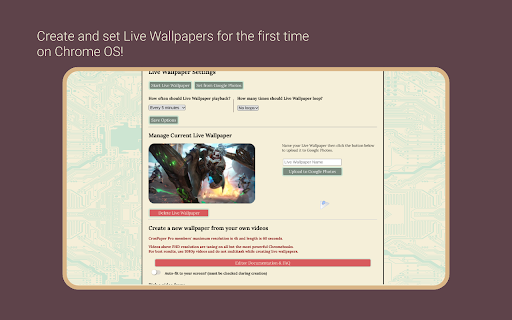
- Missing Wallpaper Engine on ChromeOS? CrosPaper can create live wallpapers using your own videos!
- Watch your video or GIF playback on your desktop every 3 minutes in HD!
- Enhance battery life by configuring CrosPaper to automatically disable playback when your Chromebook’s battery drops below 25% or when it’s unplugged.
- CrosPaper Pro members can create videos up to 1 minute long and even play them back in slow motion!

🎞 𝗪𝗔𝗟𝗟𝗣𝗔𝗣𝗘𝗥 𝗦𝗟𝗜𝗗𝗘𝗦𝗛𝗢𝗪, 𝗣𝗟𝗔𝗬𝗟𝗜𝗦𝗧, & 𝗥𝗔𝗡𝗗𝗢𝗠 𝗚𝗥𝗔𝗗𝗜𝗘𝗡𝗧𝗦
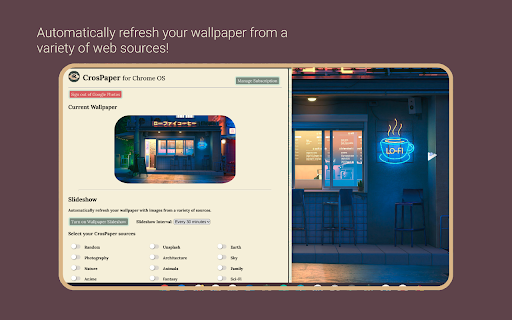
- CrosPaper uses a variety of sources across the web to supply you with pictures for cycling wallpapers.
- Pro members can choose from 19 categories of themed images!
- Pro members can randomly generate backgrounds as a source to see beautiful gradients created on your machine. It’s all local, so it’s all offline!
- As a Pro member, create local and web-based Playlists, which can change based on your media preferences. Want to have a special playlist for late-night dark mode surfing? Now you can!
- Watch your battery die in style with the Battery Playlist rule, or set a wallpaper for each moment with the Time of Day rule.

💻 𝗖𝗨𝗦𝗧𝗢𝗠 𝗦𝗖𝗥𝗘𝗘𝗡𝗦𝗔𝗩𝗘𝗥𝗦
- CrosPaper Pro members can go beyond standard ChromeOS with customizable screensavers!
- Add webpage URLs to monitor a site, whenever your Chromebook runs idle.
- Playback video as a screensaver using URLs or local files.
- If you don’t have any other ideas, try the default screensaver or your favorite YouTube video!

🦾 𝗖𝗥𝗢𝗦𝗣𝗔𝗣𝗘𝗥 𝗣𝗥𝗢
For $9.99 a year, or $19.99 one time, get access to pro features.
(Custom Pricing for Enterprise/Education)

- With CrosPaper Pro, any picture you set from the web, wallpaper slideshow, or Google Photos can be adjusted to fit your screen ratio!

- Increase Wallpaper History slots from 20 to 100!

- Pick specific categories you want to show up on your Wallpaper Slideshow! Categories include: Nature, Animals, Sci-fi, Architecture, Sports, and much more!

- Enjoy beautiful, randomly generated gradients in the Abstract Patterns mode!

- Enhance the Live Wallpaper experience with longer clips and support for up to 4k resolution videos!*

- Live Wallpaper options are expanded for more customization. Enjoy loops and shorter intervals!

- Upload images directly to Google Photos from the Chrome Context Menu!

- Use your Google Photos library of images as static wallpapers or playlists!

- Access the Playlist mode and additional sources for Slideshows—including beautiful satellite images!

- Change the letter-boxing color to match your image or brighten your screen!

- More features are always on the way!

🔒𝗦𝗧𝗔𝗬 𝗣𝗥𝗜𝗩𝗔𝗧𝗘 & 𝗦𝗘𝗖𝗨𝗥𝗘
- We use the latest, most secure extension technologies from Google to accomplish what we do. Manifest Version 3 keeps you safe from harmful extensions and we embrace it wholeheartedly.

- CrosPaper Pro payments are handled by Stripe. This system is used and trusted by Google, Amazon, Zoom, and others.

- Everyone should feel safe while browsing the internet. To make that possible, Chrome's new Enhanced Protection mode is constantly checking potentially dangerous websites, downloads, and extensions. CrosPaper is declared safe by Google's Enhanced Protection standards and we'll continue to target this level of security with every update.

𝗔𝗗𝗗𝗜𝗧𝗜𝗢𝗡𝗔𝗟 𝗜𝗡𝗙𝗢𝗥𝗠𝗔𝗧𝗜𝗢𝗡
- Any image stored on Google Photos depletes your Google Drive Storage allotment.
- The Wallpaper slideshow and all CrosPaper Pro features require internet connection.
- We developed CrosPaper for Chrome OS and it will not work on Windows, Mac OS, or Linux.

* For most devices running CrosPaper Pro Live Wallpaper, 1080p is recommended due to hardware limitations. CrosExperts is not liable for any hardware issues you may encounter.

https://www.crosexperts.com/crospaper

https://www.crosexperts.com/privacy-policy

For support, visit us on our subreddit:
https://www.reddit.com/r/CrosExperts/
🌟 𝗪𝗛𝗔𝗧'𝗦 𝗡𝗘𝗪
- Bug fixes for saving Live Wallpapers (CSP, CSPX)
- Added auto-optimization for large wallpapers! Enjoy better playback by optimizing for your device.

The Best Wallpaper App for ChromeOS!

🖱𝗥𝗜𝗚𝗛𝗧-𝗖𝗟𝗜𝗖𝗞 𝗧𝗢 𝗣𝗜𝗖𝗞
- Make a wallpaper from any image, SVG, or web page you online! It's as easy as right-clicking and picking a layout.
- Grab GIFs and videos from supported websites, then edit them into Live Wallpapers!
- With Notifications turned on, you can even reset the layout of your wallpaper from the system tray.

💾 𝗦𝗔𝗩𝗘 𝗙𝗢𝗥 𝗟𝗔𝗧𝗘𝗥
- Any picture you select from online can be saved to local storage.
- CrosPaper Pro members can upload directly to Google Photos from the Pop-up menu.
- Use the Share button to send your friends a link to your wallpapers
- Keep track of your old wallpapers using the History feature. Up to 20 entries for free members and 100 for Pro!
- Save CrosPaper Live Wallpapers for future use, or share them with your friends!

📸 𝗨𝗦𝗘 𝗬𝗢𝗨𝗥 𝗢𝗪𝗡 𝗜𝗠𝗔𝗚𝗘𝗦 𝗔𝗦 𝗪𝗔𝗟𝗟𝗣𝗔𝗣𝗘𝗥𝗦
- Use the pop-up window to add wallpapers from images in your Chromebook's local storage.
- CrosPaper Pro members can pick images from their Google Photos library as wallpapers.
- Pick a solid color to serve as a neutral backdrop!

🪄  𝗘𝗗𝗜𝗧 𝗬𝗢𝗨𝗥 𝗜𝗠𝗔𝗚𝗘𝗦
-  Add filters to enhance your backdrops with effects—including blur, brighten, and more!
- Unlike the standard ChromeOS Wallpaper app, CrosPaper can resize any image to fit your screen using our built-in image adjuster!
- Pro members can even adjust any video to fit their screen for a custom Live Wallpaper!

📽️ 𝗟𝗜𝗩𝗘 𝗪𝗔𝗟𝗟𝗣𝗔𝗣𝗘𝗥𝗦
- Missing Wallpaper Engine on ChromeOS? CrosPaper can create live wallpapers using your own videos!
- Watch your video or GIF playback on your desktop every 3 minutes in HD!
- Enhance battery life by configuring CrosPaper to automatically disable playback when your Chromebook’s battery drops below 25% or when it’s unplugged.
- CrosPaper Pro members can create videos up to 1 minute long and even play them back in slow motion!

🎞 𝗪𝗔𝗟𝗟𝗣𝗔𝗣𝗘𝗥 𝗦𝗟𝗜𝗗𝗘𝗦𝗛𝗢𝗪, 𝗣𝗟𝗔𝗬𝗟𝗜𝗦𝗧, & 𝗥𝗔𝗡𝗗𝗢𝗠 𝗚𝗥𝗔𝗗𝗜𝗘𝗡𝗧𝗦
- CrosPaper uses a variety of sources across the web to supply you with pictures for cycling wallpapers.
- Pro members can choose from 19 categories of themed images!
- Pro members can randomly generate backgrounds as a source to see beautiful gradients created on your machine. It’s all local, so it’s all offline!
- As a Pro member, create local and web-based Playlists, which can change based on your media preferences. Want to have a special playlist for late-night dark mode surfing? Now you can!
- Watch your battery die in style with the Battery Playlist rule, or set a wallpaper for each moment with the Time of Day rule.

💻 𝗖𝗨𝗦𝗧𝗢𝗠 𝗦𝗖𝗥𝗘𝗘𝗡𝗦𝗔𝗩𝗘𝗥𝗦
- CrosPaper Pro members can go beyond standard ChromeOS with customizable screensavers!
- Add webpage URLs to monitor a site, whenever your Chromebook runs idle.
- Playback video as a screensaver using URLs or local files.
- If you don’t have any other ideas, try the default screensaver or your favorite YouTube video!

🦾 𝗖𝗥𝗢𝗦𝗣𝗔𝗣𝗘𝗥 𝗣𝗥𝗢
For $9.99 a year, or $19.99 one time, get access to pro features.
(Custom Pricing for Enterprise/Education)

- With CrosPaper Pro, any picture you set from the web, wallpaper slideshow, or Google Photos can be adjusted to fit your screen ratio!

- Increase Wallpaper History slots from 20 to 100!

- Pick specific categories you want to show up on your Wallpaper Slideshow! Categories include: Nature, Animals, Sci-fi, Architecture, Sports, and much more!

- Enjoy beautiful, randomly generated gradients in the Abstract Patterns mode!

- Enhance the Live Wallpaper experience with longer clips and support for up to 4k resolution videos!*

- Live Wallpaper options are expanded for more customization. Enjoy loops and shorter intervals!

- Upload images directly to Google Photos from the Chrome Context Menu!

- Use your Google Photos library of images as static wallpapers or playlists!

- Access the Playlist mode and additional sources for Slideshows—including beautiful satellite images!

- Change the letter-boxing color to match your image or brighten your screen!

- More features are always on the way!

🔒𝗦𝗧𝗔𝗬 𝗣𝗥𝗜𝗩𝗔𝗧𝗘 & 𝗦𝗘𝗖𝗨𝗥𝗘
- We use the latest, most secure extension technologies from Google to accomplish what we do. Manifest Version 3 keeps you safe from harmful extensions and we embrace it wholeheartedly.

- CrosPaper Pro payments are handled by Stripe. This system is used and trusted by Google, Amazon, Zoom, and others.

- Everyone should feel safe while browsing the internet. To make that possible, Chrome's new Enhanced Protection mode is constantly checking potentially dangerous websites, downloads, and extensions. CrosPaper is declared safe by Google's Enhanced Protection standards and we'll continue to target this level of security with every update.

𝗔𝗗𝗗𝗜𝗧𝗜𝗢𝗡𝗔𝗟 𝗜𝗡𝗙𝗢𝗥𝗠𝗔𝗧𝗜𝗢𝗡
- Any image stored on Google Photos depletes your Google Drive Storage allotment.
- The Wallpaper slideshow and all CrosPaper Pro features require internet connection.
- We developed CrosPaper for Chrome OS and it will not work on Windows, Mac OS, or Linux.

* For most devices running CrosPaper Pro Live Wallpaper, 1080p is recommended due to hardware limitations. CrosExperts is not liable for any hardware issues you may encounter.

https://www.crosexperts.com/crospaper

https://www.crosexperts.com/privacy-policy

For support, visit us on our subreddit:
https://www.reddit.com/r/CrosExperts/
- Apr 16, 2026description
🌟 𝗪𝗛𝗔𝗧'𝗦 𝗡𝗘𝗪
- Bug fixes.
- Added new wallpaper picking capabilities.

The Best Wallpaper App for ChromeOS!

🖱𝗥𝗜𝗚𝗛𝗧-𝗖𝗟𝗜𝗖𝗞 𝗧𝗢 𝗣𝗜𝗖𝗞
- Make a wallpaper from any image, SVG, or web page you online! It's as easy as right-clicking and picking a layout.
- Grab GIFs and videos from supported websites, then edit them into Live Wallpapers!
- With Notifications turned on, you can even reset the layout of your wallpaper from the system tray.

💾 𝗦𝗔𝗩𝗘 𝗙𝗢𝗥 𝗟𝗔𝗧𝗘𝗥
- Any picture you select from online can be saved to local storage.
- CrosPaper Pro members can upload directly to Google Photos from the Pop-up menu.
- Use the Share button to send your friends a link to your wallpapers
- Keep track of your old wallpapers using the History feature. Up to 20 entries for free members and 100 for Pro!
- Save CrosPaper Live Wallpapers for future use, or share them with your friends!

📸 𝗨𝗦𝗘 𝗬𝗢𝗨𝗥 𝗢𝗪𝗡 𝗜𝗠𝗔𝗚𝗘𝗦 𝗔𝗦 𝗪𝗔𝗟𝗟𝗣𝗔𝗣𝗘𝗥𝗦
- Use the pop-up window to add wallpapers from images in your Chromebook's local storage.
- CrosPaper Pro members can pick images from their Google Photos library as wallpapers.
- Pick a solid color to serve as a neutral backdrop!

🪄  𝗘𝗗𝗜𝗧 𝗬𝗢𝗨𝗥 𝗜𝗠𝗔𝗚𝗘𝗦
-  Add filters to enhance your backdrops with effects—including blur, brighten, and more!
- Unlike the standard ChromeOS Wallpaper app, CrosPaper can resize any image to fit your screen using our built-in image adjuster!
- Pro members can even adjust any video to fit their screen for a custom Live Wallpaper!

📽️ 𝗟𝗜𝗩𝗘 𝗪𝗔𝗟𝗟𝗣𝗔𝗣𝗘𝗥𝗦
- Missing Wallpaper Engine on ChromeOS? CrosPaper can create live wallpapers using your own videos!
- Watch your video or GIF playback on your desktop every 3 minutes in HD!
- Enhance battery life by configuring CrosPaper to automatically disable playback when your Chromebook’s battery drops below 25% or when it’s unplugged.
- CrosPaper Pro members can create videos up to 1 minute long and even play them back in slow motion!

🎞 𝗪𝗔𝗟𝗟𝗣𝗔𝗣𝗘𝗥 𝗦𝗟𝗜𝗗𝗘𝗦𝗛𝗢𝗪, 𝗣𝗟𝗔𝗬𝗟𝗜𝗦𝗧, & 𝗥𝗔𝗡𝗗𝗢𝗠 𝗚𝗥𝗔𝗗𝗜𝗘𝗡𝗧𝗦
- CrosPaper uses a variety of sources across the web to supply you with pictures for cycling wallpapers.
- Pro members can choose from 19 categories of themed images!
- Pro members can randomly generate backgrounds as a source to see beautiful gradients created on your machine. It’s all local, so it’s all offline!
- As a Pro member, create local and web-based Playlists, which can change based on your media preferences. Want to have a special playlist for late-night dark mode surfing? Now you can!
- Watch your battery die in style with the Battery Playlist rule, or set a wallpaper for each moment with the Time of Day rule.

💻 𝗖𝗨𝗦𝗧𝗢𝗠 𝗦𝗖𝗥𝗘𝗘𝗡𝗦𝗔𝗩𝗘𝗥𝗦
- CrosPaper Pro members can go beyond standard ChromeOS with customizable screensavers!
- Add webpage URLs to monitor a site, whenever your Chromebook runs idle.
- Playback video as a screensaver using URLs or local files.
- If you don’t have any other ideas, try the default screensaver or your favorite YouTube video!

🦾 𝗖𝗥𝗢𝗦𝗣𝗔𝗣𝗘𝗥 𝗣𝗥𝗢
For $9.99 a year, or $19.99 one time, get access to pro features.
(Custom Pricing for Enterprise/Education)

- With CrosPaper Pro, any picture you set from the web, wallpaper slideshow, or Google Photos can be adjusted to fit your screen ratio!

- Increase Wallpaper History slots from 20 to 100!

- Pick specific categories you want to show up on your Wallpaper Slideshow! Categories include: Nature, Animals, Sci-fi, Architecture, Sports, and much more!

- Enjoy beautiful, randomly generated gradients in the Abstract Patterns mode!

- Enhance the Live Wallpaper experience with longer clips and support for up to 4k resolution videos!*

- Live Wallpaper options are expanded for more customization. Enjoy loops and shorter intervals!

- Upload images directly to Google Photos from the Chrome Context Menu!

- Use your Google Photos library of images as static wallpapers or playlists!

- Access the Playlist mode and additional sources for Slideshows—including beautiful satellite images!

- Change the letter-boxing color to match your image or brighten your screen!

- More features are always on the way!

🔒𝗦𝗧𝗔𝗬 𝗣𝗥𝗜𝗩𝗔𝗧𝗘 & 𝗦𝗘𝗖𝗨𝗥𝗘
- We use the latest, most secure extension technologies from Google to accomplish what we do. Manifest Version 3 keeps you safe from harmful extensions and we embrace it wholeheartedly.

- CrosPaper Pro payments are handled by Stripe. This system is used and trusted by Google, Amazon, Zoom, and others.

- Everyone should feel safe while browsing the internet. To make that possible, Chrome's new Enhanced Protection mode is constantly checking potentially dangerous websites, downloads, and extensions. CrosPaper is declared safe by Google's Enhanced Protection standards and we'll continue to target this level of security with every update.

𝗔𝗗𝗗𝗜𝗧𝗜𝗢𝗡𝗔𝗟 𝗜𝗡𝗙𝗢𝗥𝗠𝗔𝗧𝗜𝗢𝗡
- Any image stored on Google Photos depletes your Google Drive Storage allotment.
- The Wallpaper slideshow and all CrosPaper Pro features require internet connection.
- We developed CrosPaper for Chrome OS and it will not work on Windows, Mac OS, or Linux.

* For most devices running CrosPaper Pro Live Wallpaper, 1080p is recommended due to hardware limitations. CrosExperts is not liable for any hardware issues you may encounter.

https://www.crosexperts.com/crospaper

https://www.crosexperts.com/privacy-policy

For support, visit us on our subreddit:
https://www.reddit.com/r/CrosExperts/
🌟 𝗪𝗛𝗔𝗧'𝗦 𝗡𝗘𝗪
- Bug fixes for loading saved Live Wallpapers (CSP, CSPX)
- Improvements for larger live wallpapers to be created & saved.

The Best Wallpaper App for ChromeOS!

🖱𝗥𝗜𝗚𝗛𝗧-𝗖𝗟𝗜𝗖𝗞 𝗧𝗢 𝗣𝗜𝗖𝗞
- Make a wallpaper from any image, SVG, or web page you online! It's as easy as right-clicking and picking a layout.
- Grab GIFs and videos from supported websites, then edit them into Live Wallpapers!
- With Notifications turned on, you can even reset the layout of your wallpaper from the system tray.

💾 𝗦𝗔𝗩𝗘 𝗙𝗢𝗥 𝗟𝗔𝗧𝗘𝗥
- Any picture you select from online can be saved to local storage.
- CrosPaper Pro members can upload directly to Google Photos from the Pop-up menu.
- Use the Share button to send your friends a link to your wallpapers
- Keep track of your old wallpapers using the History feature. Up to 20 entries for free members and 100 for Pro!
- Save CrosPaper Live Wallpapers for future use, or share them with your friends!

📸 𝗨𝗦𝗘 𝗬𝗢𝗨𝗥 𝗢𝗪𝗡 𝗜𝗠𝗔𝗚𝗘𝗦 𝗔𝗦 𝗪𝗔𝗟𝗟𝗣𝗔𝗣𝗘𝗥𝗦
- Use the pop-up window to add wallpapers from images in your Chromebook's local storage.
- CrosPaper Pro members can pick images from their Google Photos library as wallpapers.
- Pick a solid color to serve as a neutral backdrop!

🪄  𝗘𝗗𝗜𝗧 𝗬𝗢𝗨𝗥 𝗜𝗠𝗔𝗚𝗘𝗦
-  Add filters to enhance your backdrops with effects—including blur, brighten, and more!
- Unlike the standard ChromeOS Wallpaper app, CrosPaper can resize any image to fit your screen using our built-in image adjuster!
- Pro members can even adjust any video to fit their screen for a custom Live Wallpaper!

📽️ 𝗟𝗜𝗩𝗘 𝗪𝗔𝗟𝗟𝗣𝗔𝗣𝗘𝗥𝗦
- Missing Wallpaper Engine on ChromeOS? CrosPaper can create live wallpapers using your own videos!
- Watch your video or GIF playback on your desktop every 3 minutes in HD!
- Enhance battery life by configuring CrosPaper to automatically disable playback when your Chromebook’s battery drops below 25% or when it’s unplugged.
- CrosPaper Pro members can create videos up to 1 minute long and even play them back in slow motion!

🎞 𝗪𝗔𝗟𝗟𝗣𝗔𝗣𝗘𝗥 𝗦𝗟𝗜𝗗𝗘𝗦𝗛𝗢𝗪, 𝗣𝗟𝗔𝗬𝗟𝗜𝗦𝗧, & 𝗥𝗔𝗡𝗗𝗢𝗠 𝗚𝗥𝗔𝗗𝗜𝗘𝗡𝗧𝗦
- CrosPaper uses a variety of sources across the web to supply you with pictures for cycling wallpapers.
- Pro members can choose from 19 categories of themed images!
- Pro members can randomly generate backgrounds as a source to see beautiful gradients created on your machine. It’s all local, so it’s all offline!
- As a Pro member, create local and web-based Playlists, which can change based on your media preferences. Want to have a special playlist for late-night dark mode surfing? Now you can!
- Watch your battery die in style with the Battery Playlist rule, or set a wallpaper for each moment with the Time of Day rule.

💻 𝗖𝗨𝗦𝗧𝗢𝗠 𝗦𝗖𝗥𝗘𝗘𝗡𝗦𝗔𝗩𝗘𝗥𝗦
- CrosPaper Pro members can go beyond standard ChromeOS with customizable screensavers!
- Add webpage URLs to monitor a site, whenever your Chromebook runs idle.
- Playback video as a screensaver using URLs or local files.
- If you don’t have any other ideas, try the default screensaver or your favorite YouTube video!

🦾 𝗖𝗥𝗢𝗦𝗣𝗔𝗣𝗘𝗥 𝗣𝗥𝗢
For $9.99 a year, or $19.99 one time, get access to pro features.
(Custom Pricing for Enterprise/Education)

- With CrosPaper Pro, any picture you set from the web, wallpaper slideshow, or Google Photos can be adjusted to fit your screen ratio!

- Increase Wallpaper History slots from 20 to 100!

- Pick specific categories you want to show up on your Wallpaper Slideshow! Categories include: Nature, Animals, Sci-fi, Architecture, Sports, and much more!

- Enjoy beautiful, randomly generated gradients in the Abstract Patterns mode!

- Enhance the Live Wallpaper experience with longer clips and support for up to 4k resolution videos!*

- Live Wallpaper options are expanded for more customization. Enjoy loops and shorter intervals!

- Upload images directly to Google Photos from the Chrome Context Menu!

- Use your Google Photos library of images as static wallpapers or playlists!

- Access the Playlist mode and additional sources for Slideshows—including beautiful satellite images!

- Change the letter-boxing color to match your image or brighten your screen!

- More features are always on the way!

🔒𝗦𝗧𝗔𝗬 𝗣𝗥𝗜𝗩𝗔𝗧𝗘 & 𝗦𝗘𝗖𝗨𝗥𝗘
- We use the latest, most secure extension technologies from Google to accomplish what we do. Manifest Version 3 keeps you safe from harmful extensions and we embrace it wholeheartedly.

- CrosPaper Pro payments are handled by Stripe. This system is used and trusted by Google, Amazon, Zoom, and others.

- Everyone should feel safe while browsing the internet. To make that possible, Chrome's new Enhanced Protection mode is constantly checking potentially dangerous websites, downloads, and extensions. CrosPaper is declared safe by Google's Enhanced Protection standards and we'll continue to target this level of security with every update.

𝗔𝗗𝗗𝗜𝗧𝗜𝗢𝗡𝗔𝗟 𝗜𝗡𝗙𝗢𝗥𝗠𝗔𝗧𝗜𝗢𝗡
- Any image stored on Google Photos depletes your Google Drive Storage allotment.
- The Wallpaper slideshow and all CrosPaper Pro features require internet connection.
- We developed CrosPaper for Chrome OS and it will not work on Windows, Mac OS, or Linux.

* For most devices running CrosPaper Pro Live Wallpaper, 1080p is recommended due to hardware limitations. CrosExperts is not liable for any hardware issues you may encounter.

https://www.crosexperts.com/crospaper

https://www.crosexperts.com/privacy-policy

For support, visit us on our subreddit:
https://www.reddit.com/r/CrosExperts/
Permissions & access
- Permissions
- contextMenuswallpaperalarmsnotificationsstorageoffscreen
- Host access
- https://*/*, file://*
Screenshots

About
🌟 𝗪𝗛𝗔𝗧'𝗦 𝗡𝗘𝗪
- Bug fixes for saving Live Wallpapers (CSP, CSPX)
- Added auto-optimization for large wallpapers! Enjoy better playback by optimizing for your device.

The Best Wallpaper App for ChromeOS!

🖱𝗥𝗜𝗚𝗛𝗧-𝗖𝗟𝗜𝗖𝗞 𝗧𝗢 𝗣𝗜𝗖𝗞
- Make a wallpaper from any image, SVG, or web page you online! It's as easy as right-clicking and picking a layout.
- Grab GIFs and videos from supported websites, then edit them into Live Wallpapers!
- With Notifications turned on, you can even reset the layout of your wallpaper from the system tray.

💾 𝗦𝗔𝗩𝗘 𝗙𝗢𝗥 𝗟𝗔𝗧𝗘𝗥
- Any picture you select from online can be saved to local storage.
- CrosPaper Pro members can upload directly to Google Photos from the Pop-up menu.
- Use the Share button to send your friends a link to your wallpapers
- Keep track of your old wallpapers using the History feature. Up to 20 entries for free members and 100 for Pro!
- Save CrosPaper Live Wallpapers for future use, or share them with your friends!

📸 𝗨𝗦𝗘 𝗬𝗢𝗨𝗥 𝗢𝗪𝗡 𝗜𝗠𝗔𝗚𝗘𝗦 𝗔𝗦 𝗪𝗔𝗟𝗟𝗣𝗔𝗣𝗘𝗥𝗦
- Use the pop-up window to add wallpapers from images in your Chromebook's local storage.
- CrosPaper Pro members can pick images from their Google Photos library as wallpapers.
- Pick a solid color to serve as a neutral backdrop!

🪄  𝗘𝗗𝗜𝗧 𝗬𝗢𝗨𝗥 𝗜𝗠𝗔𝗚𝗘𝗦
-  Add filters to enhance your backdrops with effects—including blur, brighten, and more!
- Unlike the standard ChromeOS Wallpaper app, CrosPaper can resize any image to fit your screen using our built-in image adjuster!
- Pro members can even adjust any video to fit their screen for a custom Live Wallpaper!

📽️ 𝗟𝗜𝗩𝗘 𝗪𝗔𝗟𝗟𝗣𝗔𝗣𝗘𝗥𝗦
- Missing Wallpaper Engine on ChromeOS? CrosPaper can create live wallpapers using your own videos!
- Watch your video or GIF playback on your desktop every 3 minutes in HD!
- Enhance battery life by configuring CrosPaper to automatically disable playback when your Chromebook’s battery drops below 25% or when it’s unplugged.
- CrosPaper Pro members can create videos up to 1 minute long and even play them back in slow motion!

🎞 𝗪𝗔𝗟𝗟𝗣𝗔𝗣𝗘𝗥 𝗦𝗟𝗜𝗗𝗘𝗦𝗛𝗢𝗪, 𝗣𝗟𝗔𝗬𝗟𝗜𝗦𝗧, & 𝗥𝗔𝗡𝗗𝗢𝗠 𝗚𝗥𝗔𝗗𝗜𝗘𝗡𝗧𝗦
- CrosPaper uses a variety of sources across the web to supply you with pictures for cycling wallpapers.
- Pro members can choose from 19 categories of themed images!
- Pro members can randomly generate backgrounds as a source to see beautiful gradients created on your machine. It’s all local, so it’s all offline!
- As a Pro member, create local and web-based Playlists, which can change based on your media preferences. Want to have a special playlist for late-night dark mode surfing? Now you can!
- Watch your battery die in style with the Battery Playlist rule, or set a wallpaper for each moment with the Time of Day rule.

💻 𝗖𝗨𝗦𝗧𝗢𝗠 𝗦𝗖𝗥𝗘𝗘𝗡𝗦𝗔𝗩𝗘𝗥𝗦
- CrosPaper Pro members can go beyond standard ChromeOS with customizable screensavers!
- Add webpage URLs to monitor a site, whenever your Chromebook runs idle.
- Playback video as a screensaver using URLs or local files.
- If you don’t have any other ideas, try the default screensaver or your favorite YouTube video!

🦾 𝗖𝗥𝗢𝗦𝗣𝗔𝗣𝗘𝗥 𝗣𝗥𝗢
For $9.99 a year, or $19.99 one time, get access to pro features.
(Custom Pricing for Enterprise/Education)

- With CrosPaper Pro, any picture you set from the web, wallpaper slideshow, or Google Photos can be adjusted to fit your screen ratio!

- Increase Wallpaper History slots from 20 to 100!

- Pick specific categories you want to show up on your Wallpaper Slideshow! Categories include: Nature, Animals, Sci-fi, Architecture, Sports, and much more!

- Enjoy beautiful, randomly generated gradients in the Abstract Patterns mode!

- Enhance the Live Wallpaper experience with longer clips and support for up to 4k resolution videos!*

- Live Wallpaper options are expanded for more customization. Enjoy loops and shorter intervals!

- Upload images directly to Google Photos from the Chrome Context Menu!

- Use your Google Photos library of images as static wallpapers or playlists!

- Access the Playlist mode and additional sources for Slideshows—including beautiful satellite images!

- Change the letter-boxing color to match your image or brighten your screen!

- More features are always on the way!

🔒𝗦𝗧𝗔𝗬 𝗣𝗥𝗜𝗩𝗔𝗧𝗘 & 𝗦𝗘𝗖𝗨𝗥𝗘
- We use the latest, most secure extension technologies from Google to accomplish what we do. Manifest Version 3 keeps you safe from harmful extensions and we embrace it wholeheartedly.

- CrosPaper Pro payments are handled by Stripe. This system is used and trusted by Google, Amazon, Zoom, and others.

- Everyone should feel safe while browsing the internet. To make that possible, Chrome's new Enhanced Protection mode is constantly checking potentially dangerous websites, downloads, and extensions. CrosPaper is declared safe by Google's Enhanced Protection standards and we'll continue to target this level of security with every update.

𝗔𝗗𝗗𝗜𝗧𝗜𝗢𝗡𝗔𝗟 𝗜𝗡𝗙𝗢𝗥𝗠𝗔𝗧𝗜𝗢𝗡
- Any image stored on Google Photos depletes your Google Drive Storage allotment.
- The Wallpaper slideshow and all CrosPaper Pro features require internet connection.
- We developed CrosPaper for Chrome OS and it will not work on Windows, Mac OS, or Linux.

* For most devices running CrosPaper Pro Live Wallpaper, 1080p is recommended due to hardware limitations. CrosExperts is not liable for any hardware issues you may encounter.

https://www.crosexperts.com/crospaper

https://www.crosexperts.com/privacy-policy

For support, visit us on our subreddit:
https://www.reddit.com/r/CrosExperts/
Technical
- Version
- CrosPaper - 1.0
- Manifest
- V3
- Size
- 859KiB
- Min Chrome
- 125
- Languages
- 1
- Featured
- No
Metadata
- ID
- eiaekkbkomopkiidlmeabjpjldhbikfc
- Developer ID
- u542fe136c8a1836dedf66bbe005874b9
- Developer Email
- [email protected]
- Created
- Aug 2, 2021
- Last Updated (Store)
- May 27, 2026
- Last Scraped
- Jun 21, 2026
- Website
- crosexperts.com
- Support URL
- https://www.reddit.com/r/CrosExperts/
- Privacy Policy
- https://www.crosexperts.com/privacy-policy
Similar extensions
Alternatives to CrosPaper - The Wallpaper Engine for ChromeOS, ranked by description similarity.

DesktopHut Live Wallpapers Tab Pro
Set live video wallpapers from desktophut.com directly onto your Chrome New Tab page, now with cool bookmarks!
6.0K
★ 3.7

LiveScape – Live Wallpaper New Tab
Transform your Chrome new tab into a live wallpaper engine. v2: Audio, Deep Widget Customisation, Time-of-Day Scheduler.
—
★ 5.0

Motiontabs - Best Live Wallpaper Experience
Live wallpapers, Motion Themes, Live Backgrounds and Motion Wallpapers for your Chrome
30.0K
★ 4.3

Keroppi Wallpapers New Tab
Brighten your Chrome experience with Keroppi Live Wallpaper, featuring fun designs, quick shortcuts, and customizable options
121
★ 4.5

Digital Gaze Live Wallpaper
Digital Gaze Live Wallpaper – A hypnotic digital eye watching over your Chrome tabs with sleek, futuristic animation.
349
★ 4.0

67 Meme Dark Live Wallpaper
Dive into the viral chaos of the 67 Meme with a dark and edgy live wallpaper that transforms every new tab into pure brainrot energy
—

Anomalistic Revolution Wallpapers New Tab
Transform your browser with Anomalistic Revolution featuring mesmerizing and dynamic live wallpapers.
1

67 Meme Cyberpunk Live Wallpaper
Enter a neon-drenched digital world with 67 Meme Cyberpunk Live Wallpaper - Gameograf
1.0K
★ 5.0
Data sourced from the Chrome Web Store · last verified Jun 21, 2026.