
Squint
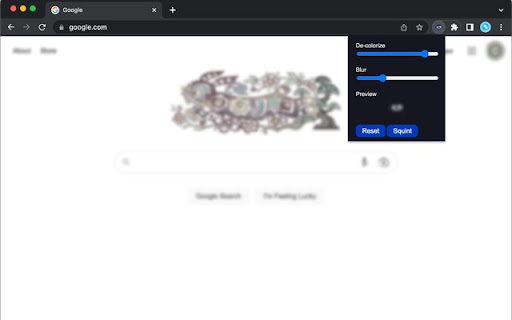
Blur and desaturate your webpage to see how well the design holds up. A tool for web designers and developers.
As of June 2026, Squint has 73 users in the fun category.
Usersdown 5.2 percent−5.2%
73
73
Ratingno change0%
—
— reviews
Reviewsno change0%
—
Version
1.0.2
Manifest V3
History
3 snapshotsTracking since Apr 1, 2026.
View as table
| Date | Users | Rating | Reviews | Version |
|---|---|---|---|---|
| Apr 1, 2026 | 77 | — | — | 1.0.2 |
| May 3, 2026 | 71 | — | — | 1.0.2 |
| Jun 2, 2026 | 79 | — | — | 1.0.2 |
| Now | 73 | — | — | 1.0.2 |
Permissions & access
- Permissions
- scripting
- Host access
- https://*/, http://*/
Screenshots
About
Squint is a simple utility for web designers to review their works in progress in a browser.

It blurs and removes the colors from your current active tab. That's it. No personal information, no ads, no micropayments, no subscriptions.

Why blur your page, you ask?
It's easy to lose track of how good a design is when you're focused on the content. It's easy to lose track of simplicity as you add incremental details to a marketing page or web application.

When I was taking college art classes, my painting professor encouraged us to walk away from our work regularly and squint at it from across the room as a way to quickly evaluate the overall composition. The same principle works here. You can tell if your project has strong visual hierarchy and good use of foundational design principles by looking at it with the distracting details obfuscated.
Technical
- Version
- 1.0.2
- Manifest
- V3
- Size
- 388KiB
- Min Chrome
- 88
- Languages
- 1
- Featured
- Yes
Metadata
- ID
- ehkbohfclddcpbldbngagfienfclipll
- Developer ID
- u11d236b5397d3bb094a1815b2b68abf6
- Developer Email
- [email protected]
- Created
- Jan 31, 2023
- Last Updated (Store)
- Jan 31, 2023
- Last Scraped
- Jun 2, 2026
- Website
- —
- Support URL
- —
Similar extensions
Alternatives to Squint, ranked by description similarity.

lowkey smarter
Blocks websites until you solve arithmetic problems.
—
★ 5.0

Chromatized
A dymamic theme for your browser. Apply visual effects to any webpage.
2

Visual Detox
Soften your browsing experience — swap unwanted images with kittens, puppies, ponies, and more..
2
★ 5.0
Page Filter Effects
Fun filter effect for webpage.
5.0K
★ 3.3

Scanline Vision
Adds a CRT-style scanline overlay to all webpages for a retro feel.
73
★ 5.0

Redacted Internet
A simple extension to navigate the Internet in a billionaire's fashion.
5

Glass Smasher 🔨
Smash any webpage with a hammer! Frosted glass overlay with fractal cracks, flying shards & realistic sound. Press Escape to exit.
19

Askew
Askew is a browser extension that drives its users to the edge of insanity.
84
★ 5.0
Data sourced from the Chrome Web Store · last verified Jun 2, 2026.