
Pinpoint – Visual Feedback
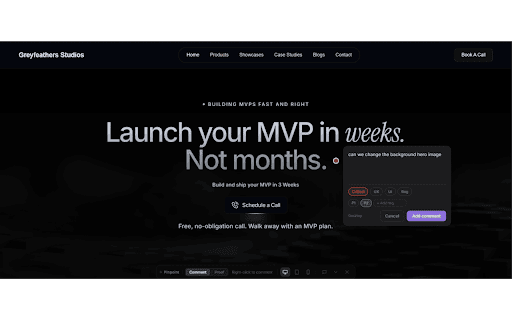
Drop a pin anywhere on any webpage to leave visual feedback with screenshots. Built for client-agency design reviews.
As of June 2026, Pinpoint – Visual Feedback has 10 users in the Developer Tools category.
Usersno change0%
10
10
Ratingno change0%
—
— reviews
Reviewsno change0%
—
Version
5.0.0
Manifest V3
History
2 snapshotsTracking since Jun 2, 2026.
Not enough history yet for this metric — the chart fills in as we collect more snapshots.
View as table
| Date | Users | Rating | Reviews | Version |
|---|---|---|---|---|
| Jun 2, 2026 | — | — | — | 5.0.0 |
| Jun 8, 2026 | — | — | — | 5.0.0 |
| Now | 10 | — | — | 5.0.0 |
Permissions & access
- Permissions
- activeTabscriptingtabsstoragewebNavigationalarms
- Host access
- <all_urls>
Screenshots


About
Pinpoint makes client feedback painless.

Instead of long email threads with vague descriptions like "the button on the homepage looks off," your clients and teammates can click directly on the problem, leave a comment, and attach an automatic screenshot — all without leaving the page.

HOW IT WORKS
1. Click the Pinpoint icon and sign in
2. Hit "Comment" to activate on any website
3. Right-click anywhere to drop a pin and leave feedback with a screenshot
4. Use "Proof" mode to screenshot and confirm a fix is done

BUILT FOR AGENCIES
→ Invite clients and teammates to projects
→ Organise feedback with labels and statuses (Open, Done, Resolved)
→ Reply to comments and thread discussions
→ Get notified via Slack when new feedback arrives
→ Vote on comments to prioritise what matters

WORKS ON ANY WEBSITE
No script tag needed. Works on any URL — staging environments, client sites, local dev, anywhere.
Technical
- Version
- 5.0.0
- Manifest
- V3
- Size
- 81.7KiB
- Min Chrome
- 88
- Languages
- 1
- Featured
- No
Metadata
- ID
- ehgkhdnmoeomeehngcgoakbfegkjokkf
- Developer ID
- u8e039d10b10fbfed4508b78bf3cff523
- Developer Email
- [email protected]
- Created
- Jun 1, 2026
- Last Updated (Store)
- Jun 1, 2026
- Last Scraped
- Jun 8, 2026
- Website
- —
- Support URL
- —
- Privacy Policy
- https://commenting-app-two.vercel.app/privacy
Data sourced from the Chrome Web Store · last verified Jun 8, 2026.