
ClearView Reader
A minimalist, professional reader tool for distraction-free browsing.
As of June 2026, ClearView Reader has — users in the Productivity category.
Usersno change0%
—
—
Ratingno change0%
—
— reviews
Reviewsno change0%
—
Version
1.7
Manifest V3
History
1 snapshotsTracking since Jun 8, 2026.
Not enough history yet for this metric — the chart fills in as we collect more snapshots.
View as table
| Date | Users | Rating | Reviews | Version |
|---|---|---|---|---|
| Jun 8, 2026 | — | — | — | 1.7 |
| Now | — | — | — | 1.7 |
Permissions & access
- Permissions
- activeTabscriptingstorage
- Host access
- https://api.gumroad.com/*
Screenshots


About
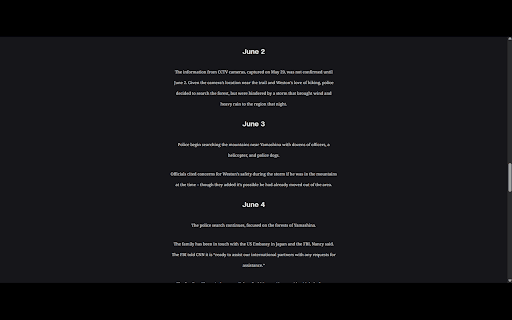
Transform cluttered websites into a beautiful, distraction-free reading experience.

ClearView Reader instantly re-architects messy webpages, news sites, and blogs by stripping away invasive ad containers, sidebars, popups, and cluttered headers. What is left is a beautifully optimized, central column of text designed for deep focus and comfortable reading.

Whether you are studying research papers, catching up on the daily news, or reading long articles, ClearView Reader protects your eyes and saves your focus.

✨ FREE FEATURES (Available to Everyone)

• Layout Optimization: Hide sidebars, banners, marketing clutter, and footers with a single click.

• Light Mode Layout: Formats text into a perfectly centered, high-legibility document container.

• One-Click Reset: Instant webpage recovery—reload to bring back the original site style at any time.

🔑 PREMIUM UPGRADE (Unlock with an Activation Key)

Take control of your digital workspace with our professional customization suite:

• Advanced Typographic Scaling: Effortlessly increase or decrease font sizes locally across any website without breaking page frameworks.

• Dynamic Column Positioning: Slide the entire reading column to the Left, Center, or Right of your monitor to match your posture and workflow.

• Precision Text Alignment: Switch layouts fluidly between Left, Centered, or Justified text formatting.

• Dark Mode Comfort: Relax your eyes at night with a deeply rich, battery-saving dark interface.

• Premium Sepia Theme: Replicate the signature warmth of premium e-readers and physical paperbacks to dramatically reduce eye fatigue.

🔒 PRIVACY-FIRST DESIGN

ClearView Reader operates entirely inside your local browser storage. We never collect, track, or sell your reading history, browsing metrics, or personal data.

🚀 GET STARTED IN SECONDS

1. Click "Add to Chrome" to install.

2. Open any news article or blog post.

3. Click the ClearView puzzle piece icon in your toolbar and hit "Optimize Layout".

Upgrade to Premium anytime directly through the app interface to unlock the full layout and design suite!
Technical
- Version
- 1.7
- Manifest
- V3
- Size
- 17.49KiB
- Min Chrome
- 88
- Languages
- 1
- Featured
- No
Metadata
- ID
- ehfgbffomfndfpmhklolaobgaelchhgg
- Developer ID
- ue51391ef9e1bfcf037b287d6d70eb6d5
- Developer Email
- [email protected]
- Created
- Jun 7, 2026
- Last Updated (Store)
- Jun 7, 2026
- Last Scraped
- Jun 8, 2026
- Website
- —
- Support URL
- —
Data sourced from the Chrome Web Store · last verified Jun 8, 2026.