
ICommentExporter - Export Comments
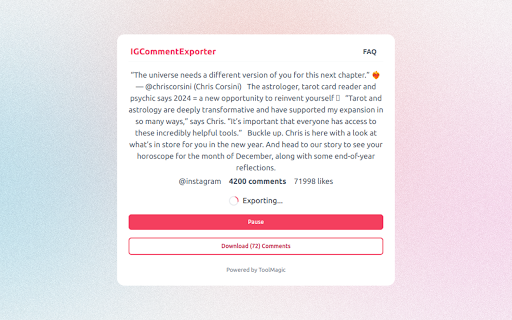
One click to export Instagram Comments to Excel in CSV for analysis.
As of June 2026, ICommentExporter - Export Comments has 10,000 users and a 1.73/5 rating from 11 reviews in the Social & Communication category.
Usersno change0%
10.0K
10,000
Ratingno change0%
1.73
11 reviews
Reviewsno change0%
11
Version
1.14.0
Manifest V3
90-day change · In the last 90 days this extension 3 version updates.
History
3 snapshotsTracking since May 14, 2026.
View as table
| Date | Users | Rating | Reviews | Version |
|---|---|---|---|---|
| May 14, 2026 | 10.0K | 1.73 | 11 | 1.11.0 |
| Jun 5, 2026 | 10.0K | 1.73 | 11 | 1.12.0 |
| Jun 18, 2026 | 10.0K | 1.73 | 11 | 1.13.0 |
| Now | 10.0K | 1.73 | 11 | 1.14.0 |
Permissions & access
- Permissions
- storageidentitywebRequestscriptingcookiesunlimitedStoragealarms
- Host access
- *://*.instagram.com/*
Screenshots


About
ICommentExporter (previously known as "IGCommentExporter") is a powerful Instagram comment export tool that helps you export Instagram comments to a CSV file. The tool can also extract email addresses and phone numbers (if available) from the user who posted the comment, allowing you to identify potential leads, tailor your marketing campaigns, and gain deeper insights into your audience.

Features:
- Export comments and replies
- Extract email and phone number if available
- Save as CSV / Excel
- Automatic and customizable handling of rate limits and challenges

Note:
- This tool follows a freemium model, enabling you to export up to 100 comments per post at no cost. If additional exports are required, consider upgrading to our premium version.
- To protect your primary Instagram account from temporary restrictions, we highly recommend creating a separate account specifically for data exports. By keeping your data export activities separate from your main account, you can significantly reduce the chances of encountering any interruptions to your regular Instagram usage.

What type of data can you export?
- User ID
- Username
- Full Name
- Comment ID
- Comment
- Comment Time
- Followers
- Following
- Posts
- Email
- Phone
- Is Verified
- Is Private
- Is Business
- Is Creator
- Category
- Biography
- External URL
- User Homepage
- Avatar URL

How to use it?
To use our Comment Export tool, simply add our extension to browser and create an account. Once you have signed in, you can input the post link and click the "Export" button. Your comments data will be exported to a CSV or Excel file, which you can then download to your computer.

Data Privacy:
All data is processed on your local computer, never passing through our web servers. Your exports are confidential.

Frequently Asked Questions:
https://igcommentexporter.toolmagic.app/#faqs
Feel free to contact us if you have any other questions.

Disclaimer:
This tool is a third-party extension designed to facilitate the export of Instagram comments, along with associated data, for enhanced analytics and management. This extension is not developed, endorsed, or officially affiliated with Instagram, Inc.
Technical
- Version
- 1.14.0
- Manifest
- V3
- Size
- 606KiB
- Min Chrome
- 88
- Languages
- 51
- Featured
- No
Metadata
- ID
- ehaaocefdhppmemaaeedemaokjooldgm
- Developer ID
- u19f1d27e1e00a5cc726f2c53094b30e3
- Developer Email
- [email protected]
- Created
- Dec 26, 2023
- Last Updated (Store)
- Jun 13, 2026
- Last Scraped
- Jun 18, 2026
- Website
- —
- Support URL
- —
- Privacy Policy
- https://igcommentexporter.toolmagic.app/privacy
Similar extensions
Alternatives to ICommentExporter - Export Comments, ranked by description similarity.

Comment Exporter
The best tool to export Instagram comments to CSV with one click, ideal for contests and insights.
10.0K
★ 3.4

Comment Exporter - Export Ins Comments
This extension will help you quickly export instagram comments to Excel xlsx or csv files.
696
★ 5.0

IGCommentsExport - Export Comment for IG
Comment Export Tool for IG to Extract Instagram Comments and export to CSV with one click
10.0K
★ 3.7

Export Comments, Including Nested Replies for IG
Comment Extractor for IG to Extract Instagram Comments including Nested Comments and export to CSV
60

IG Exporter & Scraper: Export Instagram Comments data to list
Extract Instagram comments. Pick into CSV and Excel formats.
10.0K
★ 4.7

Free Turbo Comment Export Tool
Free Extract Instagram comment to CSV with one click
2.0K
★ 3.7

Followers Exporter
Simplify Instagram data export with This IG Exporter. Export followers or following lists to CSV, all in a few clicks
100.0K
★ 3.5
Super Export Tool - All in one export tool
Scrape and extract user data from IG hashtag, location, follower, following, comment, like to CSV.
1.0K
★ 4.0
Data sourced from the Chrome Web Store · last verified Jun 18, 2026.