
Button Stealer Chrome
Collect live UI buttons as a visual library for design and frontend work.
As of June 2026, Button Stealer Chrome has 39 users and a 5.00/5 rating from 4 reviews in the art category.
Usersup 56.0 percent+56.0%
39
39
Ratingno change0%
5.00
4 reviews
Reviewsno change0%
4
Version
1.0.3.1
Manifest V3
History
7 snapshotsTracking since Apr 1, 2026.
View as table
| Date | Users | Rating | Reviews | Version |
|---|---|---|---|---|
| Apr 1, 2026 | 25 | 5.00 | 4 | 1.0.3.1 |
| Apr 19, 2026 | 31 | 5.00 | 4 | 1.0.3.1 |
| Apr 29, 2026 | 33 | 5.00 | 4 | 1.0.3.1 |
| May 8, 2026 | 32 | 5.00 | 4 | 1.0.3.1 |
| May 16, 2026 | 37 | 5.00 | 4 | 1.0.3.1 |
| May 25, 2026 | 34 | 5.00 | 4 | 1.0.3.1 |
| Jun 4, 2026 | 35 | 5.00 | 4 | 1.0.3.1 |
| Now | 39 | 5.00 | 4 | 1.0.3.1 |
Permissions & access
- Permissions
- storageoffscreen
- Host access
- None declared
Screenshots
About
Button Stealer Chrome

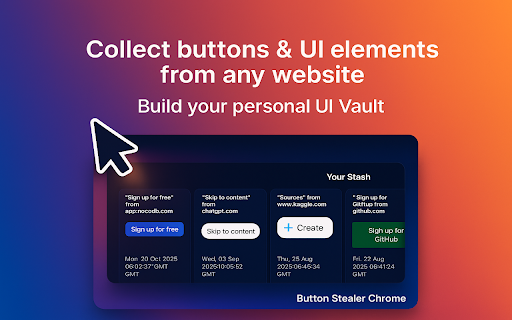
Designers and frontend developers spend hours rebuilding the same small interface pieces. Button Stealer Chrome changes that. It automatically captures interactive UI elements, dropdowns, and reusable components from websites and keeps them in your personal UI Vault for later use.

🥱 No more endless code copying. The Button Stealer Chrome extension quietly saves useful interface assets while you browse. Open your vault, preview saved designs, copy HTML / CSS, or jump to the original page when you need context.

⚙️ How It Works

1️⃣ Install Button Stealer Chrome extension from the Web Store.
2️⃣ Browse any site — captured UI components are stored automatically.
3️⃣ Open your design vault to view, search, or organize saved items.
4️⃣ Copy HTML / CSS with one click or open the original page.

🌟 Features and Benefits

• 📌 Automatic saving of stolen buttons, dropdowns, and design controls.
• 🗂 Organized UI Library with previews and instant copy.
• 🔗 Quick export of HTML / CSS for prototypes or production.
• ✅ Works smoothly with chrome browser elements and custom widgets.
• 💡 Integrates with figma set button steal workflow.
• 🕹 Simplifies reuse of design components across multiple projects.

The button stealer extension helps capture styles, test interface variations, and maintain design consistency. From standard chrome app controls to unique dropdowns, it fits into any workflow.

💡 Why Designers Choose It

➤ Speeds up UI development and prototyping.

➤ Builds a personal button stealer library for daily work.

➤ Collects details like chrome hearts buttons or custom hover states.

➤ Reduces repetitive coding for frontend teams.

➤ Compatible with modern chrome tools and frameworks.

📚 Practical Use Cases

🛠 Frontend Development: reuse captured interface elements instantly.
🎨 Design: collect unique examples with button stealer chrome extension app.
🛒 E-commerce: analyze and store add to wishlist button chrome layouts.
📊 Product Teams: keep a shared vault of chrome UI components.
📑 Prototyping: pull ready assets from your library to build faster.

💬 Frequently Asked Questions

❓ How does Button Stealer Chrome work?
💡 It automatically detects and stores interface components inside your UI Vault while you browse.

❓ Can it save more than buttons?
💡 Yes — dropdowns, forms, and interactive controls are captured as well.

❓ What is a “stealing option button”?
💡 It means saving different states of interactive elements or menu options.

❓ How do I reuse saved items?
💡 Open the vault, click to copy the HTML / CSS, or return to the original page.

❓ Is it compatible with Figma and other design tools?
💡 Absolutely. Export your saved components and connect through figma set button steal.

🧩 Example Scenarios

Store native elements such as a refresh control in Chrome or a reset component for your browser UI.

Save creative samples from cute save button chrome extension layouts.

Capture dropdowns, toggles, or animated interface pieces.

Use collected UI elements to enhance prototypes and design systems.

🏆 Final Thoughts

Button Stealer Chrome is more than an extension — it’s your automated UI Vault for capturing and reusing web components. Build a library of stolen buttons, dropdowns, and custom controls ready for any project. Whether you design or develop, Button Stealer Chrome extension saves time and keeps your assets organized.

👆 Click “Add to Chrome” and start building your collection of reusable UI elements today.
Technical
- Version
- 1.0.3.1
- Manifest
- V3
- Size
- 761KiB
- Min Chrome
- 88
- Languages
- 40
- Featured
- No
Metadata
- ID
- egjciafefkgckpefakpplkchbmcldped
- Developer ID
- u3162e80ffec2d4642768b0c332b4e214
- Developer Email
- [email protected]
- Created
- Dec 30, 2025
- Last Updated (Store)
- Dec 30, 2025
- Last Scraped
- Jun 4, 2026
- Website
- —
Similar extensions
Alternatives to Button Stealer Chrome, ranked by description similarity.

Color Inspector & Picker
Inspect colors of any element and change them with a color picker
17
★ 5.0

Image Download
Quickly download images (including embedded SVGs) from any web page to boost your creative workflow.
192
★ 5.0

Button Stealer
Steals buttons from the websites you visit. Do your usual online stuff and watch the collection of stolen buttons grow.
10.0K
★ 4.9

Download Images from Website
Use Download Images from Website for web photo download or to batch save pictures from any site. Save photos with image downloader.
1.0K
★ 5.0

Image Downloader Pro
Download images from any webpage with advanced management features
28

Bulk Image Downloader - ImgHunt
A modern image downloader extension. Find and download images from any web pages.
5.0K
★ 4.8

Site Colors
Extract color palettes from any website
54
★ 5.0

Site Palette 2.0
Extract beautiful color palettes from any website with advanced tools for designers and developers.
14
Data sourced from the Chrome Web Store · last verified Jun 4, 2026.