
UniquePasswordBuider
A strong password generator per site
As of June 2026, UniquePasswordBuider has 90 users and a 4.00/5 rating from 1 reviews in the Workflow & Planning category.
Usersup 25.0 percent+25.0%
90
90
Ratingno change0%
4.00
1 reviews
Reviewsno change0%
1
Version
1.1.6
Manifest V3
History
3 snapshotsTracking since Apr 1, 2026.
View as table
| Date | Users | Rating | Reviews | Version |
|---|---|---|---|---|
| Apr 1, 2026 | 72 | 4.00 | 1 | 1.1.6 |
| May 3, 2026 | 68 | 4.00 | 1 | 1.1.6 |
| Jun 2, 2026 | 96 | 4.00 | 1 | 1.1.6 |
| Now | 90 | 4.00 | 1 | 1.1.6 |
Permissions & access
- Permissions
- activeTabstorageclipboardWrite
- Host access
- None declared
Screenshots

About
A good security practice is to use a different and strong passwords for each site you visit.
Memorizing that in your head is a pain.
The UniquePasswordBuilder addon allows you to construct strong and different passwords based from a single master password (the only you have to know).
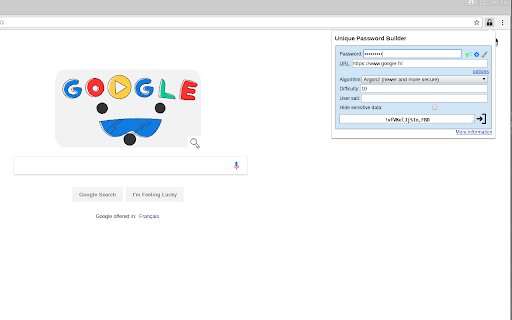
When you’re on a login page, click on the lock icon, then type your master password. When finished, a password for that login page has been generated. You can then click on the icon on the right or press enter to paste it into clipboard, then just paste it in the login form. For each website, the generated password is different.

The master password is hashed a large number of time with the domain’s site generating an unique password for that site. Hashing algorithm is scrypt (which is memory resistant).

Note that your master password should be strong (more than 10 characters in lower and upper case, numbers and special characters). Using simple password makes brute force attack easier.

Other password tools (LastPass, KeyPass, etc) usually stores websites passwords into a encrypted database.
The drawback of that approach is that the database needs to be synced between all of your devices.
UniquePasswordBuilder doesn’t uses a central database because it recomputes your password each time.
For increased security, you can set a `user salt`, which make it even more resilient against rainbow table attacks.

You can use CTRL + SHIFT + L to open the addon.

That addon is free software and you can study the source code here : https://github.com/paulgreg/UniquePasswordBuilder
You’ll find further information on the project home page : https://paulgreg.me/UniquePasswordBuilder/
Technical
- Version
- 1.1.6
- Manifest
- V3
- Size
- 685KiB
- Min Chrome
- 88
- Languages
- 1
- Featured
- Yes
Metadata
- ID
- egilgkfibealmbllcigihfhglhipnmie
- Developer ID
- u0f137e54ceb904bd7e75f9d90a0deb43
- Developer Email
- [email protected]
- Created
- Aug 21, 2016
- Last Updated (Store)
- May 31, 2024
- Last Scraped
- Jun 2, 2026
- Website
- —
- Privacy Policy
- —
Similar extensions
Alternatives to UniquePasswordBuider, ranked by description similarity.

Robust Password & Passphrase
Gives Robust Password & Passphrase
34
★ 3.7

SecurePZ - One Click Password Generator
Easily create complex and secure passwords and copy it to the clipboard with one click.
25
★ 5.0

LessPass
chrome and firefox web extension for lesspass password manager
4.0K
★ 4.8

Password Generator
Generate strong passwords with one click!
—

Random password generator
Simple tool to generate strong and secure passwords.
10.0K
★ 4.1

GetMyPassword - Create Strong, Random Passwords Instantly
Fast and simple Chrome extension with an on-page widget for generating strong, random passwords directly in website forms
93
★ 5.0

Password Generator
Simple tool for generating strong and secure passwords.
3

Tough Password
Password generation and insertion
4
★ 5.0
Data sourced from the Chrome Web Store · last verified Jun 2, 2026.