
Markdown Browser
Read, write, and organize local markdown files. Full-text search, in-browser editor, hot reload — 100% offline & private.
As of June 2026, Markdown Browser has 4 users and a 5.00/5 rating from 3 reviews in the Productivity category.
Usersno change0%
4
4
Ratingno change0%
5.00
3 reviews
Reviewsno change0%
3
Version
2.0.0
Manifest V3
90-day change · In the last 90 days this extension 1 version update.
History
3 snapshotsTracking since May 21, 2026.
View as table
| Date | Users | Rating | Reviews | Version |
|---|---|---|---|---|
| May 21, 2026 | — | — | — | 1.0.0 |
| Jun 3, 2026 | — | — | — | 1.0.0 |
| Jun 9, 2026 | 2 | — | — | 1.0.0 |
| Now | 4 | 5.00 | 3 | 2.0.0 |
Changelog
- Jun 9, 2026description
Markdown Browser is a Chrome extension for reading local markdown files — fast, private, and fully offline.

 Open any folder from your file system and browse your markdown files with a clean sidebar. Files auto-refresh when you save in your editor, so you always see the latest version without reloading.

  Features:
  • Sidebar file tree with collapsible folders and live filter
  • Full-text search across all files with ⌘K
  • Table of contents with scroll-spy highlighting
  • Syntax highlighting for code blocks
  • Front matter (YAML metadata) display
  • Light and dark mode
  • Resizable sidebar, adjustable font size, reading width, and font family
  • Recent files history

  No account required. No data ever leaves your machine. Works entirely offline.
Markdown Browser is a powerful Chrome extension for working with local markdown files. Open any folder and instantly browse, read, edit, and manage your .md files with a clean, distraction-free interface. No account required. No data ever leaves your machine. Works entirely offline.

✏️ IN-BROWSER EDITOR
Edit any file directly — no external app needed. Press ⌘E to enter edit mode, make your changes, and save with ⌘S. Your edits are written back to the original file instantly.

📁 FILE MANAGEMENT
Create new markdown files from the sidebar with the + button. Delete files with a single click. All file operations require your explicit permission through Chrome's built-in security dialog.

🔍 FIND & REPLACE
Press ⌘F in the editor to search and replace text. Navigate matches with the arrow buttons, replace one at a time or replace all at once.

📄 EXPORT TO PDF
Click the PDF button in the file breadcrumb for a clean, print-ready export.

🔎 FULL-TEXT SEARCH
Press ⌘K to open the command palette — search file names and file content across your entire folder instantly. Results appear as you type.

⚡ HOT RELOAD
Toggle Live in the header. While active, the viewer auto-refreshes whenever you save a file in an external editor — perfect for live previewing as you write.

📚 RICH MARKDOWN RENDERING
Full GitHub Flavored Markdown — tables, task lists, front matter, fenced code blocks. Syntax highlighting for all programming language files. Table of contents with scroll-spy highlighting.

🎨 CUSTOMISABLE READING EXPERIENCE
Resizable sidebar, adjustable font size, reading width, and font family. Light and dark mode — toggle in the header, preference saved. Recent files history.

🔒 PRIVACY FIRST
No account required. No data ever leaves your machine. Zero network requests. Works entirely offline. Read and write access to your files is granted only through Chrome's built-in permission dialog, and only when you initiate an action that requires it.

This App was built by abhikuchbhi.in and it's completely open-source and free.
Copy ideas freely. Credit generously :)
- Jun 9, 2026short_description
Read and organize local markdown files with sidebar navigation, full-text search, and hot reload.
Read, write, and organize local markdown files. Full-text search, in-browser editor, hot reload — 100% offline & private.
Permissions & access
- Permissions
- storagetabs
- Host access
- None declared
Screenshots


About
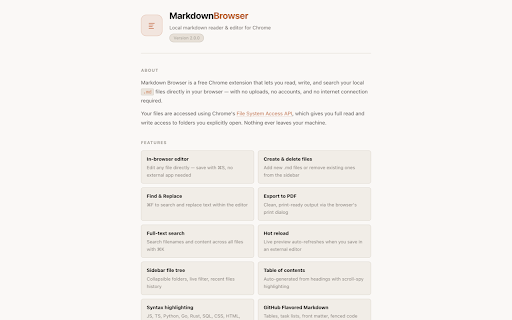
Markdown Browser is a powerful Chrome extension for working with local markdown files. Open any folder and instantly browse, read, edit, and manage your .md files with a clean, distraction-free interface. No account required. No data ever leaves your machine. Works entirely offline.

✏️ IN-BROWSER EDITOR
Edit any file directly — no external app needed. Press ⌘E to enter edit mode, make your changes, and save with ⌘S. Your edits are written back to the original file instantly.

📁 FILE MANAGEMENT
Create new markdown files from the sidebar with the + button. Delete files with a single click. All file operations require your explicit permission through Chrome's built-in security dialog.

🔍 FIND & REPLACE
Press ⌘F in the editor to search and replace text. Navigate matches with the arrow buttons, replace one at a time or replace all at once.

📄 EXPORT TO PDF
Click the PDF button in the file breadcrumb for a clean, print-ready export.

🔎 FULL-TEXT SEARCH
Press ⌘K to open the command palette — search file names and file content across your entire folder instantly. Results appear as you type.

⚡ HOT RELOAD
Toggle Live in the header. While active, the viewer auto-refreshes whenever you save a file in an external editor — perfect for live previewing as you write.

📚 RICH MARKDOWN RENDERING
Full GitHub Flavored Markdown — tables, task lists, front matter, fenced code blocks. Syntax highlighting for all programming language files. Table of contents with scroll-spy highlighting.

🎨 CUSTOMISABLE READING EXPERIENCE
Resizable sidebar, adjustable font size, reading width, and font family. Light and dark mode — toggle in the header, preference saved. Recent files history.

🔒 PRIVACY FIRST
No account required. No data ever leaves your machine. Zero network requests. Works entirely offline. Read and write access to your files is granted only through Chrome's built-in permission dialog, and only when you initiate an action that requires it.

This App was built by abhikuchbhi.in and it's completely open-source and free.
Copy ideas freely. Credit generously :)
Technical
- Version
- 2.0.0
- Manifest
- V3
- Size
- 40.33KiB
- Min Chrome
- 88
- Languages
- 1
- Featured
- No
Metadata
- ID
- egadnmmhblnmjphmjfblgijjhcfofghe
- Developer ID
- u17d627236ead4d307d324f134b3e9d35
- Developer Email
- [email protected]
- Created
- May 20, 2026
- Last Updated (Store)
- Jun 6, 2026
- Last Scraped
- Jun 9, 2026
- Website
- —
- Privacy Policy
- https://markdownbrowser.abhikuchbhi.in/privacy.html
Data sourced from the Chrome Web Store · last verified Jun 9, 2026.