
Admin Assist
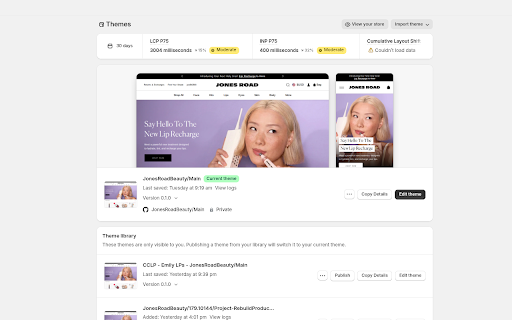
Native 'Copy Details' button for Shopify Themes.
As of June 2026, Admin Assist has — users and a 5.00/5 rating from 1 reviews in the Productivity category.
Usersno change0%
—
—
Ratingno change0%
5.00
1 reviews
Reviewsno change0%
1
Version
1.2
Manifest V3
90-day change · In the last 90 days this extension 2 version updates, changed permissions.
History
9 snapshotsTracking since Apr 14, 2026.
View as table
| Date | Users | Rating | Reviews | Version |
|---|---|---|---|---|
| Apr 14, 2026 | 2 | — | — | 1.0 |
| Apr 22, 2026 | 2 | — | — | 1.0 |
| Apr 26, 2026 | 4 | 5.00 | 1 | 1.1 |
| May 4, 2026 | 2 | 5.00 | 1 | 1.1 |
| May 9, 2026 | — | 5.00 | 1 | 1.2 |
| May 20, 2026 | 2 | 5.00 | 1 | 1.2 |
| May 27, 2026 | 3 | 5.00 | 1 | 1.2 |
| Jun 3, 2026 | — | 5.00 | 1 | 1.2 |
| Jun 9, 2026 | 2 | 5.00 | 1 | 1.2 |
| Now | — | 5.00 | 1 | 1.2 |
Changelog
- Apr 22, 2026description
Admin Assist is a lightweight productivity utility designed specifically for Shopify developers and store managers. Stop digging through URL strings or theme settings just to find a Theme ID or a preview link.

Key Features:
Native Integration: Adds a seamless "Copy Details" button directly into your Shopify Themes dashboard using the native Polaris design.
Instant Metadata: Grab the Theme ID, Theme Name, Preview Link, and GitHub Branch in a single click.
Developer-First: Perfect for sharing preview links with clients or referencing Theme IDs in your local development environment (CLI).
Privacy-Focused: AdminFlow runs entirely in your browser. No data is collected, stored, or transmitted to external servers.

How to use:
Navigate to your Shopify Admin > Online Store > Themes.
Click the "Copy Details" button next to any theme.
Paste the formatted details anywhere you need them!
Admin Assist: The Shopify Theme Shortcut
Stop digging through URL strings and settings. Admin Assist is a lightweight productivity tool designed for Shopify developers and store managers who need theme data instantly.

Why use Admin Assist?
One-Click Metadata: Adds a "Copy Details" button directly to your Shopify Themes page. Instantly copy the Theme ID, Name, Preview URL, and GitHub branch in one go.

Smarter Preview Links: Automatically detects your store's primary domain so preview links look professional—no more messy myshopify.com URLs for your clients.

Clean Up Your UI: Tired of seeing "Publish" buttons on every draft theme? Use the extension popup to hide them and reduce dashboard clutter.

Built for Developers: Perfect for sharing quick preview links in tickets, Slack, or local CLI tooling.

How it Works:
Navigate to Online Store → Themes in your Shopify Admin.

Click Copy Details on any theme row.

Paste the formatted info anywhere you need it.

Privacy First
Admin Assist runs entirely in your browser. We have no backend servers, and we never see your theme data or clipboard. Your settings are saved locally to your device.
- Apr 22, 2026host_permissions
https://admin.shopify.com/*, https://*.myshopify.com/*, https://online-store-web.shopifyapps.com/*
https://admin.shopify.com/store/*/themes*
- Apr 22, 2026permissions
clipboardWrite
clipboardWrite, storage
Permissions & access
- Permissions
- clipboardWritestorage
- Host access
- https://admin.shopify.com/store/*/themes*
Screenshots

About
Admin Assist: The Shopify Theme Shortcut
Stop digging through URL strings and settings. Admin Assist is a lightweight productivity tool designed for Shopify developers and store managers who need theme data instantly.

Why use Admin Assist?
One-Click Metadata: Adds a "Copy Details" button directly to your Shopify Themes page. Instantly copy the Theme ID, Name, Preview URL, and GitHub branch in one go.

Smarter Preview Links: Automatically detects your store's primary domain so preview links look professional—no more messy myshopify.com URLs for your clients.

Clean Up Your UI: Tired of seeing "Publish" buttons on every draft theme? Use the extension popup to hide them and reduce dashboard clutter.

Built for Developers: Perfect for sharing quick preview links in tickets, Slack, or local CLI tooling.

How it Works:
Navigate to Online Store → Themes in your Shopify Admin.

Click Copy Details on any theme row.

Paste the formatted info anywhere you need it.

Privacy First
Admin Assist runs entirely in your browser. We have no backend servers, and we never see your theme data or clipboard. Your settings are saved locally to your device.
Technical
- Version
- 1.2
- Manifest
- V3
- Size
- 16.56KiB
- Min Chrome
- 88
- Languages
- 1
- Featured
- No
Metadata
- ID
- efnpbhdofddhdkieeilgndmbfpkikbpn
- Developer ID
- u7032f8e88eb06874cf4136d20669bd70
- Developer Email
- [email protected]
- Created
- Apr 11, 2026
- Last Updated (Store)
- May 3, 2026
- Last Scraped
- Jun 9, 2026
- Website
- —
- Support URL
- —
- Privacy Policy
- —
Data sourced from the Chrome Web Store · last verified Jun 9, 2026.