
Loudly – Audio Amplifier
Boost audio volume beyond 100% on any tab. Simple, fast, and privacy-friendly sound amplifier.
As of June 2026, Loudly – Audio Amplifier has 7 users in the Productivity category.
Usersup 75.0 percent+75.0%
7
7
Ratingno change0%
—
— reviews
Reviewsno change0%
—
Version
1.12.0
Manifest V3
History
6 snapshotsTracking since Apr 16, 2026.
View as table
| Date | Users | Rating | Reviews | Version |
|---|---|---|---|---|
| Apr 16, 2026 | 4 | — | — | 1.12.0 |
| Apr 24, 2026 | 5 | — | — | 1.12.0 |
| May 1, 2026 | 8 | — | — | 1.12.0 |
| May 18, 2026 | 7 | — | — | 1.12.0 |
| May 24, 2026 | 5 | — | — | 1.12.0 |
| Jun 6, 2026 | 9 | — | — | 1.12.0 |
| Now | 7 | — | — | 1.12.0 |
Permissions & access
- Permissions
- activeTabstoragecontextMenus
- Host access
- <all_urls>
Screenshots



About
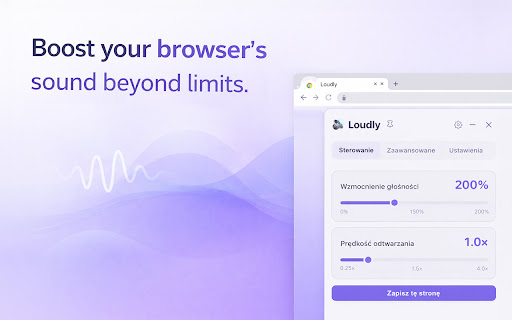
Loudly is a lightweight audio amplifier that gives you full control over volume and playback speed — on any website, any tab, any media element.

Some videos are too quiet. Some podcasts are barely audible. Some meetings need a volume boost. Loudly solves this with a clean, per-tab audio amplifier powered by the Web Audio API — boosting volume up to 500% beyond the browser's default limit.

✅ One purpose: amplify and control audio on any tab
🧩 Simple & powerful: volume boost, speed control, per-site memory, saved profiles
🔒 Privacy-first: no data collection, no analytics, no external requests

---

Key Features (at a glance)

* 🔊 Volume Boost up to 500% — amplify any tab's audio beyond the browser's default limit using the Web Audio API
* ⏩ Playback Speed Control — adjust speed from 0.25× to 4.0× for any media element
* 💾 Per-Site Memory — automatically remember your volume and speed settings for each website
* 📌 Save Up to 10 Sites — quick-access saved site configurations with one-click restore
* 🎨 Dark & Light Themes — choose your preferred theme or follow system settings
* 📌 Pin to Page — pin the popup as a draggable overlay on any page for quick access
* 🌍 7 Languages — automatic browser language detection with full UI translations
* ♿ Keyboard-Friendly — accessible controls with proper ARIA attributes
* 🖱️ Right-Click Context Menu — boost audio or reset volume from the context menu without opening the popup (can be toggled in Settings)

---

What Loudly Helps You Do

🔊 Boost Audio Beyond 100%

Overcome quiet audio on any website without touching system volume.

* Amplify any tab's audio from 0% to 500%
* Uses the Web Audio API for clean, distortion-aware amplification
* Works on YouTube, podcasts, meetings, courses — any HTML5 media

---

⏩ Control Playback Speed

Watch and listen at your own pace.

* Adjust speed from 0.25× to 4.0× for any media element
* Speed and volume controls work independently
* Per-site settings persist across sessions

---

💾 Save & Restore Per-Site Settings

Set it once, forget about it — Loudly remembers your preferences.

* Automatic per-site memory for volume and speed
* Save up to 10 site configurations for quick access
* One-click restore from the saved sites list

---

🔧 Right-Click Quick Actions

Access audio controls from any page without opening the full popup.

* Boost audio on this tab — instantly amplify the current tab
* Reset audio — return volume and speed to defaults
* Can be toggled on/off in Settings

---

📌 Pin & Drag Overlay

Keep Loudly accessible without opening the popup every time.

* Pin as a floating overlay on any page
* Drag it anywhere on the screen
* Toggle with the toolbar icon

---

Designed for Clarity (Not Feature Bloat)

Loudly does one thing well: give you control over audio volume and playback speed.

* ✨ Clean, compact popup — minimal footprint
* ⚡ Lightweight — no performance impact
* 🧠 Intuitive slider controls with clear labels
* 🔁 Works across SPA navigation without reloads
* 🌍 Available in 7 languages

---

Privacy & Data

Loudly does not:

* collect personal data
* track your browsing behavior
* run analytics or profiling
* make any network requests
* contact any external servers

It works entirely locally in your browser. All settings are stored in `chrome.storage.local` and never leave your device.
Technical
- Version
- 1.12.0
- Manifest
- V3
- Size
- 45.88KiB
- Min Chrome
- 88
- Languages
- 7
- Featured
- No
Metadata
- ID
- efnnabpifobceimhbabjmiakbgogfnoh
- Developer ID
- uf2f091b9ae469b29a492aa2ccbc4704a
- Developer Email
- [email protected]
- Created
- Feb 24, 2026
- Last Updated (Store)
- Mar 11, 2026
- Last Scraped
- Jun 6, 2026
- Website
- —
- Support URL
- https://polprog.pl/
- Privacy Policy
- https://polprog.pl/apps/Loudly/privacy_policy/index.html
Similar extensions
Alternatives to Loudly – Audio Amplifier, ranked by description similarity.

Volume Booster
Boost tab volume up to 600%
3

UltraVolume - Sound Amplifier
Boost web audio volume beyond system limits with advanced equalizer and audio enhancement features
216

Volume Booster - Audio Amplifier
Supercharge your browser audio up to 600% with deep bass enhancement and EQ presets. Perfect for YouTube, Twitch, Netflix & more.
38
★ 5.0

SoundBoost Pro
Boost volume up to 300% and enhance audio with EQ on any website. Click to activate.
79
★ 5.0

Volume Booster Pro
Advanced volume booster with voice boost, bass boost, and per-tab control up to 800%
109
★ 5.0

Volume Booster 6X - Increase Sound
Volume Booster 6x helps you amplify sound of videos playing in your browser
132
★ 4.7

Ultimate Volume Booster
The Ultimate Volume Booster: Boost any tab's audio up to 1000% with premium clarity, safe boost protection, and per-site memory.
178
★ 5.0

SoundBlast — Volume Booster Pro
Boost volume up to 600%. Bass, Lo-Fi, Reverb, EQ modes. Works on YouTube, Netflix, Twitch, every site.
167
★ 5.0
Data sourced from the Chrome Web Store · last verified Jun 6, 2026.