
AWS Account Color Overlay
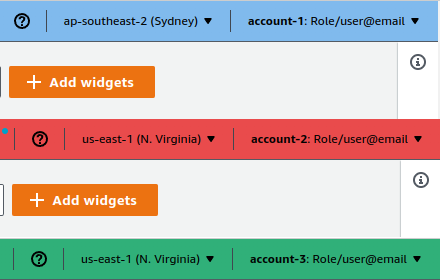
Displays current AWS account ID & region as an overlay. Prevents misoperations with custom names, colors & dynamic border.
As of June 2026, AWS Account Color Overlay has 13 users in the Developer Tools category.
Usersdown 7.1 percent−7.1%
13
13
Ratingno change0%
—
— reviews
Reviewsno change0%
—
Version
2.1.2
Manifest V3
History
10 snapshotsTracking since Apr 1, 2026.
View as table
| Date | Users | Rating | Reviews | Version |
|---|---|---|---|---|
| Apr 1, 2026 | 14 | — | — | 2.1.2 |
| Apr 16, 2026 | 15 | — | — | 2.1.2 |
| Apr 22, 2026 | 14 | — | — | 2.1.2 |
| Apr 27, 2026 | 13 | — | — | 2.1.2 |
| May 4, 2026 | 12 | — | — | 2.1.2 |
| May 10, 2026 | 17 | — | — | 2.1.2 |
| May 15, 2026 | 13 | — | — | 2.1.2 |
| May 21, 2026 | 16 | — | — | 2.1.2 |
| May 28, 2026 | 13 | — | — | 2.1.2 |
| Jun 9, 2026 | 14 | — | — | 2.1.2 |
| Now | 13 | — | — | 2.1.2 |
Permissions & access
- Permissions
- activeTabstorage
- Host access
- None declared
Screenshots


About
AWS Account Color Overlay: Enhance Your AWS Console Safety & Clarity

Short Description:
Prevent misoperations in the AWS console! This extension displays the current AWS account ID and region as an overlay, making it visually easy to identify. Customize account names and colors for each account, and dynamically change the browser border. Supports safe and comfortable AWS operations.

Support my work: https://buymeacoffee.com/masayuki

Full Description:

Never operate in the wrong AWS account or region again! The AWS Account Color Overlay is an essential Chrome extension designed to enhance your operational safety and clarity within the AWS Management Console.

KEY FEATURES:

- Clear Account & Region Overlay: Instantly see the current AWS account ID and region displayed prominently as a customizable overlay on every console page.
- Dynamic Browser Border: The browser's top border dynamically changes color based on the active AWS account, providing an immediate visual cue of your environment.
- Custom Account Mappings: Assign friendly names and specific colors to your AWS account IDs. No more memorizing numbers – see "Production," "Development," or "Staging" at a glance.
- Flexible Color Logic:
  - Automatically detect and use AWS's native dynamic header colors.
  - Override with your custom mapped colors for specific accounts.
  - Set a fallback background color for the overlay when dynamic or mapped colors aren't available.
- Overlay Customization: Tailor the overlay's appearance to your preference:
  - Adjust background color and opacity.
  - Choose from various font families (including popular Japanese web fonts like Kaisei Opti, Sawarabi Mincho, etc.).
  - Set font size and color.
  - Drag and drop the overlay to your preferred screen position.
- Border Width Control: Adjust the thickness of the dynamic browser border.

BENEFITS:

- Prevent Costly Mistakes: Drastically reduce the risk of making changes in the wrong AWS account or region.
- Improved Focus & Efficiency: Quickly identify your working environment, allowing you to focus on your tasks without constant double-checking.
- Personalized Experience: Customize visual cues to match your team's conventions or personal preferences.
- Seamless Integration: Works in the background, providing critical information without disrupting your workflow.

HOW IT WORKS:
The extension intelligently detects your active AWS console session. Based on your configured mappings and AWS's dynamic styling, it renders a clear, customizable overlay and a colored border to keep you informed.
To ensure minimal interference with the AWS console's existing elements, this extension uses uniquely prefixed IDs for all its injected elements. All such IDs utilize the unique prefix `kuwa4Vz8NYIx-`. This design prevents conflicts with AWS's native DOM structure.

Get started today and bring a new level of safety and clarity to your AWS console experience!

DISCLAIMER

This extension is not an official AWS product. Use of this extension is at your own risk. The developer assumes no responsibility for any direct or indirect damages or issues arising from the use of this extension. Please exercise caution when configuring and operating your AWS accounts.
Technical
- Version
- 2.1.2
- Manifest
- V3
- Size
- 34.26KiB
- Min Chrome
- 88
- Languages
- 2
- Featured
- No
Metadata
- ID
- efnbododalknkbkeeoipjnbgpodgcedb
- Developer ID
- u28bfb667fb09636d6e3e83f084880d52
- Developer Email
- [email protected]
- Created
- Oct 30, 2025
- Last Updated (Store)
- Mar 8, 2026
- Last Scraped
- Jun 9, 2026
- Website
- —
- Support URL
- —
- Privacy Policy
- https://pp.mkuwamura.com/
Similar extensions
Alternatives to AWS Account Color Overlay, ranked by description similarity.

AWS Peacock Management Console
Browser Extension to change color of AWS Management Console, by Account ID
2.0K
★ 4.6

Prod Guard
Adds a warning banner for specific AWS account numbers
14
★ 5.0

AWS Console Bar
Increase your productivity in AWS Console with aws-console-bar Chrome Extension
40
★ 5.0

AWS Account Labeler
Customize and display labels for different AWS accounts directly on the AWS console.
40
★ 5.0

Extension for AWS IAM Identity Center (AWS SSO)
This extension is for AWS IAM Identity Center, formerly known as AWS Single Sign-On (AWS SSO).
61

AWS Masking
Enhance your security by auto-hiding sensitive information on AWS Management Console.
437
★ 5.0

AWS Account ID Mapper
Map AWS Account ID in AWS Console, multi-session pages & browser tab with a friendly name, shortcutname and color
52
★ 5.0
AWS SSO Colourise
Change the AWS navbar colour based on account (and a few other little niceties)
26
★ 5.0
Data sourced from the Chrome Web Store · last verified Jun 9, 2026.