
ticketing.events - sell event tickets online
Ticketing.events enables anyone to create events and sell tickets online and on mobile.
As of June 2026, ticketing.events - sell event tickets online has 196 users and a 5.00/5 rating from 8 reviews.
Usersdown 13.3 percent−13.3%
196
196
Ratingno change0%
5.00
8 reviews
Reviewsno change0%
8
Version
1.0.0.5
Manifest V2
History
3 snapshotsTracking since Apr 23, 2026.
View as table
| Date | Users | Rating | Reviews | Version |
|---|---|---|---|---|
| Apr 23, 2026 | 226 | 5.00 | 8 | 1.0.0.5 |
| May 12, 2026 | 214 | 5.00 | 8 | 1.0.0.5 |
| Jun 7, 2026 | 209 | 5.00 | 8 | 1.0.0.5 |
| Now | 196 | 5.00 | 8 | 1.0.0.5 |
Permissions & access
- Permissions
- None declared
- Host access
- None declared
Screenshots

About
For event organizers who sell tickets online, Ticketing.events provides a simple, modern, and affordable platform for creating events, collecting payment, issuing QR Code e-tickets, and managing attendees.

Creating Events:
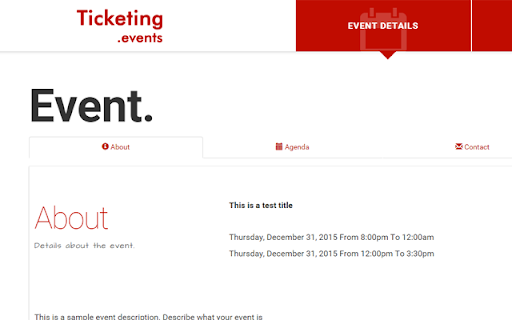
With Ticketing.events, anyone can create and publish beautiful event web pages that work well on mobile devices.

Events created can be for any type of event. For example Charity, Free Admission, Paid-for etc.

Charging For Events:
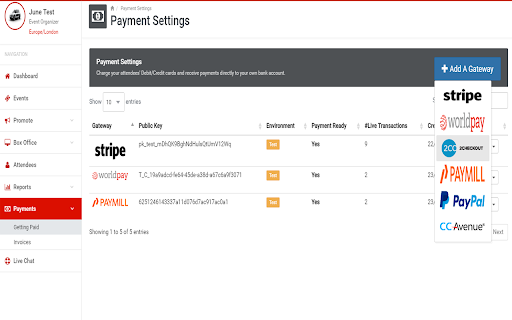
For tickets that require payment, event organizers can choose to use payment gateways such as Stripe, PayPal, Apple Pay, Google Pay, Square, Alipay, Wechat Pay, PayUMoney, PayU, Giropay, Blik, Bancontact, GrabPay, CashApp, Przelewy24, EPS, iDEAL, FPX, and AsiaPay (PayDollar, SiamPay, PesoPay).

You can also sell tickets at the door using POS integration via Stripe and Square.

Money earned from the ticket sales are INSTANTLY deposited to the payment gateway account that was used to charge the buyer's credit or debit card.


Issuing Tickets:
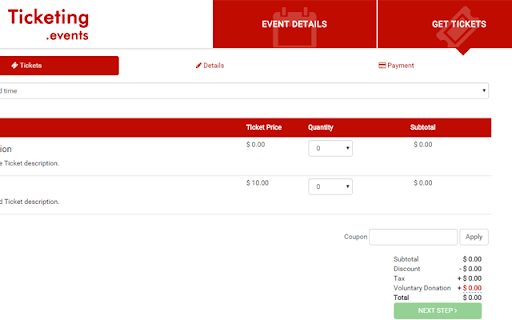
Ticketing.events, makes it easy to issue unique QR code e-tickets that are sent via email, can be saved on Passbook or Wallet, or even be printed. Alternatively, tickets can be saved onto NFC Tags.

A free iOS and Android app is available for scanning and validating these QR codes and NFC tickets.

Managing Attendees:
Event organizers are able to view attendee details such as names, email addresses and mobile numbers. Attendee details can also be imported or exported to CSV files.

Communicating with the attendees can be done via scheduled emails.

You can elevate the attendee experience by creating NFC passes for access to exclusive privileges, and NFC vCard badges for networking and contact sharing.

Integration:
Integrate your account with Mailchimp, Campaign Monitor, Constant Contact, Google Sheets, Zapier, or Excel Online. Attendees names and email addresses will be added to the integrated platform automatically.

Reports:
- View ticket sales and revenue reports
- View checked-in attendee data. Also includes non-attendance data.
- Generate visualization reports in Power BI or Looker Studio.

Notifications:
Push, webhook, Google Chat and Microsoft Team notifications for many configurable custom conditions such as ticket sales, ticket validation, etc.

Our Charges:
- Free Admission or Charity events are free of charge.
- Paid-for events only get charged USD $1 per ticket regardless of the ticket price or quantity sold.

Website - https://ticketing.events/
Technical
- Version
- 1.0.0.5
- Manifest
- V2
- Size
- 20.14KiB
- Min Chrome
- —
- Languages
- 26
- Featured
- No
Metadata
- ID
- eflomkaokodlcbgfnkinialekfceeopj
- Developer ID
- u6082ea43009843a4643737b1e284f7ce
- Developer Email
- [email protected]
- Created
- Sep 18, 2015
- Last Updated (Store)
- Jan 17, 2024
- Last Scraped
- Jun 7, 2026
- Website
- https://ticketing.events/
- Support URL
- https://ticketing.events/#contact
- Privacy Policy
- —
Similar extensions
Alternatives to ticketing.events - sell event tickets online, ranked by description similarity.

Ticketing.events Event & Attendee Management
Ticketing.events enables anyone to create events, sell tickets and manage attendees.
—

Eventjoy: Free event ticketing & registration
Eventjoy is the easiest way to organize an event. Sell tickets online for free -- even for paid events!
228
★ 5.0

Boss Hub | Event
BossHub Event | Sidebar, A multi-vendor event ticket booking platform
9

My events
My events is a free online event management application with QR code (Checkin/Checkout) and Paypal payment support
24

ProTickets Market Tracker
Real-time ticket insights across 20+ platforms. Presale codes, Price HeatMap & Monitors.
56
★ 5.0

Datemark - Extract Events from Web Pages with AI
AI-powered tool to automatically extract events from any webpage and add them to Google Calendar in seconds.
12
★ 4.6

Tixpy - Compare All-in Ticket Prices
Instantly compare all-in ticket prices across resale sites.
312
★ 5.0

LineUpr - Mobile Event Apps
Create a mobile event app for your festival, conference or any other kind of event. Communicate with your attendees.
7
★ 5.0
Data sourced from the Chrome Web Store · last verified Jun 7, 2026.