
Relocantly Autofill
Autofill job application forms from your Relocantly profile. You review and submit — nothing is sent automatically.
As of July 2026, Relocantly Autofill has — users in the Productivity category.
Usersno change0%
—
—
Ratingno change0%
—
— reviews
Reviewsno change0%
—
Version
1.0.0
Manifest V3
History
1 snapshotsTracking since Jul 18, 2026.
Not enough history yet for this metric — the chart fills in as we collect more snapshots.
View as table
| Date | Users | Rating | Reviews | Version |
|---|---|---|---|---|
| Jul 18, 2026 | — | — | — | 1.0.0 |
| Now | — | — | — | 1.0.0 |
Permissions & access
- Permissions
- storageactiveTabscripting
- Host access
- https://relocantly.com/*
Screenshots


About
Relocantly Autofill fills job-application forms for you — your name, email, phone and links —
straight from your Relocantly profile, so you apply in seconds instead of retyping the same details
on every employer's site.

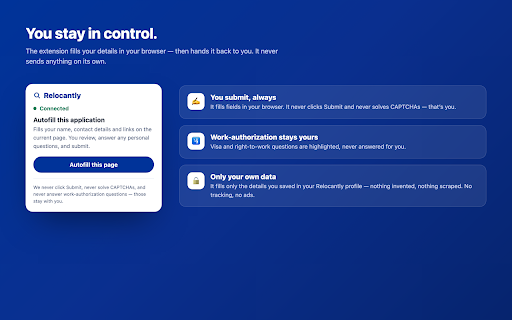
You stay in control at every step:
• It fills fields only when you click "Autofill" — never automatically, never in the background.
• It NEVER clicks Submit, and never solves CAPTCHAs.
• Work-authorization and visa-sponsorship questions are highlighted for you to answer — the
  extension never answers them for you.
• Your CV upload is highlighted so you can attach it — the extension can't and won't upload files.

How it works:
1. Install the extension and connect it to your Relocantly account (one click, no password leaves the page).
2. On any application form, click the Relocantly icon → Autofill this page.
3. Review everything, answer any personal questions, and submit.

Privacy: the extension only ever fills the details you saved in your own Relocantly profile. It does
not track your browsing, contains no analytics or ads, and makes network requests only to
relocantly.com to fetch your own profile. Full policy: https://relocantly.com/extension/privacy

You'll need a free Relocantly account (relocantly.com).
Technical
- Version
- 1.0.0
- Manifest
- V3
- Size
- 21.06KiB
- Min Chrome
- 88
- Languages
- 1
- Featured
- No
Metadata
- ID
- effmeaeaappnckcjbkhjdpaiohigcmhh
- Developer ID
- u7a6c5a8b7d6d89a6bc2dbf13e5fc2b03
- Developer Email
- [email protected]
- Created
- Jul 17, 2026
- Last Updated (Store)
- Jul 17, 2026
- Last Scraped
- Jul 18, 2026
- Website
- —
- Support URL
- —
- Privacy Policy
- https://relocantly.com/extension/privacy
Data sourced from the Chrome Web Store · last verified Jul 18, 2026.