
UniSave
Save anything from the web — YouTube, Instagram, Reddit, X, Pinterest and more. Organize with collections and tags.
As of June 2026, UniSave has 5 users and a 5.00/5 rating from 2 reviews in the Productivity category.
Usersup 400.0 percent+400.0%
5
5
Ratingno change0%
5.00
2 reviews
Reviewsup 100.0 percent+100.0%
2
Version
2.0.3
Manifest V3
90-day change · In the last 90 days this extension 1 version update.
History
3 snapshotsTracking since May 30, 2026.
View as table
| Date | Users | Rating | Reviews | Version |
|---|---|---|---|---|
| May 30, 2026 | 1 | 5.00 | 1 | 2.0.1 |
| Jun 5, 2026 | 1 | 5.00 | 1 | 2.0.1 |
| Jun 12, 2026 | 2 | 5.00 | 2 | 2.0.1 |
| Now | 5 | 5.00 | 2 | 2.0.3 |
Permissions & access
- Permissions
- contextMenusactiveTabscriptingstoragenotificationstabs
- Host access
- <all_urls>, http://localhost:5173/*, https://unisave.onrender.com/*, https://unisave-unkd.onrender.com/*
Screenshots

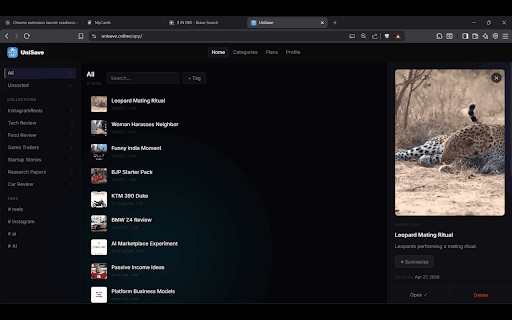

About
UniSave is your personal web clipper for the modern internet.

Save links from anywhere — YouTube videos, Instagram posts, Reddit threads, X/Twitter posts, Pinterest pins, or any website — and access them all in one clean dashboard.

—— WHAT YOU CAN SAVE ——
- YouTube videos
- Instagram posts and reels
- Reddit threads
- X / Twitter posts
- Pinterest pins
- Any website or article

—— FEATURES ——
- One-click saving from any tab
- Smart AI titles — messy captions cleaned up automatically
- AI Summarize — get a quick summary of any saved item
- Organize with Collections and Tags
- Works with your UniSave account across Chrome, Android & iOS
- See which account you're saving to in the popup
- Right-click any page to save instantly
- Dashboard at unisave.online to view everything

—— HOW IT WORKS ——
1. Install the extension
2. Sign up free at unisave.online
3. Click the UniSave icon on any page to save it
4. View and organize everything at unisave.online

Free to use. No ads. Your data stays yours.
Technical
- Version
- 2.0.3
- Manifest
- V3
- Size
- 52.85KiB
- Min Chrome
- 88
- Languages
- 1
- Featured
- No
Metadata
- ID
- eeipijafkhhlgblhljkpkmkhmhbpfpdj
- Developer ID
- u6af2b1f6447e6301f05ea336de42ef65
- Developer Email
- [email protected]
- Created
- May 2, 2026
- Last Updated (Store)
- Jun 12, 2026
- Last Scraped
- Jun 12, 2026
- Website
- —
- Support URL
- https://www.unisave.online/
- Privacy Policy
- https://www.unisave.online/privacy-policy.html
Data sourced from the Chrome Web Store · last verified Jun 12, 2026.