
Peek AI
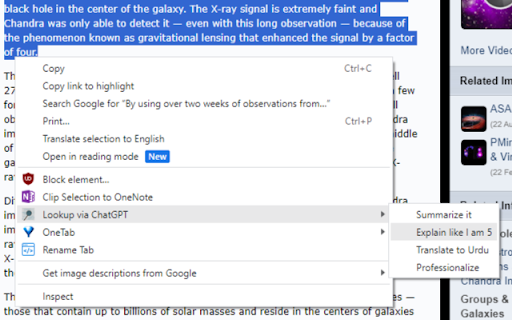
Look up selected text using ChatGPT using your own prompts and show the results on the same page
As of June 2026, Peek AI has 44 users and a 3.00/5 rating from 2 reviews in the Productivity category.
Usersup 4.8 percent+4.8%
44
44
Ratingno change0%
3.00
2 reviews
Reviewsno change0%
2
Version
1.73
Manifest V3
History
3 snapshotsTracking since Apr 23, 2026.
View as table
| Date | Users | Rating | Reviews | Version |
|---|---|---|---|---|
| Apr 23, 2026 | 42 | 3.00 | 2 | 1.73 |
| May 12, 2026 | 44 | 3.00 | 2 | 1.73 |
| Jun 7, 2026 | 51 | 3.00 | 2 | 1.73 |
| Now | 44 | 3.00 | 2 | 1.73 |
Permissions & access
- Permissions
- activeTabcontextMenusstoragescripting
- Host access
- https://api.openai.com/*
Screenshots


About
NOTE: You must have OpenAI API Key to use this extension.

1. Open options
2. Enter your API key
3. (optional) add custom prompts (have a look at the screenshots for inspiration).

Usage:
1. On any webpage select any text, right click and select a prompt. Result of the prompt will appear in a tiny pop-up which you can dismiss using the close (x) button.
2. Use reload (r) button to regenerate the result
3. Input text to ask further questions. NOTE: Only the first prompt and last message are kept in context whenever you ask further questions.
Technical
- Version
- 1.73
- Manifest
- V3
- Size
- 15.17KiB
- Min Chrome
- 88
- Languages
- 1
- Featured
- No
Metadata
- ID
- eehddkmcdpoojccopfpbcplffmcaffec
- Developer ID
- u0aced3610c419197436ca105a40589b1
- Developer Email
- [email protected]
- Created
- Nov 9, 2023
- Last Updated (Store)
- Jan 29, 2025
- Last Scraped
- Jun 7, 2026
- Website
- —
- Support URL
- https://github.com/SMUsamaShah/LookupChatGPT
- Privacy Policy
- —
Similar extensions
Alternatives to Peek AI, ranked by description similarity.

Prompt Selected
Run custom prompts on text in the browser. Create your AI helper for grammar fixes, summaries, and translations with an OpenAI key
29

Highlight2Prompt
Highlight any text → choose a prompt (Explain, Expand, Fact Check, or custom) → send it to your favorite AI
6

Cenvoy
Bring Your Own Agent right into your browser! Deploy a browser agent via context menu for tailored prompts and efficient workflow.
—

Prompt for Prompt - Prompt Optimizer
A browser extension that optimizes prompts for LLMs.
—

ChatGPT Context Menu
Select text and send it to OpenAI ChatGPT. Prepend prompts to add instructions or search.
72
★ 5.0

OneClickPrompts
One Click Prompts for AI chat interfaces
634
★ 5.0

Prompt It!
Run custom AI promptlets on any text.
11

WebNexus AI: Send Web, PDF, YouTube to AI
Extract content from any webpage, PDF, or YouTube video and send it to any AI platform.
39
★ 5.0
Data sourced from the Chrome Web Store · last verified Jun 7, 2026.