
YT Pair With Code
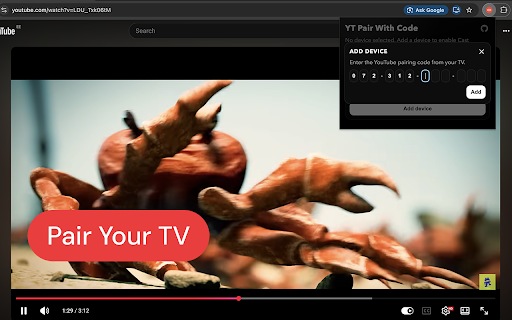
Pair your browser with YouTube TV using a pairing code and control playback as if you were casting.
As of June 2026, YT Pair With Code has — users in the Functionality & UI category.
Usersno change0%
—
—
Ratingno change0%
—
— reviews
Reviewsno change0%
—
Version
1.0.0
Manifest V3
History
1 snapshotsTracking since Jun 29, 2026.
Not enough history yet for this metric — the chart fills in as we collect more snapshots.
View as table
| Date | Users | Rating | Reviews | Version |
|---|---|---|---|---|
| Jun 29, 2026 | — | — | — | 1.0.0 |
| Now | — | — | — | 1.0.0 |
Permissions & access
- Permissions
- storagetabsscripting
- Host access
- https://www.youtube.com/*, https://music.youtube.com/*
Screenshots

About
On your TV, open YouTube and go to Settings → Watch on TV → Enter TV Code. You'll see a 12-character pairing code. Enter it in the extension popup, and the Cast button will appear in YouTube's player. From that point your browser acts as a remote: play, pause, seek, skip ads, and change volume all go directly to your TV.
Technical
- Version
- 1.0.0
- Manifest
- V3
- Size
- 68.18KiB
- Min Chrome
- 88
- Languages
- 1
- Featured
- No
Metadata
- ID
- eeehkcjnlggagaiflkjbbimcapcdcnjd
- Developer ID
- u597b1af85661acc83fec01c5c7290aaf
- Developer Email
- [email protected]
- Created
- Jun 28, 2026
- Last Updated (Store)
- Jun 28, 2026
- Last Scraped
- Jun 29, 2026
- Website
- —
Data sourced from the Chrome Web Store · last verified Jun 29, 2026.