
CleanShot
Turn any YouTube video into a publish-ready LinkedIn carousel in 30 seconds.
As of June 2026, CleanShot has 27 users and a 5.00/5 rating from 2 reviews in the Productivity category.
Usersup 68.8 percent+68.8%
27
27
Ratingno change0%
5.00
2 reviews
Reviewsup 100.0 percent+100.0%
2
Version
2.1.0
Manifest V3
90-day change · In the last 90 days this extension 1 version update, changed permissions.
History
9 snapshotsTracking since Apr 17, 2026.
View as table
| Date | Users | Rating | Reviews | Version |
|---|---|---|---|---|
| Apr 17, 2026 | 16 | 5.00 | 1 | 1.0.7 |
| Apr 24, 2026 | 22 | 5.00 | 2 | 1.0.7 |
| May 1, 2026 | 24 | 5.00 | 2 | 2.1.0 |
| May 8, 2026 | 21 | 5.00 | 2 | 2.1.0 |
| May 12, 2026 | 20 | 5.00 | 2 | 2.1.0 |
| May 18, 2026 | 19 | 5.00 | 2 | 2.1.0 |
| May 24, 2026 | 23 | 5.00 | 2 | 2.1.0 |
| May 31, 2026 | 25 | 5.00 | 2 | 2.1.0 |
| Jun 6, 2026 | 26 | 5.00 | 2 | 2.1.0 |
| Now | 27 | 5.00 | 2 | 2.1.0 |
Changelog
- Apr 24, 2026description
CleanShot for YouTube helps creators and learners capture key moments from videos without the clutter.

Key Features:
📸 Clean Capture: One-click screenshot without play bar, buttons, or ads.
⏱️ Smart Timestamp: Auto-save video title, time, and URL link.
📝 AI Prompt Gen: Instantly generate a structured prompt for ChatGPT/Claude to write LinkedIn posts.
📂 Local Storage: Your data stays in your browser. No login required.
📄 Export PDF: Save your insights as a clean report.

Perfect for:
- Content Creators (LinkedIn, Twitter/X)
- Students & Researchers
- Anyone who takes notes from YouTube

Start building your insight library today!
CleanShot turns any YouTube video into a publish-ready LinkedIn carousel in 30 seconds.

— No prompt writing. No copy-pasting. No ChatGPT gymnastics.
— One click, and you get a complete carousel: a contrarian hook, 7 insight slides, a CTA, and hashtags.
— Three pro-grade templates (Minimal Dark, Editorial Bold, Clean Light) with your profile automatically embedded.
— Download as PDF (for LinkedIn Document posts) or individual PNGs (for multi-image posts).

▸ HOW IT WORKS
1. Open any YouTube video with captions (TED Talks, podcasts, interviews work great).
2. Click "Generate Carousel" in the CleanShot side panel.
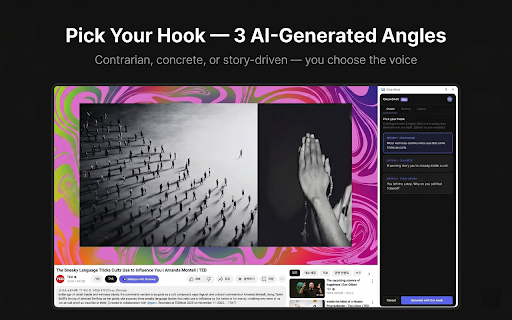
3. Claude AI extracts the transcript, identifies key insights, and gives you 3 hook variants to choose from.
4. Pick your favorite angle. Get a complete carousel in seconds.
5. Download the ZIP — it contains a ready-to-upload PDF, individual slide images, your post caption, and a "How to post" guide.

▸ WHAT'S INCLUDED
• One-Shot Generator — video to carousel in 30 seconds
• 3 Template Designs — Minimal Dark, Editorial Bold, Clean Light
• Brand Identity — your photo, name, and handle auto-embedded on every carousel
• Hook Variants — Claude suggests 3 different angles (contrarian, concrete, story-driven)
• Library — every carousel you generate, searchable and favoritable
• Capture Tools — quick screenshot and timestamp capture, with PDF export (legacy feature)
• AI Analysis — powered by Claude Haiku (insights) and Claude Sonnet (carousel copy)

▸ PRICING
• Free: 1 carousel (lifetime trial)
• Creator: $19/month — 30 carousels, all templates
• Pro: $49/month — unlimited carousels, brand voice, priority support

▸ PERFECT FOR
• LinkedIn ghostwriters
• B2B content creators
• Marketing professionals
• Founders and thought leaders
• Anyone who repurposes video content for social media

▸ PRIVACY
Your data is secure. Transcripts are processed by Anthropic's Claude AI (which does not use API inputs for training). See our full policy: https://thoopring.github.io/DwCanvas/privacy.html

▸ TERMS
https://thoopring.github.io/DwCanvas/terms.html

Questions? [email protected]
- Apr 24, 2026short_description
Capture clean screenshots without UI, save timestamps, and generate AI insights for LinkedIn.
Turn any YouTube video into a publish-ready LinkedIn carousel in 30 seconds.
- Apr 24, 2026name
CleanShot for YouTube: Capture & Insight
CleanShot
- Apr 24, 2026category
productivity/workflow
productivity/tools
- Apr 24, 2026host_permissions
*://*.youtube.com/*
*://*.youtube.com/*, https://cleanshot-api.thoopring.workers.dev/*
- Apr 24, 2026permissions
sidePanel, activeTab, storage, contextMenus
sidePanel, activeTab, storage, contextMenus, identity
Permissions & access
- Permissions
- sidePanelactiveTabstoragecontextMenusidentity
- Host access
- *://*.youtube.com/*, https://cleanshot-api.thoopring.workers.dev/*
Screenshots



About
CleanShot turns any YouTube video into a publish-ready LinkedIn carousel in 30 seconds.

— No prompt writing. No copy-pasting. No ChatGPT gymnastics.
— One click, and you get a complete carousel: a contrarian hook, 7 insight slides, a CTA, and hashtags.
— Three pro-grade templates (Minimal Dark, Editorial Bold, Clean Light) with your profile automatically embedded.
— Download as PDF (for LinkedIn Document posts) or individual PNGs (for multi-image posts).

▸ HOW IT WORKS
1. Open any YouTube video with captions (TED Talks, podcasts, interviews work great).
2. Click "Generate Carousel" in the CleanShot side panel.
3. Claude AI extracts the transcript, identifies key insights, and gives you 3 hook variants to choose from.
4. Pick your favorite angle. Get a complete carousel in seconds.
5. Download the ZIP — it contains a ready-to-upload PDF, individual slide images, your post caption, and a "How to post" guide.

▸ WHAT'S INCLUDED
• One-Shot Generator — video to carousel in 30 seconds
• 3 Template Designs — Minimal Dark, Editorial Bold, Clean Light
• Brand Identity — your photo, name, and handle auto-embedded on every carousel
• Hook Variants — Claude suggests 3 different angles (contrarian, concrete, story-driven)
• Library — every carousel you generate, searchable and favoritable
• Capture Tools — quick screenshot and timestamp capture, with PDF export (legacy feature)
• AI Analysis — powered by Claude Haiku (insights) and Claude Sonnet (carousel copy)

▸ PRICING
• Free: 1 carousel (lifetime trial)
• Creator: $19/month — 30 carousels, all templates
• Pro: $49/month — unlimited carousels, brand voice, priority support

▸ PERFECT FOR
• LinkedIn ghostwriters
• B2B content creators
• Marketing professionals
• Founders and thought leaders
• Anyone who repurposes video content for social media

▸ PRIVACY
Your data is secure. Transcripts are processed by Anthropic's Claude AI (which does not use API inputs for training). See our full policy: https://thoopring.github.io/DwCanvas/privacy.html

▸ TERMS
https://thoopring.github.io/DwCanvas/terms.html

Questions? [email protected]
Technical
- Version
- 2.1.0
- Manifest
- V3
- Size
- 202KiB
- Min Chrome
- 88
- Languages
- 1
- Featured
- No
Metadata
- ID
- edmcmaccinkbibcbafabojdiaadnejbd
- Developer ID
- uac79a7a10a1ad6ecd29e4313d58b4548
- Developer Email
- [email protected]
- Created
- Feb 11, 2026
- Last Updated (Store)
- Apr 21, 2026
- Last Scraped
- Jun 6, 2026
- Website
- —
- Support URL
- —
- Privacy Policy
- https://thoopring.github.io/DwCanvas/privacy.html
Similar extensions
Alternatives to CleanShot, ranked by description similarity.

QuickShot Screenshot Editor
Take and edit screenshots with OCR text extraction
73
★ 5.0

Clip Insights
Clip Insights: Capture video screenshots, add notes, extract key points, and save summaries as PDFs.
29
★ 5.0

YouTube Screenshot
Capture YouTube video screenshots with YouTube Screenshot. Fast, easy, and powerful tool screenshot youtube generator.
304
★ 4.0

Creator Studio: YouTube AI Toolkit, ChatGPT, and Obsidian Integration
Creator Studio: Learn. Create. Repeat.
385
★ 3.0

YTShot
Takes screenshots from YouTube and saves them into a Google Doc.
3
★ 5.0

YouTube Timestamp Notes
Save and export timestamp notes while watching YouTube videos.
11

Screenshot YouTube - Video & Shorts
Take a screenshot of any YouTube video and shorts with one click.
154
★ 4.5

YouTube Screenshot Pro
Capture, annotate and edit YouTube screenshots for reaction videos and content creation
14
★ 1.0
Data sourced from the Chrome Web Store · last verified Jun 6, 2026.