
LivePilot- Free AI Browser Automation Agent
AI browser automation agent — automate tasks, record sessions, extract data with self-healing selectors
As of June 2026, LivePilot- Free AI Browser Automation Agent has 14 users in the Developer Tools category.
Usersno change0%
14
14
Ratingno change0%
—
— reviews
Reviewsno change0%
—
Version
1.5.0
Manifest V3
History
5 snapshotsTracking since May 17, 2026.
View as table
| Date | Users | Rating | Reviews | Version |
|---|---|---|---|---|
| May 17, 2026 | — | — | — | 1.5.0 |
| May 23, 2026 | — | — | — | 1.5.0 |
| May 30, 2026 | 2 | — | — | 1.5.0 |
| Jun 5, 2026 | 7 | — | — | 1.5.0 |
| Jun 13, 2026 | 6 | — | — | 1.5.0 |
| Now | 14 | — | — | 1.5.0 |
Changelog
- May 23, 2026description
LivePilot — AI Browser Agent for Chrome | Automate any Web Task in Plain English
================================================================================

Turn your browser into an AI agent. LivePilot is a free Chrome extension that lets you describe a web task in plain English and watch it run — automatically. It plans, executes, self-heals broken selectors, extracts data, and records every session, all from a clean Chrome side panel that never gets in the way.

Stop copy-pasting, stop manually filling forms, stop maintaining brittle automation scripts. Tell LivePilot what you want; it does the rest.


━━━━━━━━━━━━━━━━━━━━━━━━━━━━━━━━━━━━━━
🤖  WHAT LIVEPILOT DOES
━━━━━━━━━━━━━━━━━━━━━━━━━━━━━━━━━━━━━━

LivePilot is an AI-powered browser automation agent that works on ANY website. Type a goal like:

    "Go to amazon.com, search for MacBook Air, extract the top 5 prices"
    "Fill out this signup form using my saved details"
    "Open my email and reply 'thanks!' to the latest message from Sam"
    "Apply promo code SPRING25 to my cart and checkout"
    "Scrape every product title and price on this category page"

…and LivePilot plans the steps, runs them in your active tab, watches the live DOM, and shows you exactly what it's doing — step by step, with screenshots, in real time.


━━━━━━━━━━━━━━━━━━━━━━━━━━━━━━━━━━━━━━
✨  KEY FEATURES
━━━━━━━━━━━━━━━━━━━━━━━━━━━━━━━━━━━━━━

⚡  AI TASK EXECUTION
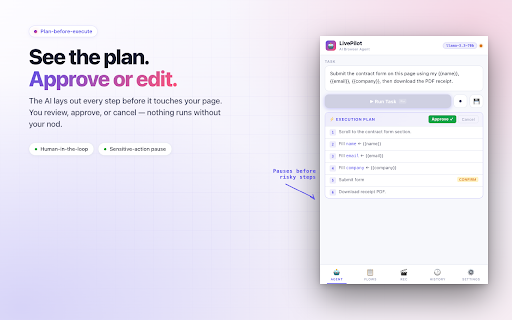
Plain-English instructions are converted by an LLM into a concrete, multi-step plan. Review the plan, approve it, then watch each step run with a live progress log.

🔧  SELF-HEALING SELECTORS
When a button moves or a class name changes, LivePilot re-inspects the live DOM and picks the right element again — automatically. Your automation keeps working when the website updates.

🎬  SESSION RECORDER & REPLAY
Record any browser flow with a single click. Replay it with a custom iteration count — perfect for repeated forms, daily check-ins, QA regression flows, or data-entry loops.

📊  STRUCTURED DATA EXTRACTION
Pull lists, prices, links, headlines, contact info, anything. Preview as a table, copy to clipboard, or export as CSV for spreadsheets and reports. A built-in web scraper that needs no scripting.

💾  REUSABLE WORKFLOWS
Save any task as a named workflow. Search, edit, and run them later in one click. Build a library of your own browser automations.

🧩  SMART VARIABLES
Use {{email}}, {{name}}, {{company}}, {{phone}} placeholders in tasks for safe, repeatable form-fill across sites.

🛡️  HUMAN-IN-THE-LOOP CONTROLS
Sensitive actions (submitting forms, clicking checkout, downloading files) pause for your confirmation. The AI never runs a destructive step without your nod.

📋  PLAN-BEFORE-EXECUTE
See the full execution plan before anything happens. Approve, cancel, or rework — you stay in control.

📷  AUTOMATIC SCREENSHOTS
Capture the page after every step so you can audit, debug, or share what the agent did.

🪟  CHROME SIDE PANEL
The entire UI lives in Chrome's native side panel — always one click away, never overlapping the page.

🌍  WORKS ON ANY WEBSITE
LivePilot automates any standard web page, single-page apps, dashboards, intranets, marketplaces, social networks, internal tools — whatever you can open in Chrome.


━━━━━━━━━━━━━━━━━━━━━━━━━━━━━━━━━━━━━━
🎯  WHO LIVEPILOT IS FOR
━━━━━━━━━━━━━━━━━━━━━━━━━━━━━━━━━━━━━━

• Founders & operators automating recurring web chores
• Researchers and analysts scraping prices, listings, papers, datasets
• Recruiters and SDRs filling forms, sending outreach, sourcing leads
• QA engineers recording and replaying regression flows
• Customer-success teams running daily dashboards and reports
• Anyone who keeps repeating the same 5-click sequence and wants it to just… happen

If you've ever wished your browser would "do this for me," LivePilot is that wish.


━━━━━━━━━━━━━━━━━━━━━━━━━━━━━━━━━━━━━━
🆚  WHY LIVEPILOT IS DIFFERENT
━━━━━━━━━━━━━━━━━━━━━━━━━━━━━━━━━━━━━━

Most browser automation tools (Selenium, Playwright, Puppeteer, low-code RPA platforms) need you to write scripts or maintain selectors. They break the moment a website updates a single class name.

LivePilot is different:

✓ No code, no selectors to maintain — describe what you want, in English.
✓ Self-healing — adapts to DOM changes automatically using AI.
✓ Lives in your real Chrome session — uses your logins, your cookies, your extensions.
✓ Side-panel UI — doesn't take over the page; never blocks your workflow.
✓ Free, fast, privacy-first — bring your own free Groq API key; nothing is stored on remote servers.
✓ Records real human interactions, then lets the AI generalize them.

It's the browser automation experience that finally feels like the future.


━━━━━━━━━━━━━━━━━━━━━━━━━━━━━━━━━━━━━━
🔒  PRIVACY-FIRST BY DESIGN
━━━━━━━━━━━━━━━━━━━━━━━━━━━━━━━━━━━━━━

We take your data seriously:

• Your Groq API key, saved workflows, recordings, history, and smart variables are stored LOCALLY in Chrome storage. They never leave your browser.
• LivePilot has NO developer-operated backend. There's no analytics, no tracking, no telemetry.
• The only outbound request is from YOUR browser to Groq's API, using YOUR key, with the prompts YOU author.
• LivePilot is explicitly disabled on sensitive financial and identity domains: mail.google.com, accounts.google.com, paypal.com, stripe.com.
• Open about permissions — every one is documented and justified in the store listing.

What happens in your browser stays in your browser.


━━━━━━━━━━━━━━━━━━━━━━━━━━━━━━━━━━━━━━
🚀  GETTING STARTED IN 60 SECONDS
━━━━━━━━━━━━━━━━━━━━━━━━━━━━━━━━━━━━━━

1.  Install LivePilot and pin it to your toolbar.
2.  Click the LivePilot icon to open the side panel.
3.  Get a free Groq API key at console.groq.com — takes 30 seconds, no credit card needed.
4.  Paste the key into LivePilot's onboarding step.
5.  Type a task. Hit Run. Watch your browser do the work.


━━━━━━━━━━━━━━━━━━━━━━━━━━━━━━━━━━━━━━
💡  EXAMPLE TASKS TO TRY
━━━━━━━━━━━━━━━━━━━━━━━━━━━━━━━━━━━━━━

→  "Search Google for 'best wireless headphones 2026' and extract the top 10 article titles and URLs"
→  "Fill out this contact form using my saved name, email, and company, then submit"
→  "Open my Notion dashboard and tick all checkboxes in today's standup template"
→  "Go to LinkedIn, search for 'product designers in Berlin', and scrape the first 20 profiles"
→  "Apply coupon code WELCOME10 and proceed through checkout to the payment step (then stop)"
→  "Download every invoice PDF from my billing page"
→  "Check the status of all my orders on this e-commerce site"


━━━━━━━━━━━━━━━━━━━━━━━━━━━━━━━━━━━━━━
📈  POWERFUL FOR EVERYDAY USE
━━━━━━━━━━━━━━━━━━━━━━━━━━━━━━━━━━━━━━

LivePilot replaces:

•  Manual form filling and copy-pasting
•  Hand-written browser automation scripts (Selenium / Playwright / Puppeteer)
•  Expensive RPA platforms (UiPath, Automation Anywhere, Blue Prism)
•  Brittle Zapier "scraping" workarounds
•  Generic AI chat copy-paste loops for web tasks

…with a single Chrome extension that runs natively in your browser and adapts to whatever website you point it at.


━━━━━━━━━━━━━━━━━━━━━━━━━━━━━━━━━━━━━━
🛠  TECHNICAL HIGHLIGHTS
━━━━━━━━━━━━━━━━━━━━━━━━━━━━━━━━━━━━━━

•  Manifest V3 Chrome extension
•  Uses Groq's lightning-fast LLM inference (Llama 3.3 70B by default; Llama 3.1 8B for speed)
•  Live DOM inspection for selector resolution and self-healing
•  Tab event listening for multi-page flows
•  CSV / plain-text / clipboard data export
•  Chrome side panel native integration
•  Minimum Chrome version 114
•  No remote code loading — all JavaScript is bundled in the package
•  English locale support (more languages coming)


━━━━━━━━━━━━━━━━━━━━━━━━━━━━━━━━━━━━━━
❓  FREQUENTLY ASKED QUESTIONS
━━━━━━━━━━━━━━━━━━━━━━━━━━━━━━━━━━━━━━

Is LivePilot really free?
Yes. The extension is free. Groq's API gives you a generous free tier — no credit card required.

Do I need to know how to code?
No. You describe tasks in plain English. LivePilot handles the rest.

Will my logins work?
Yes. LivePilot runs in your real Chrome profile, so you're already signed in everywhere.

What about CAPTCHAs?
LivePilot doesn't try to bypass CAPTCHAs. It pauses and lets you solve them, then continues.

Does it support Firefox / Safari / Edge?
This release is for Chromium-based browsers (Chrome, Brave, Arc, Edge). Firefox/Safari are on the roadmap.

Can I share my workflows with my team?
Workflows export as JSON and can be re-imported on another machine. Team-sync is on the roadmap.

What models does it support?
Currently Groq's Llama 3.3 70B (quality) and Llama 3.1 8B (speed). More providers are coming.


━━━━━━━━━━━━━━━━━━━━━━━━━━━━━━━━━━

Browser automation, AI agents, web scraping, form filling, RPA, session recording, workflow automation, no-code automation, browser AI, Chrome AI agent, browser copilot, automated data extraction, web task automation, LLM browser, AI web assistant, smart form filler, automatic scraper, side panel AI, productivity Chrome extension, free AI extension — LivePilot is all of them, in one tool.

Try LivePilot today. Tell your browser what to do.
# LivePilot — Free AI Browser Agent & Web Scraper Turn your browser into an autonomous AI agent. Describe any web task in plain English and watch it run automatically. LivePilot plans, executes, self-heals broken selectors, extracts data, and records your sessions—all from a clean Chrome side panel that stays completely out of your way. Stop copy-pasting, stop manually filling forms, and stop maintaining brittle automation scripts. Tell LivePilot what you want; it does the rest. --- ## 🤖 WHAT LIVEPILOT DOES LivePilot is an AI-powered browser automation agent that works on **ANY** website. Just open the side panel and type a goal: * *"Go to amazon.com, search for MacBook Air, extract the top 5 prices"* * *"Fill out this signup form using my saved details"* * *"Open my email and reply 'thanks!' to the latest message from Sam"* * *"Apply promo code SPRING25 to my cart and checkout"* * *"Scrape every product title and price on this category page"* LivePilot instantly breaks down your prompt into steps, runs them natively in your active tab, tracks the live DOM, and logs its progress step-by-step with real-time screenshots. --- ## ✨ KEY FEATURES * **⚡ AI Task Execution:** Plain-English instructions are converted by an LLM into a concrete, multi-step plan. Review the plan, approve it, and hit run. * **🔧 Self-Healing Selectors:** When a button moves or a class name changes, LivePilot re-inspects the live DOM and picks the right element dynamically. Your automations won't break when websites update. * **📊 Structured Data Extraction:** Pull lists, prices, links, headlines, or contact info effortlessly. Preview data as a table, copy it to your clipboard, or export it to a CSV file for your spreadsheets. * **🎬 Session Recorder & Replay:** Record any browser flow with a single click. Replay it instantly with a custom iteration count—perfect for repeated forms, daily check-ins, or data-entry loops. * **💾 Reusable Workflows:** Save your favorite tasks as named workflows. Build your own library of automated browser shortcuts and trigger them in one click. * **🧩 Smart Variables:** Use `{{email}}`, `{{name}}`, `{{company}}`, and `{{phone}}` placeholders in your tasks for safe, rapid form-filling across different sites. * **🛡️ Human-in-the-Loop Controls:** Sensitive actions (like submitting forms, clicking checkout, or downloading files) pause for your confirmation. The AI never takes a critical step without your nod. --- ## 🆚 WHY LIVEPILOT IS DIFFERENT Traditional RPA tools (like Selenium, Playwright, or Puppeteer) require complex code and break the moment a website updates. * **No Code, No Selectors:** Describe what you want in simple English. * **Uses Your Real Session:** It runs directly in your active Chrome tab, meaning it automatically uses your active logins, cookies, and extensions. * **Sleek Side-Panel UI:** It lives in Chrome's native side panel, meaning it never overlaps or blocks your active web page. * **100% Free & Fast:** Bring your own free Groq API key. Zero hosting fees, zero premium paywalls. --- ## 🔒 PRIVACY-FIRST BY DESIGN What happens in your browser stays in your browser: * **100% Local Storage:** Your Groq API key, saved workflows, recordings, history, and smart variables are saved locally in your Chrome storage. * **No Backend:** LivePilot has no developer-operated server, no analytics tracking, and no telemetry. * **Direct Connections:** The only outbound request is from your browser directly to Groq’s secure API using your personal key. * **Sensitive Domains Blocked:** LivePilot is strictly disabled on sensitive financial and identity domains by default (including `mail.google.com`, `accounts.google.com`, `paypal.com`, and `stripe.com`). --- ## 🚀 GETTING STARTED IN 60 SECONDS 1. Install LivePilot and pin it to your extensions toolbar. 2. Click the icon to open Chrome's native **Side Panel**. 3. Create a free API key at **console.groq.com** (takes 30 seconds, no credit card required). 4. Paste your key into LivePilot's onboarding screen. 5. Type your first web task, hit **Run**, and watch your browser go to work! --- ## 🛠 TECHNICAL HIGHLIGHTS * Built using the modern **Chrome Manifest V3** standard. * Powered by Groq's lightning-fast LLM inference (**Llama 3.3 70B** for quality; **Llama 3.1 8B** for speed). * Local DOM inspection for instant element resolution. * Supports data exports via CSV, plain-text, or clipboard. * Minimum Chrome version required: 114.
Permissions & access
- Permissions
- activeTabtabsstoragescriptingsidePanel
- Host access
- <all_urls>
Screenshots


About
# LivePilot — Free AI Browser Agent & Web Scraper

Turn your browser into an autonomous AI agent. Describe any web task in plain English and watch it run automatically.

LivePilot plans, executes, self-heals broken selectors, extracts data, and records your sessions—all from a clean Chrome side panel that stays completely out of your way.

Stop copy-pasting, stop manually filling forms, and stop maintaining brittle automation scripts. Tell LivePilot what you want; it does the rest.

---

## 🤖 WHAT LIVEPILOT DOES

LivePilot is an AI-powered browser automation agent that works on **ANY** website. Just open the side panel and type a goal:

* *"Go to amazon.com, search for MacBook Air, extract the top 5 prices"*
* *"Fill out this signup form using my saved details"*
* *"Open my email and reply 'thanks!' to the latest message from Sam"*
* *"Apply promo code SPRING25 to my cart and checkout"*
* *"Scrape every product title and price on this category page"*

LivePilot instantly breaks down your prompt into steps, runs them natively in your active tab, tracks the live DOM, and logs its progress step-by-step with real-time screenshots.

---

## ✨ KEY FEATURES

* **⚡ AI Task Execution:** Plain-English instructions are converted by an LLM into a concrete, multi-step plan. Review the plan, approve it, and hit run.
* **🔧 Self-Healing Selectors:** When a button moves or a class name changes, LivePilot re-inspects the live DOM and picks the right element dynamically. Your automations won't break when websites update.
* **📊 Structured Data Extraction:** Pull lists, prices, links, headlines, or contact info effortlessly. Preview data as a table, copy it to your clipboard, or export it to a CSV file for your spreadsheets.
* **🎬 Session Recorder & Replay:** Record any browser flow with a single click. Replay it instantly with a custom iteration count—perfect for repeated forms, daily check-ins, or data-entry loops.
* **💾 Reusable Workflows:** Save your favorite tasks as named workflows. Build your own library of automated browser shortcuts and trigger them in one click.
* **🧩 Smart Variables:** Use `{{email}}`, `{{name}}`, `{{company}}`, and `{{phone}}` placeholders in your tasks for safe, rapid form-filling across different sites.
* **🛡️ Human-in-the-Loop Controls:** Sensitive actions (like submitting forms, clicking checkout, or downloading files) pause for your confirmation. The AI never takes a critical step without your nod.

---

## 🆚 WHY LIVEPILOT IS DIFFERENT

Traditional RPA tools (like Selenium, Playwright, or Puppeteer) require complex code and break the moment a website updates.

* **No Code, No Selectors:** Describe what you want in simple English.
* **Uses Your Real Session:** It runs directly in your active Chrome tab, meaning it automatically uses your active logins, cookies, and extensions.
* **Sleek Side-Panel UI:** It lives in Chrome's native side panel, meaning it never overlaps or blocks your active web page.
* **100% Free & Fast:** Bring your own free Groq API key. Zero hosting fees, zero premium paywalls.

---

## 🔒 PRIVACY-FIRST BY DESIGN

What happens in your browser stays in your browser:
* **100% Local Storage:** Your Groq API key, saved workflows, recordings, history, and smart variables are saved locally in your Chrome storage.
* **No Backend:** LivePilot has no developer-operated server, no analytics tracking, and no telemetry.
* **Direct Connections:** The only outbound request is from your browser directly to Groq’s secure API using your personal key.
* **Sensitive Domains Blocked:** LivePilot is strictly disabled on sensitive financial and identity domains by default (including `mail.google.com`, `accounts.google.com`, `paypal.com`, and `stripe.com`).

---

## 🚀 GETTING STARTED IN 60 SECONDS

1. Install LivePilot and pin it to your extensions toolbar.
2. Click the icon to open Chrome's native **Side Panel**.
3. Create a free API key at **console.groq.com** (takes 30 seconds, no credit card required).
4. Paste your key into LivePilot's onboarding screen.
5. Type your first web task, hit **Run**, and watch your browser go to work!

---

## 🛠 TECHNICAL HIGHLIGHTS

* Built using the modern **Chrome Manifest V3** standard.
* Powered by Groq's lightning-fast LLM inference (**Llama 3.3 70B** for quality; **Llama 3.1 8B** for speed).
* Local DOM inspection for instant element resolution.
* Supports data exports via CSV, plain-text, or clipboard.
* Minimum Chrome version required: 114.Technical
- Version
- 1.5.0
- Manifest
- V3
- Size
- 39.1KiB
- Min Chrome
- 114
- Languages
- 1
- Featured
- No
Metadata
- ID
- edlngbhkfbenfpcllgpepapbbddekinl
- Developer ID
- uaac08f697f884d2e15373081f6c5a995
- Developer Email
- [email protected]
- Created
- May 16, 2026
- Last Updated (Store)
- May 18, 2026
- Last Scraped
- Jun 13, 2026
- Website
- —
- Support URL
- —
Data sourced from the Chrome Web Store · last verified Jun 13, 2026.