
Enable Right-Click & Copy
Instantly restore right-click, text selection, copy and paste on sites that block them. No reload needed. Clean copy included.
As of July 2026, Enable Right-Click & Copy has — users in the Productivity category.
Usersno change0%
—
—
Ratingno change0%
—
— reviews
Reviewsno change0%
—
Version
1.0.0
Manifest V3
History
1 snapshotsTracking since Jul 9, 2026.
Not enough history yet for this metric — the chart fills in as we collect more snapshots.
View as table
| Date | Users | Rating | Reviews | Version |
|---|---|---|---|---|
| Jul 9, 2026 | — | — | — | 1.0.0 |
| Now | — | — | — | 1.0.0 |
Permissions & access
- Permissions
- storage
- Host access
- <all_urls>
Screenshots


About
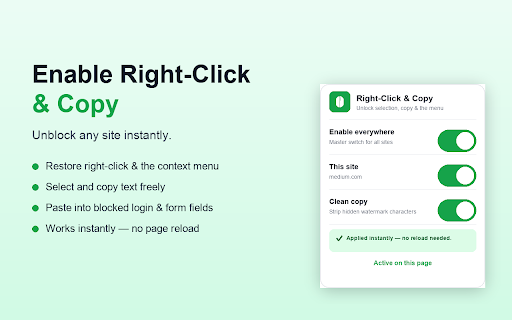
Enable Right-Click & Copy restores your browsing freedom. Some websites disable right-click, block text selection, or stop you from copying and pasting. This extension puts control back in your hands.

✔ Enable right-click — bring back the context menu everywhere
✔ Select text freely — no more "selection disabled" pages
✔ Copy and paste — including password, code, and form fields that block paste
✔ Instant apply — toggle it and it works on the open page, no reload required
✔ Clean copy — automatically strips hidden watermark characters some sites inject into copied text
✔ Per-site control — turn it off for individual sites with one click

HOW IT WORKS
Once installed, the extension is on by default. Open the popup to toggle it globally, disable it for the current site, or turn Clean Copy on/off. A green ON/OFF badge shows its status for each tab.

PRIVACY
This extension collects no data. It stores only your on/off preferences locally in your browser. Nothing is sent anywhere.

NOTES
Text rendered inside images or <canvas> cannot be selected, because there is no real text to copy. Chrome does not run extensions on internal pages such as the Web Store or chrome:// pages.
Technical
- Version
- 1.0.0
- Manifest
- V3
- Size
- 20.66KiB
- Min Chrome
- 88
- Languages
- 1
- Featured
- No
Metadata
- ID
- edhpghidmbobjbdkijjphkgdhfcbkjbn
- Developer ID
- ue543a865ce5d0fff1539d60c602632c5
- Developer Email
- [email protected]
- Created
- Jul 8, 2026
- Last Updated (Store)
- Jul 8, 2026
- Last Scraped
- Jul 9, 2026
- Website
- —
- Support URL
- —
- Privacy Policy
- https://shaligramk.github.io/visahub/privacy/
Data sourced from the Chrome Web Store · last verified Jul 9, 2026.